.svg?fit=max&auto=format&n=RaTUOQa09vPhW7_D&q=85&s=368f39de7ecc6605f73c43c2017546a3)
.svg?fit=max&auto=format&n=RaTUOQa09vPhW7_D&q=85&s=01a6eb27b4db3af8a1d5557525c579d3)
What are Multi-Agent Workflows?
AI Agents are specialized AI assistants that are built to handle specific tasks. Each agent is trained with a custom system prompt, custom training data, and a base AI model to perform its designated role effectively. Multi-Agent Workflows take this a step further by combining several AI agents into one cohesive system. Each agent specializes in a particular function, such as scheduling, content creation, or data analysis, and they collaborate to complete tasks more efficiently. Think of it as a team where each agent focuses on a particular task, such as scheduling, writing, or analyzing data. The agents communicate and work together to help you achieve specific tasks. By delegating tasks to specialized AI agents, businesses can eliminate bottlenecks, improve accuracy, and accelerate their workflows. However, building such workflows often requires significant time, resources, and technical expertise. This can be a barrier for many teams. Fortunately, TypingMind provides a no-code solution for creating and managing multi-agent workflows, make it accessible and easy to implement for everyone. Let’s see how it works via TypingMind.How to use Multi-Agent Workflows on TypingMind?
TypingMind simplifies creating and managing multi-agent workflows. Here’s how you can get started:Step 1: Build an AI Agent
You can start by creating a new AI Agent on TypingMind:- Provide custom system instruction to guide the AI Agent behavior.
- Assign a base model for the AI Agent to make sure you will get the optimized results from the most appropriate AI model.
- Set custom knowledge for the AI Agent so it can refer to your data when it receives a query.
- Set skills for the AI Agents with Plugins* and Text-to-speech
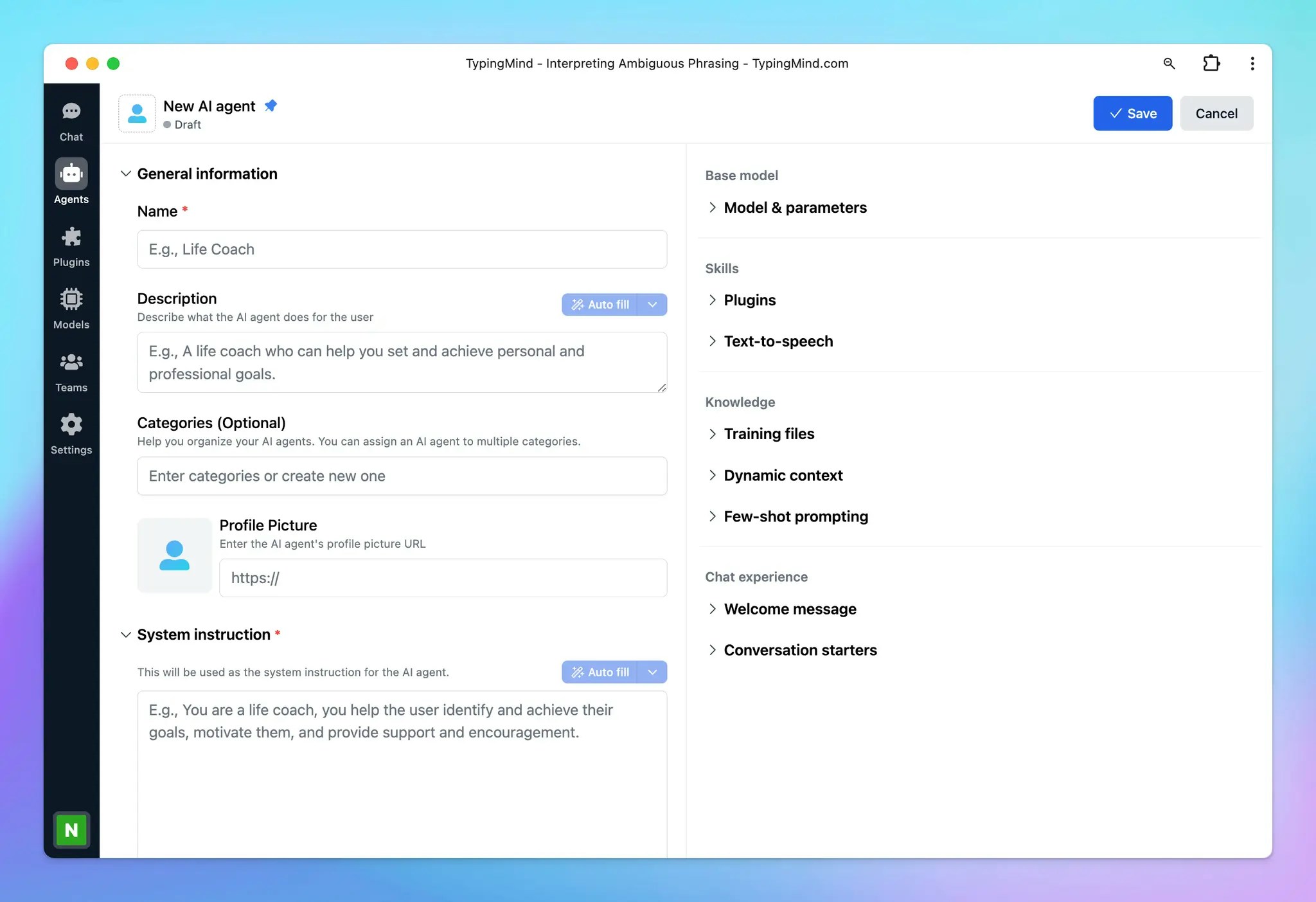
Learn more on what you can do with AI Agent before bringing it into the workflow: https://docs.typingmind.com/ai-agents/ai-agents-overview
Step 2: Bring AI Agents into a workflow
Activating Multi-Agent Workflows for automation on TypingMind is simple and intuitive. Follow these steps below:- Start with an AI Agent: in the message area, mention
@[AI_Agent_name]followed by your prompt to begin interacting with a specific AI agent. - Add more Agents: to bring additional AI agents into the workflow, use the syntax
---(four dashes) to separate prompts for different agents. - Each agent jumps into the workflow bringing its own settings you set for them in step 1 like AI models, parameters, and plugins to the table to allow you to create more powerful, automatic processes.
- The “Marketing Researcher” agent will help you analyze the remote work trends and provide insights.
- Then the “Marketing Planner” will jump in to create a marketing plan based on the insights from “Marketing Researcher”
- After you get the content plan, you can ask the “Marketing Assistant” to break down those plans into small tasks and add those tasks to Todoist or Slack channel.
- The “Content Writer” agent will proceed with the detailed social post content in January.
- The “Marketing Assistant” agent is brought back to help schedule these posts via Zapier.
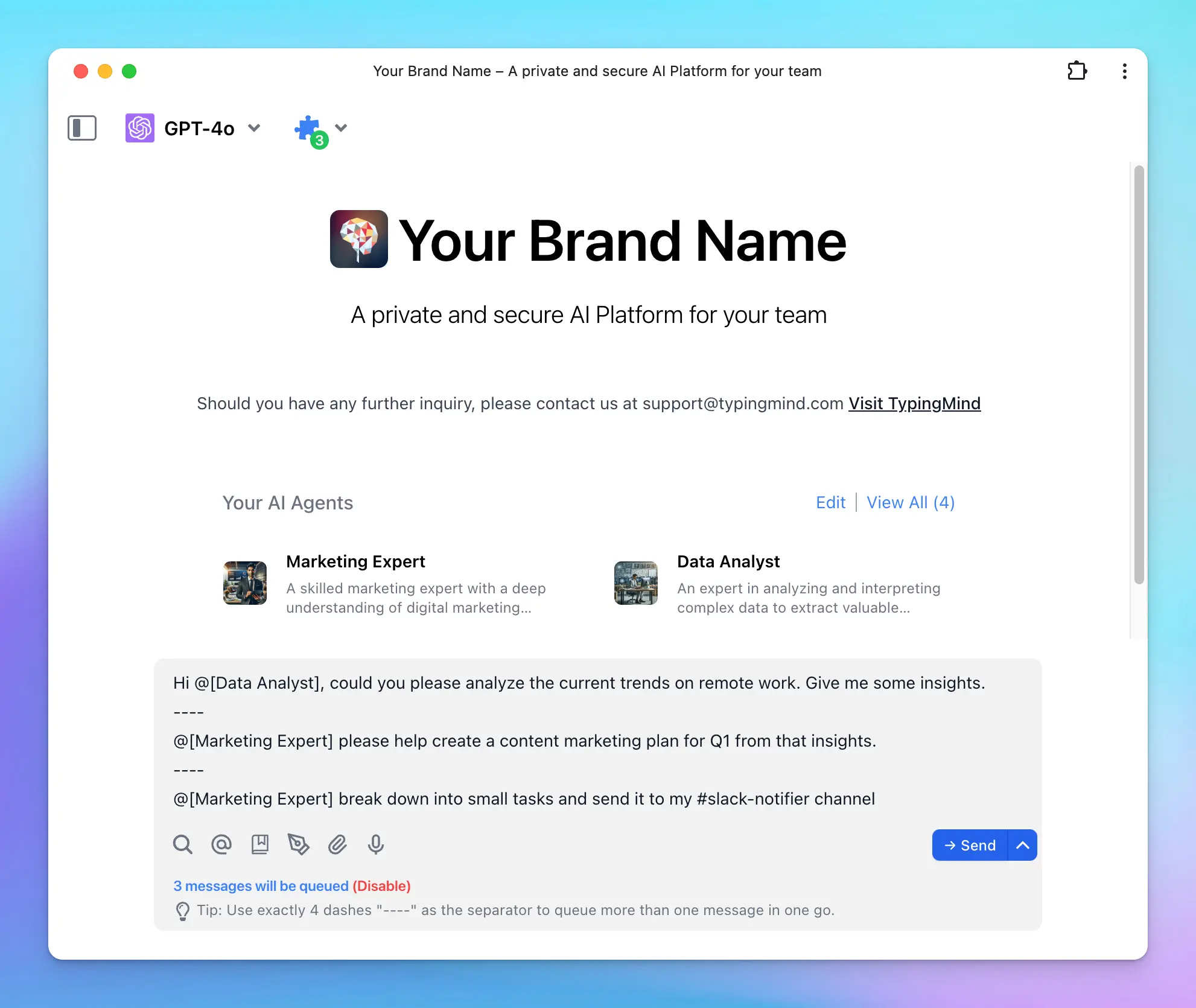 multiagent flow.mp4
Some practical use cases for Multi-Agent Workflows
Multi-Agent Workflows on TypingMind can change the way how businesses and individuals manage tasks, collaborate, and drive efficiency. Here are practical examples:1. Marketing campaign planning
Managing a marketing campaign includes various moving parts, from ideation to execution. Multi-Agent Workflows can streamline this process:- Market Researcher: gather insights on audience behavior, industry trends, and competitors.
- Marketing Strategist: develop a content marketing plan based on the research
- Content Writer: draft engaging copy for blogs, social posts, and newsletters.
- Marketing Assistant: schedule posts and tasks in project management tools like Todoist or Trello.
2. Project management and collaboration
Large projects includes multiple stakeholders, deadlines, and deliverables. Multi-Agent Workflows help manage and coordinate effectively:- Task Allocator: break down the project into tasks and assigns them to the right team members.
- Timeline Coordinator: set deadlines and monitors progress.
- Risk Manager: identify risks and suggests solutions.
- Progress Reporter: compile status updates and generates reports.Example: “Summarize the weekly progress report for the product launch.”
3. Customer support
Customer service is critical to business success. Multi-Agent Workflows can boost efficiency while maintaining a personalized touch:- Ticket Categorizer: sort incoming inquiries into categories like technical issues, billing, or general questions.
- Customer Analyst: analyze customer queries to identify which aspects customers concern about most, which issues they are encountering.
- Business Analyst : break down the issues and concerns and assign to proper departments via Slack.
4. Financial Planning and Budgeting
Managing finances is a common challenge for businesses and individuals. Multi-Agent Workflows can simplify this:- Expense Tracker: categorize and summarizes spending trends
- Budget Planner: suggest adjustments based on spending patterns
- Savings Advisor: track progress toward financial goals and suggests improvements
- Investment Monitor: review and optimizes investment portfolios
5. Content Creation and Distribution
Producing and managing high-quality content can be time-consuming. Multi-Agent Workflows can streamline this process:- Trend Analyzer: research trending topics and keywords
- Content Creator: write engaging articles, posts, or email campaigns.
- SEO Specialist: optimize content for search engines.
- Scheduler: publish content and sets reminders for updates.