Managing AI resources effectively for your chat instance is more important than ever.That’s why we’ve revamped our Usage Limits system which provides you with better control over your AI resources!This guide will walk you through the different types of usage limits you can set - Global Limits, Model Limits, AI Agent Limits, Plugin Limits and User Limits - and how to implement them step by step.
With TypingMind, you can set up multiple AI Agents and prompts, enabling your team to interact with various AI models.While this flexibility enhances productivity, it also requires careful management to control API costs. Setting usage limits helps you:
Prevent overuse: make sure that no single AI model, agent, or user consumes an excessive amount of resources.
Optimize costs: keep expenses in check by regulating usage.
Enhance fairness: distribute AI capabilities evenly across users or departments
Message limits: the number of messages a user or group can send.
Character limits per message: the maximum number of characters allowed in a single message.
Character limits per time period: the total number of characters a user or group can send within a specific time frame.
Tokens limit per time period: the number of tokens can be used within a specific time framce
These limits are managed via Limit Groups.
Using Limit Groups allows admins to reuse the limits you’ve already set up.Once you’ve created a Limit Group with specific restrictions, you can apply that group across different settings - whether for different AI models, agents, or user groups - without having to redefine the limits each time.
You can apply the limits from your Limit Groups as follows:
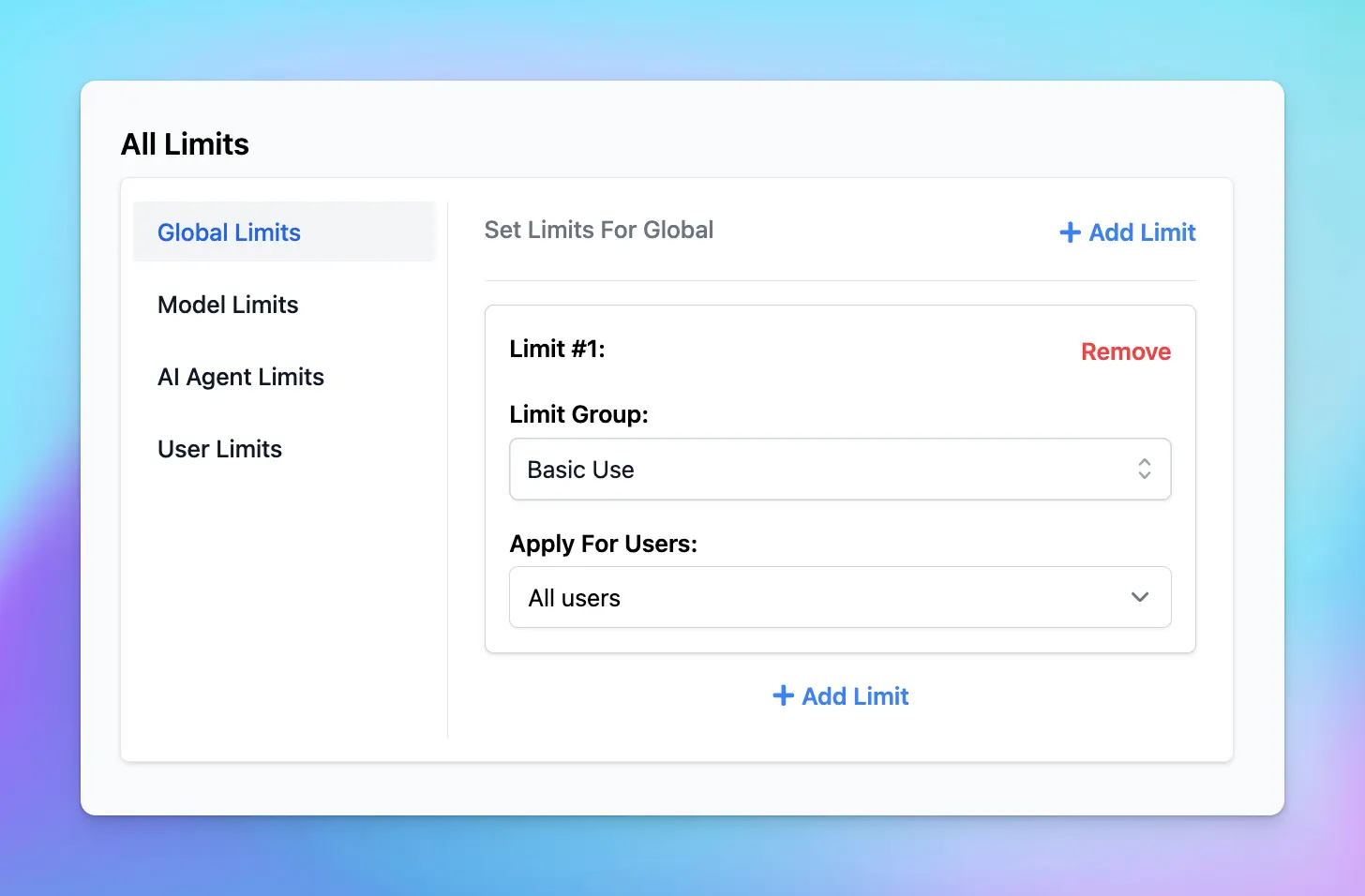
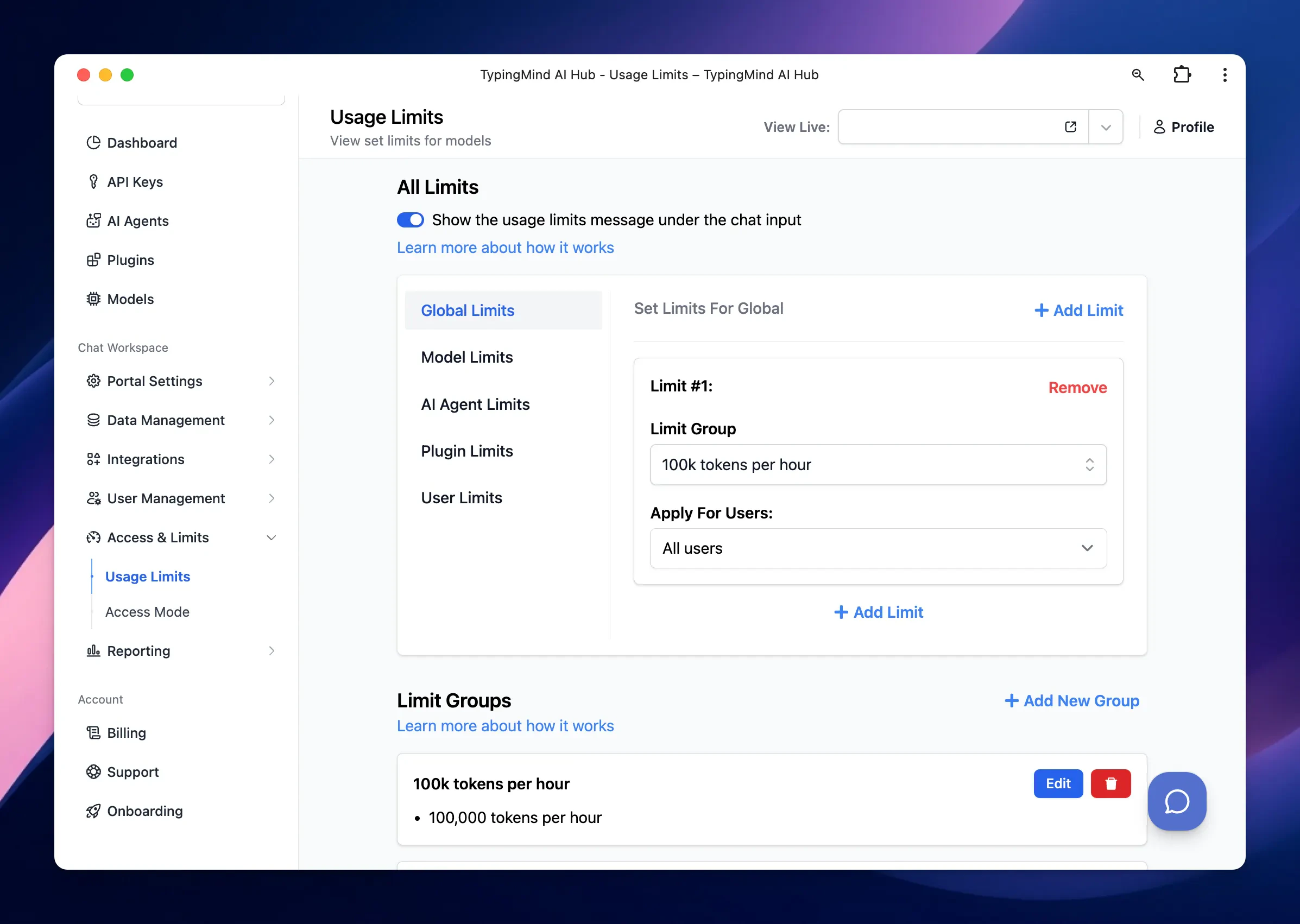
Global Limits: apply limits to all users or specific groups across the entire chat system.
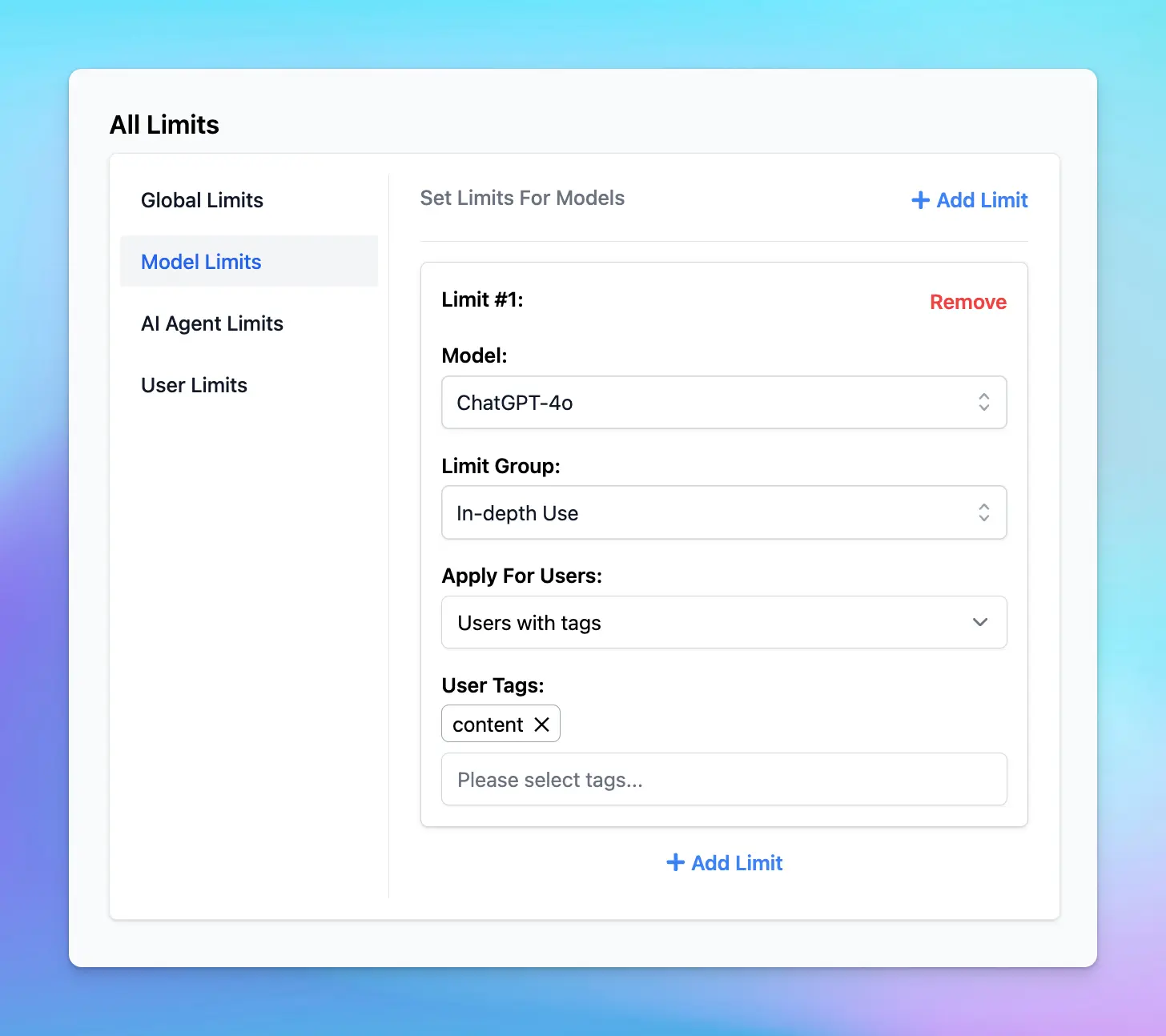
Model Limits: set limits for each specific AI model, which can apply to all users or specific user groups.
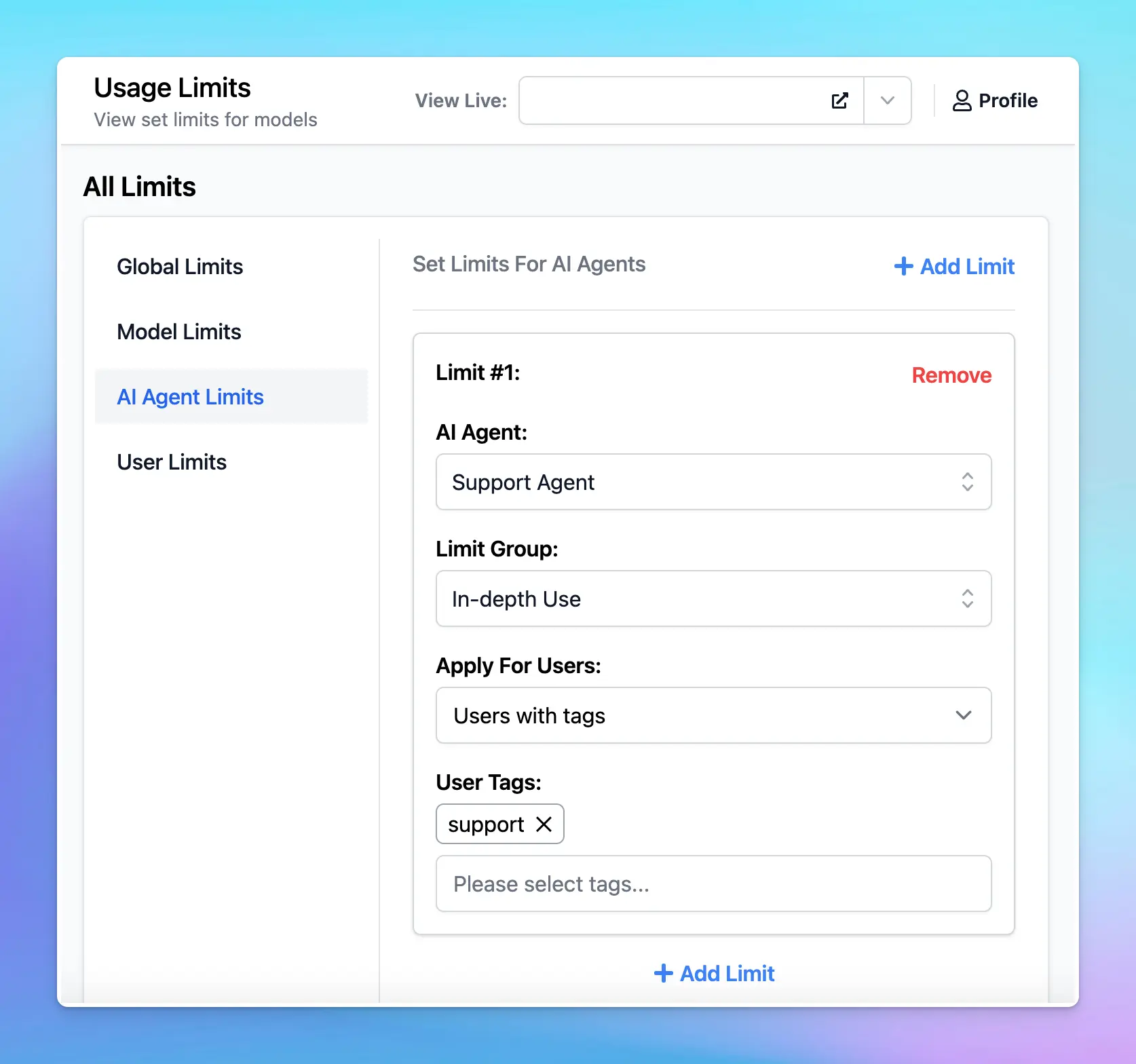
AI Agent Limits: apply limits to individual AI Agents for all users or specific groups.
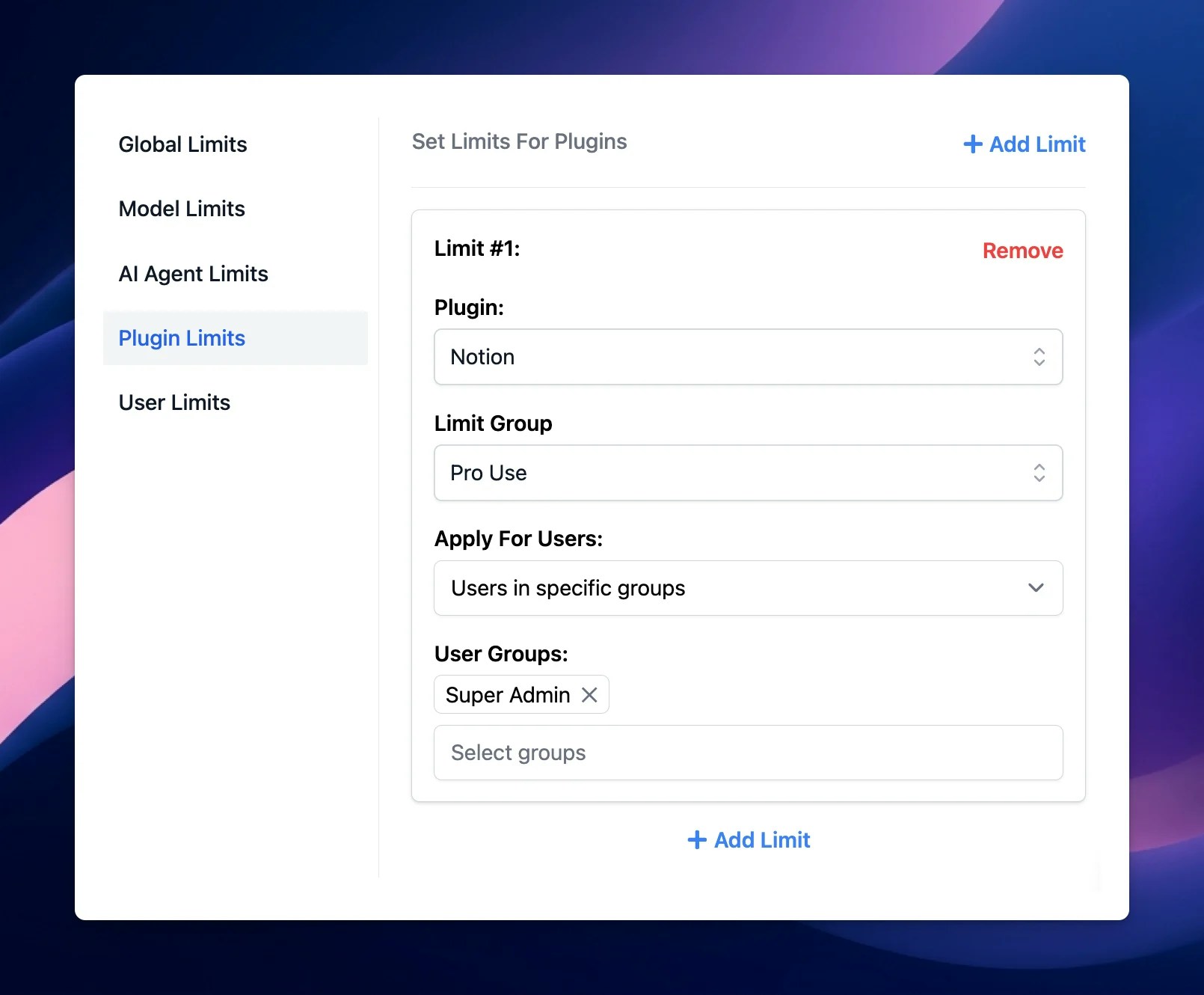
Plugin limits: apply limits to Plugins for all users or specific user groups.
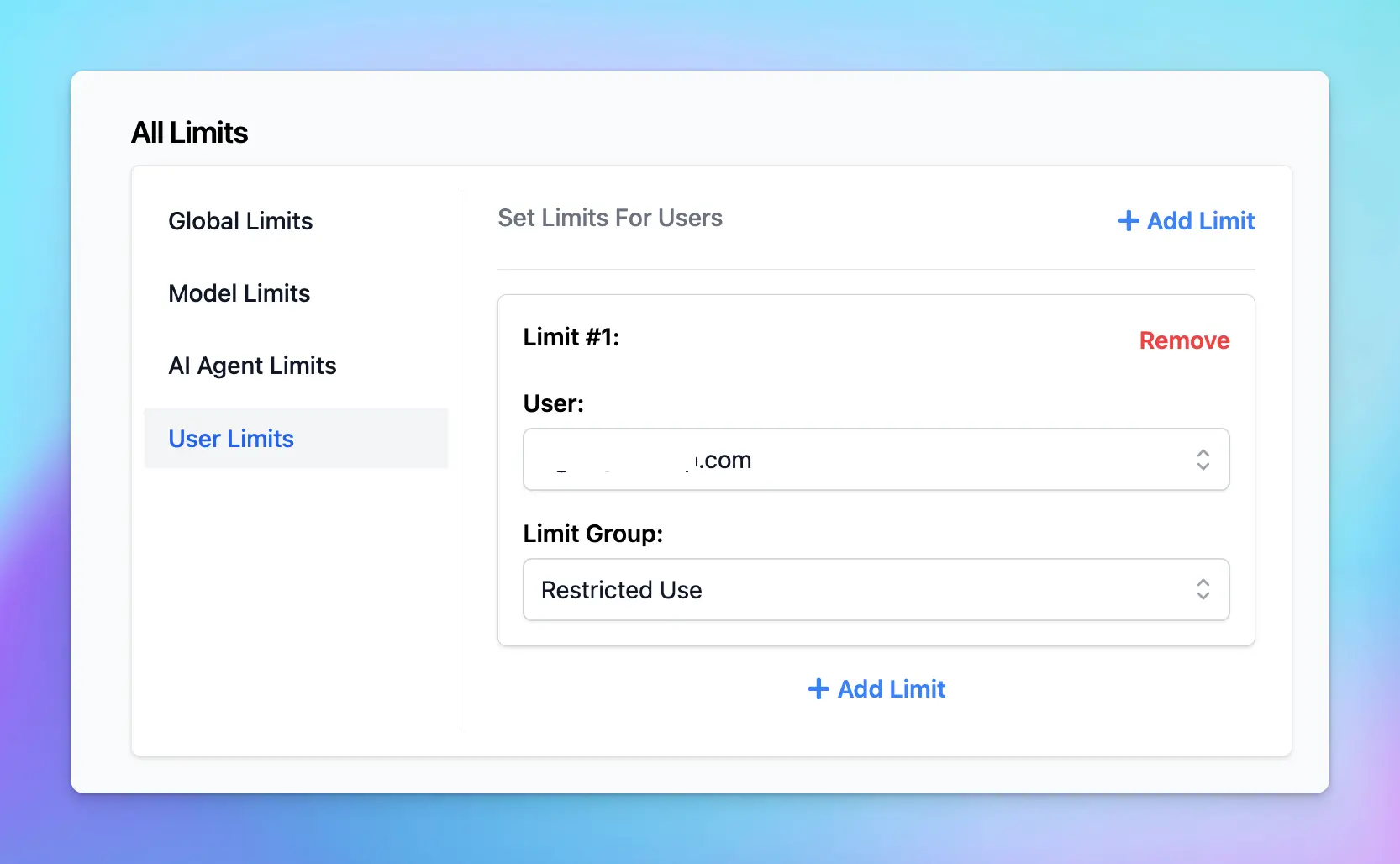
User Limits: set limits for individual users.
Let’s see how to set up these limits for your chat instance!
Before setting limits, it’s helpful to organize users into different groups. This allows you to apply specific limits to different categories of users.
Within your Admin Panel, go to Usage Limits within Access & Limits menu
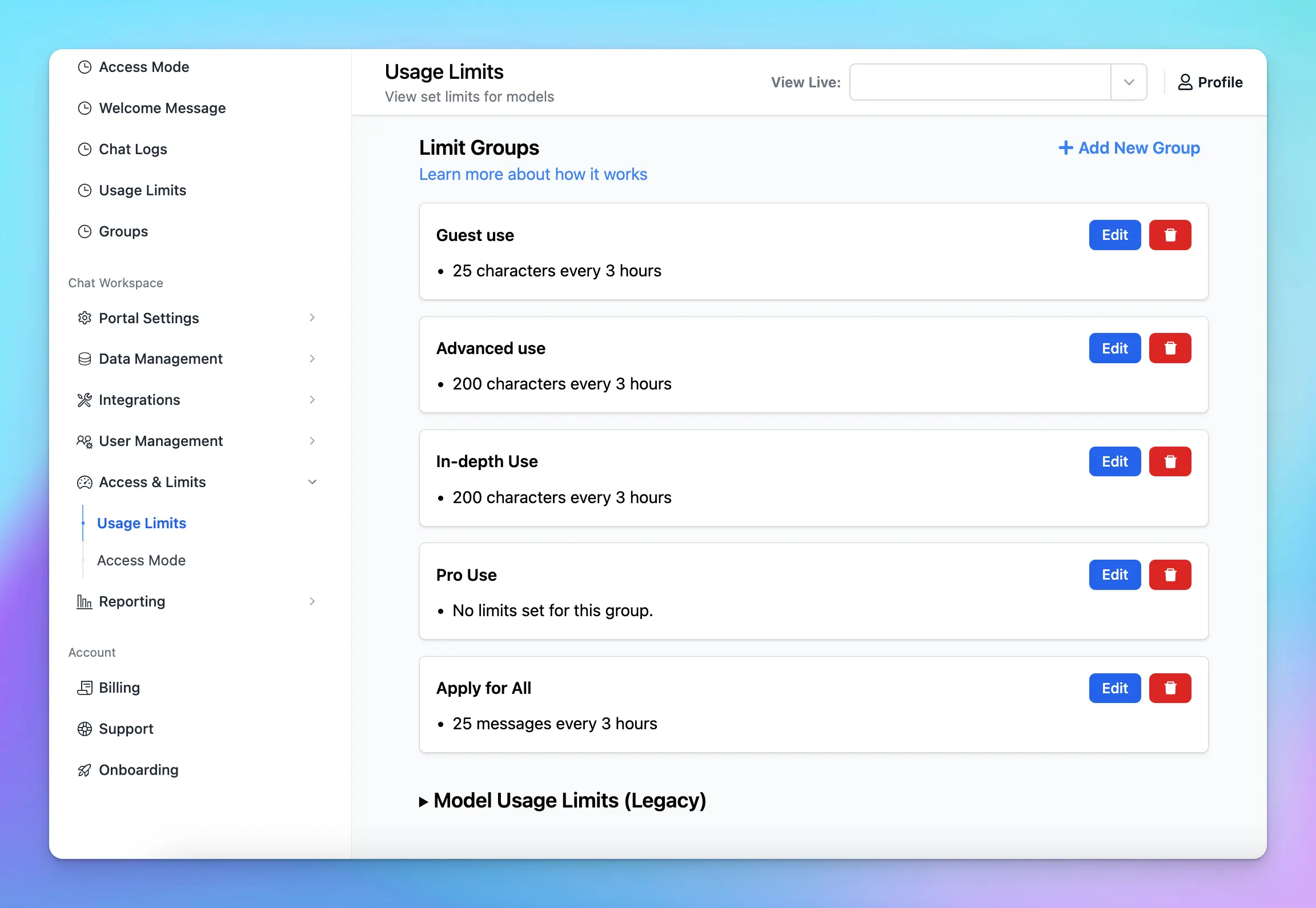
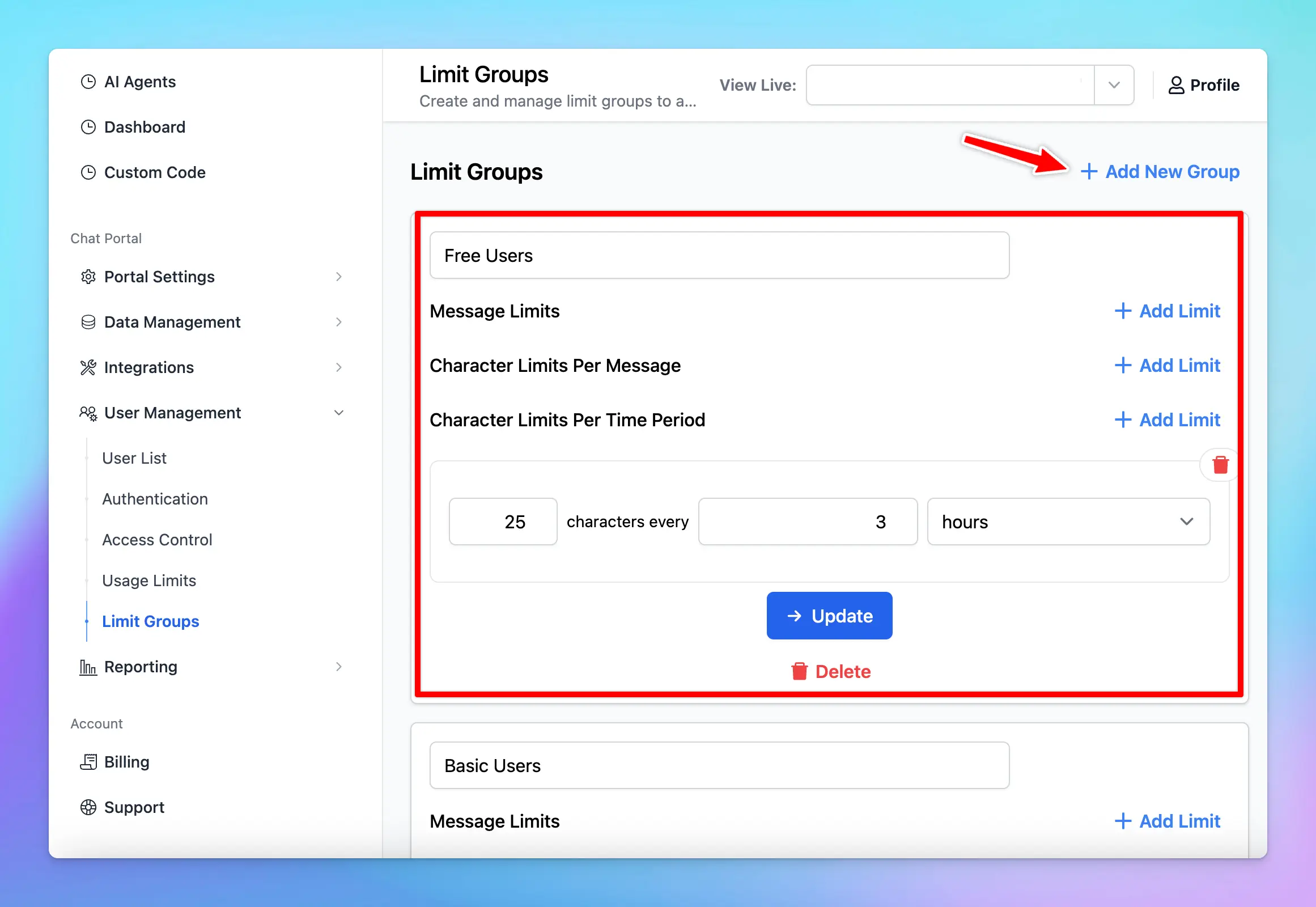
Scroll down to Limit Groups
Click on “Add New Group”
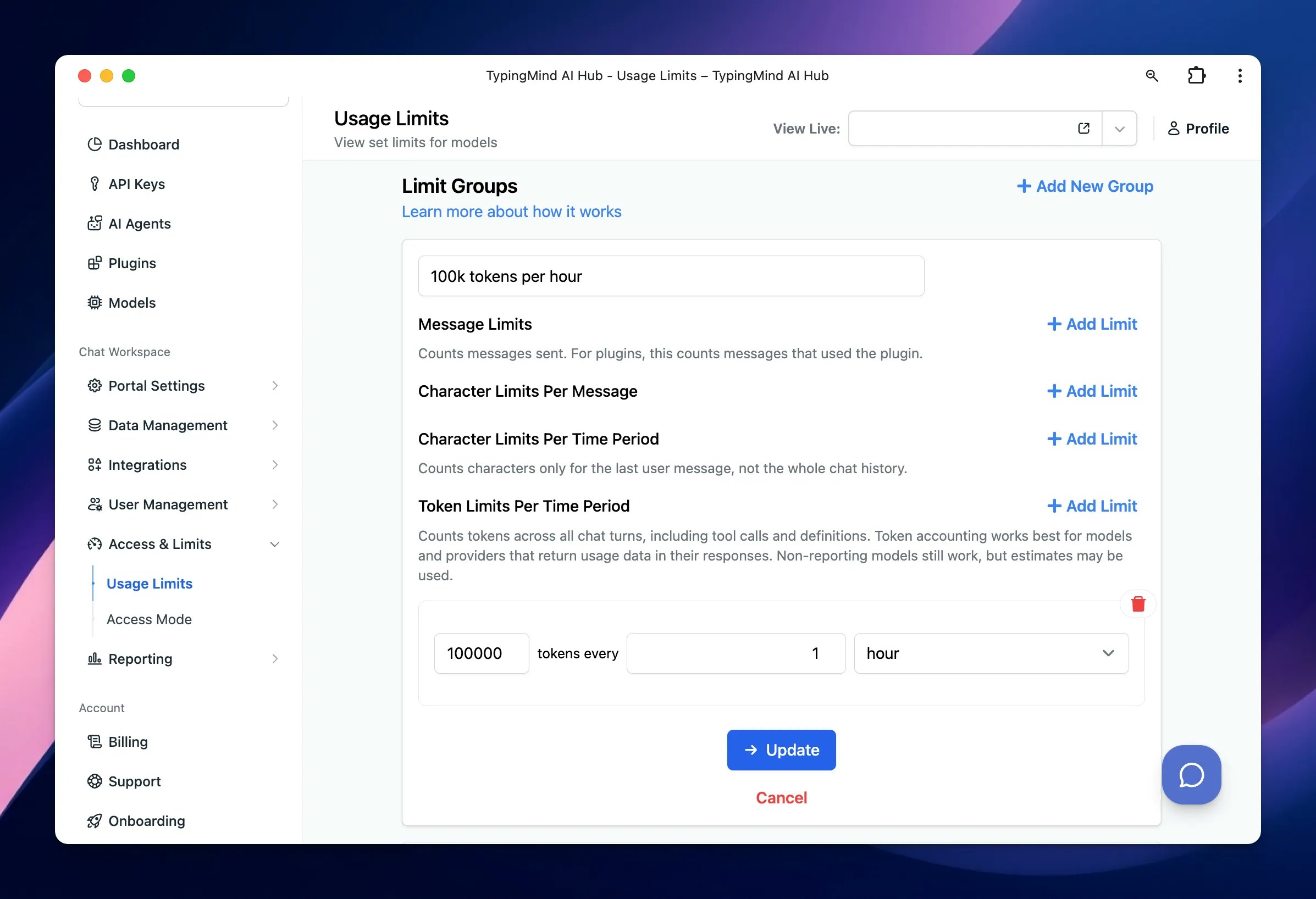
Define the limits for your group by setting:
Message Limits
Character Limits Per Message
Character Limits Per Time Period (If a particular limit is not needed, you can leave that field blank)
Token limits per time period
For example, you can create different limit groups as follows:
Basic Use: 50 messages can be sent per 3 hours - suitable for users who need minimal interaction with AI, such as those who send fewer messages or shorter content.
In-depth Use: 200 messages can be sent per 3 hours - for users who require extensive AI interactions, allow sending more messages and longer content.
These Limit Groups are reusable, which means once you’ve created them, you can apply them to different AI Models, AI Agents, or individual Users without needing to redefine the limits each time.
For example, if the “Content Team” uses GPT-4o more frequently, you might set tighter restrictions on that model for this group - with GPT-4o, set “In-depth Use” for “content” group
For example: If the Support Agent is primarily used by the “Support Team” and less by the “Marketing Team,” you can set different limits for this agent tailored to each group’s usage needs:
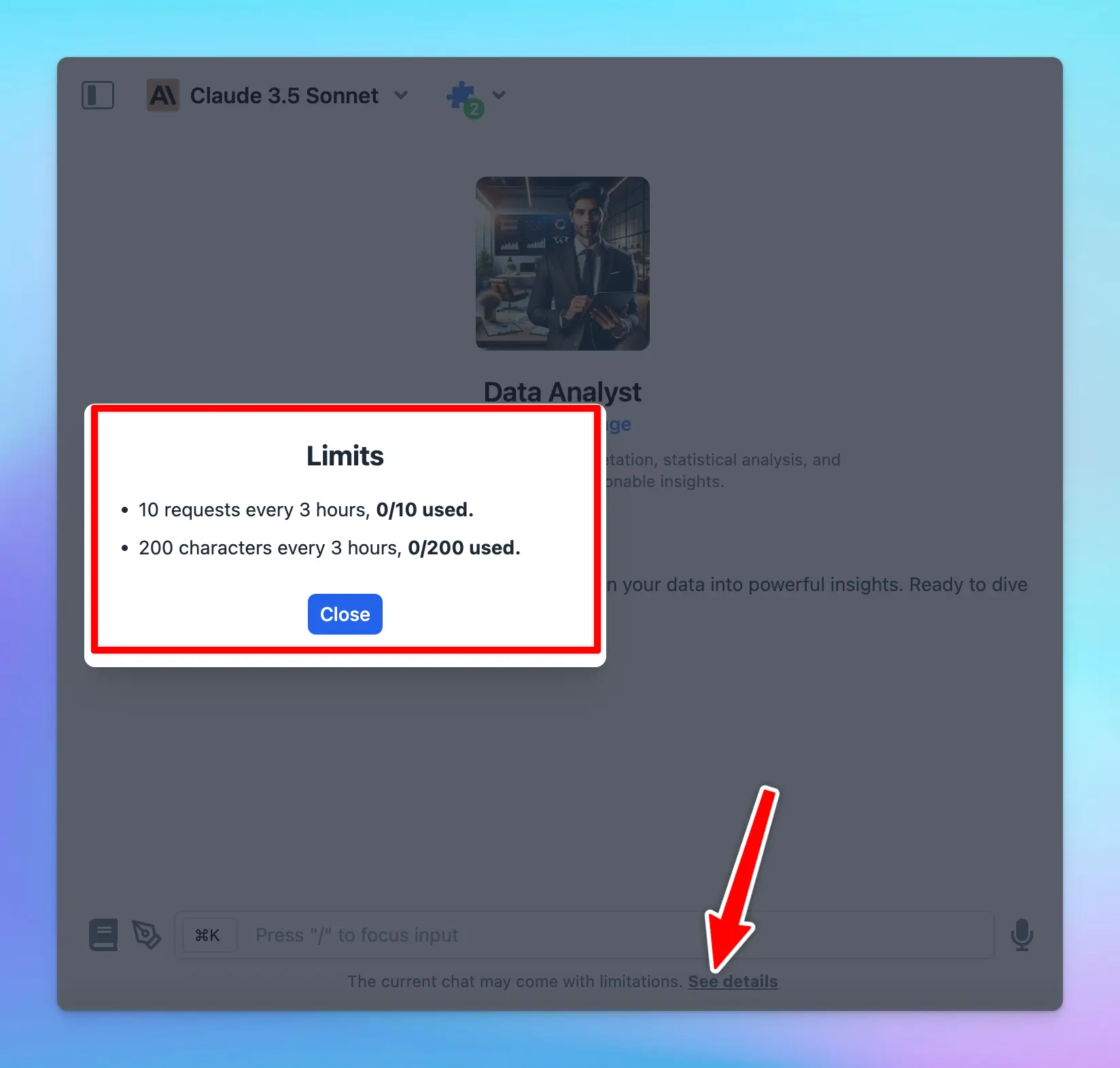
Users who have restrictions applied will see a notification below the message area stating, “The current chat may come with limitations. See details.”You can hide this notification via the Chat Features section within the Portal settings if you want.
Some best practices so you can effectively manage AI usage:
Start conservatively: start with stricter limits and adjust them as you gather actual usage data through chat logs or the analytics dashboard.
Review regularly: regularly review and update limits to align with changing needs and usage patterns.
Adapt to new AI Models: test new AI models to evaluate their performance and cost-effectiveness, then adjust your usage limits accordingly if you think the new model is a better fit for your team.
The old Model Usage Limits (Legacy) will still be available, but we recommend moving your limit settings to the new Usage Limits system for better control and management.
Currently, if you want to set Model Availability for specific user groups without using limit groups, you can scroll down to Model Usage Limits (Legacy) to adjust availability. We will be updating this option within the new Usage Limits system soon!
We are actively enhancing the Usage Limits system to offer even greater control and flexibility, so stay tuned for updates that will further improve your experience!
Was this page helpful?
{"docsConfig":{"theme":"mint","$schema":"https://mintlify.com/docs.json","name":"TypingMind Docs","description":"Your go-to resource for getting the most out of TypingMind","colors":{"primary":"#1539a3","light":"#1e4bd4","dark":"#102c7f"},"logo":{"light":"https://mintcdn.com/typingmind/RaTUOQa09vPhW7_D/images/logo-light(3).svg?fit=max\u0026auto=format\u0026n=RaTUOQa09vPhW7_D\u0026q=85\u0026s=368f39de7ecc6605f73c43c2017546a3","dark":"https://mintcdn.com/typingmind/RaTUOQa09vPhW7_D/images/logo-dark(3).svg?fit=max\u0026auto=format\u0026n=RaTUOQa09vPhW7_D\u0026q=85\u0026s=01a6eb27b4db3af8a1d5557525c579d3","href":"https://www.typingmind.com/?utm_source=docs"},"favicon":"https://mintcdn.com/typingmind/pm53BB_D69NXvWmb/images/logotypingmind3.webp?fit=max\u0026auto=format\u0026n=pm53BB_D69NXvWmb\u0026q=85\u0026s=a689e470c2dc7a6b4fd8efa9a7549ae8","background":{"color":{"light":"#ffffff","dark":"#000000"}},"navbar":{"links":[{"href":"mailto:support@typingmind.com","label":"Support"},{"href":"https://feedback.typingmind.com/changelog","label":"Changelog"}]},"footer":{"socials":{"x":"https://x.com/TypingMindApp","linkedin":"https://www.linkedin.com/company/typingmind","youtube":"https://www.youtube.com/@TypingMind","website":"https://www.typingmind.com/?utm_source=docs"}},"seo":{"indexing":"all"},"icons":{"library":"lucide"},"interaction":{"drilldown":false},"styling":{"latex":true},"navigation":{"pages":[]}},"deployment":{"deploymentMetadataValue":{"subdomain":"typingmind","hasAudioNarration":false,"actualSubdomain":"typingmind","customDomains":["docs.typingmind.com"],"gitSource":{"type":"github","owner":"typingmindinternal","repo":"typingmind-docs","deployBranch":"main","contentDirectory":"","isPrivate":true,"mountPath":"","label":""},"chroma":{"liveDeploymentHistoryId":"6adefc566c71dd37a9872453","collectionId":"cc5a7e0a-03f4-48e5-979e-32fbee606ab4","schemaVersion":"v3","latestBuiltDeploymentHistoryId":"6adefc566c71dd37a9872453"},"feedback":{"thumbs":true},"entitlements":{"AI_CHAT":{"status":"DISABLED"}},"buildId":"6adefc566c71dd37a9872453","clientVersion":"0.0.3966","searchFilterCounts":[{"language":"default","tag":"Documentation","count":190},{"language":"default","tag":"TypingMind Teams","count":67},{"language":"default","tag":"AI Models","count":37},{"language":"default","tag":"Plugins","count":31},{"language":"default","tag":"Account \u0026 support","count":28},{"language":"default","tag":"Supported Models","count":21},{"language":"default","tag":"Model Context Protocol (MCP)","count":20},{"language":"default","tag":"Get started","count":19},{"language":"default","tag":"Chat Management","count":18},{"language":"default","tag":"Workspace Setup","count":18}]},"assistantConfig":{"enableAskAiButton":false,"enableStarterQuestions":false,"enableContextualStarterQuestions":false,"enableAskAiSearchBar":true},"hasChatPermissions":false,"hasWebMcpPermissions":false,"toggles":[{"name":"kill-isr","enabled":true,"variant":{"name":"disabled","enabled":false,"feature_enabled":true},"impressionData":false},{"name":"agent-mintlify-slack","enabled":true,"variant":{"name":"disabled","enabled":false,"feature_enabled":true},"impressionData":false},{"name":"editor-v7-file-tree","enabled":true,"variant":{"name":"disabled","enabled":false,"feature_enabled":true},"impressionData":false},{"name":"agent-integrations-settings","enabled":true,"variant":{"name":"disabled","enabled":false,"feature_enabled":true},"impressionData":false},{"name":"automations-pr-grouping","enabled":true,"variant":{"name":"disabled","enabled":false,"feature_enabled":true},"impressionData":false},{"name":"custom-prefix","enabled":true,"variant":{"name":"disabled","enabled":false,"feature_enabled":true},"impressionData":false},{"name":"analytics-v7","enabled":true,"variant":{"name":"disabled","enabled":false,"feature_enabled":true},"impressionData":false},{"name":"user-flows-analytics","enabled":true,"variant":{"name":"disabled","enabled":false,"feature_enabled":true},"impressionData":false},{"name":"no-publish-flow","enabled":true,"variant":{"name":"disabled","enabled":false,"feature_enabled":true},"impressionData":false},{"name":"workos-onboarding","enabled":true,"variant":{"name":"disabled","enabled":false,"feature_enabled":true},"impressionData":false},{"name":"llms-txt-v2","enabled":true,"variant":{"name":"disabled","enabled":false,"feature_enabled":true},"impressionData":false},{"name":"pause-universal-search-reconcile","enabled":true,"variant":{"name":"disabled","enabled":false,"feature_enabled":true},"impressionData":false},{"name":"snapshot-serving-live","enabled":true,"variant":{"name":"disabled","enabled":false,"feature_enabled":true},"impressionData":false},{"name":"stripTemperatureMiddleware","enabled":true,"variant":{"name":"disabled","enabled":false,"feature_enabled":true},"impressionData":false},{"name":"per-site-search-delta","enabled":true,"variant":{"name":"disabled","enabled":false,"feature_enabled":true},"impressionData":false},{"name":"support-platform-pylon-zendesk","enabled":true,"variant":{"name":"disabled","enabled":false,"feature_enabled":true},"impressionData":false},{"name":"snapshot-serving","enabled":true,"variant":{"name":"disabled","enabled":false,"feature_enabled":true},"impressionData":false},{"name":"instant-rollback","enabled":true,"variant":{"name":"disabled","enabled":false,"feature_enabled":true},"impressionData":false},{"name":"granular-notifications-server","enabled":true,"variant":{"name":"disabled","enabled":false,"feature_enabled":true},"impressionData":false},{"name":"granular-notifications","enabled":true,"variant":{"name":"disabled","enabled":false,"feature_enabled":true},"impressionData":false},{"name":"editor-private-page-search","enabled":true,"variant":{"name":"disabled","enabled":false,"feature_enabled":true},"impressionData":false},{"name":"automations-fable","enabled":true,"variant":{"name":"disabled","enabled":false,"feature_enabled":true},"impressionData":false},{"name":"fixed-ai-action-pricing","enabled":true,"variant":{"name":"disabled","enabled":false,"feature_enabled":true},"impressionData":false},{"name":"automation-resolve-merge-conflict","enabled":true,"variant":{"name":"disabled","enabled":false,"feature_enabled":true},"impressionData":false},{"name":"scoped-publishing","enabled":true,"variant":{"name":"disabled","enabled":false,"feature_enabled":true},"impressionData":false},{"name":"mintql","enabled":true,"variant":{"name":"disabled","enabled":false,"feature_enabled":true},"impressionData":false},{"name":"page-level-analytics","enabled":true,"variant":{"name":"disabled","enabled":false,"feature_enabled":true},"impressionData":false},{"name":"editor-version-history-v2","enabled":true,"variant":{"name":"disabled","enabled":false,"feature_enabled":true},"impressionData":false},{"name":"editor-nav-generations","enabled":true,"variant":{"name":"disabled","enabled":false,"feature_enabled":true},"impressionData":false},{"name":"billing-page-v2","enabled":true,"variant":{"name":"disabled","enabled":false,"feature_enabled":true},"impressionData":false},{"name":"workspace-projects","enabled":true,"variant":{"name":"disabled","enabled":false,"feature_enabled":true},"impressionData":false},{"name":"assistant-v5","enabled":true,"variant":{"name":"disabled","enabled":false,"feature_enabled":true},"impressionData":false},{"name":"byok-sep-25","enabled":true,"variant":{"name":"disabled","enabled":false,"feature_enabled":true},"impressionData":false},{"name":"fork-pr-previews","enabled":true,"variant":{"name":"disabled","enabled":false,"feature_enabled":true},"impressionData":false},{"name":"revalidation-jwt","enabled":true,"variant":{"name":"disabled","enabled":false,"feature_enabled":true},"impressionData":false},{"name":"vite-origin","enabled":true,"variant":{"name":"disabled","enabled":false,"feature_enabled":true},"impressionData":false},{"name":"editor-agent-model-picker","enabled":true,"variant":{"name":"disabled","enabled":false,"feature_enabled":true},"impressionData":false},{"name":"billing-updated-9-15","enabled":true,"variant":{"name":"disabled","enabled":false,"feature_enabled":true},"impressionData":false},{"name":"hobby-abuse-scan","enabled":true,"variant":{"name":"disabled","enabled":false,"feature_enabled":true},"impressionData":false},{"name":"dashboard-inbox","enabled":true,"variant":{"name":"disabled","enabled":false,"feature_enabled":true},"impressionData":false}],"isAtlas":false,"googleFontsInlined":false},"customCss":[],"page":{"pagePath":"typingmind-team/user-management/usage-limits","slug":"/typingmind-team/user-management/usage-limits","pageMetadata":{"title":"Usage Limits","sidebarTitle":"Usage Limits","description":null,"href":"/typingmind-team/user-management/usage-limits"},"pageType":"default","mdx":{"mdxSource":{"compiledSource":"\"use strict\";const{Fragment:_Fragment,jsx:_jsx,jsxs:_jsxs}=arguments[0];const{useMDXComponents:_provideComponents}=arguments[0];function _createMdxContent(props){const _components={a:`a`,li:`li`,ol:`ol`,p:`p`,strong:`strong`,ul:`ul`,..._provideComponents(),...props.components},{Frame,Heading,OptimizedImage,Tip}=_components;if(!Frame)_missingMdxReference(`Frame`,true);if(!Heading)_missingMdxReference(`Heading`,true);if(!OptimizedImage)_missingMdxReference(`OptimizedImage`,true);if(!Tip)_missingMdxReference(`Tip`,true);return _jsxs(_Fragment,{children:[_jsx(_components.p,{children:`Managing AI resources effectively for your chat instance is more important than ever.`}),`\n`,_jsx(_components.p,{children:`That’s why we’ve revamped our Usage Limits system which provides you with better control over your AI resources!`}),`\n`,_jsxs(_components.p,{children:[`This guide will walk you through the different types of usage limits you can set - `,_jsx(_components.strong,{children:`Global Limits`}),`, `,_jsx(_components.strong,{children:`Model Limits`}),`, `,_jsx(_components.strong,{children:`AI Agent Limits`}),`, `,_jsx(_components.strong,{children:`Plugin Limits`}),` and `,_jsx(_components.strong,{children:`User Limits -`}),` and how to implement them step by step.`]}),`\n`,_jsx(Frame,{children:_jsx(OptimizedImage,{src:`https://mintcdn.com/typingmind/VAznm0Uo9H9pR4_5/images/usage-limit.webp?fit=max\u0026auto=format\u0026n=VAznm0Uo9H9pR4_5\u0026q=85\u0026s=c07ca0513746864b6caa2200cd7458a2`,alt:`Usage Limit`,\"data-og-width\":`2394`,width:`2394`,\"data-og-height\":`1702`,height:`1702`,\"data-path\":`images/usage-limit.webp`,\"data-optimize\":`true`,\"data-opv\":`3`,srcset:`https://mintcdn.com/typingmind/VAznm0Uo9H9pR4_5/images/usage-limit.webp?w=280\u0026fit=max\u0026auto=format\u0026n=VAznm0Uo9H9pR4_5\u0026q=85\u0026s=2113c50c87c1f726a9ffc00f21934a35 280w, https://mintcdn.com/typingmind/VAznm0Uo9H9pR4_5/images/usage-limit.webp?w=560\u0026fit=max\u0026auto=format\u0026n=VAznm0Uo9H9pR4_5\u0026q=85\u0026s=e87948ec3e8d8f944982c87e21e49aee 560w, https://mintcdn.com/typingmind/VAznm0Uo9H9pR4_5/images/usage-limit.webp?w=840\u0026fit=max\u0026auto=format\u0026n=VAznm0Uo9H9pR4_5\u0026q=85\u0026s=eded3fd049243ff86bc5d48a4184c562 840w, https://mintcdn.com/typingmind/VAznm0Uo9H9pR4_5/images/usage-limit.webp?w=1100\u0026fit=max\u0026auto=format\u0026n=VAznm0Uo9H9pR4_5\u0026q=85\u0026s=88938e9b6b0c2b9efc7a17ef2ada1c77 1100w, https://mintcdn.com/typingmind/VAznm0Uo9H9pR4_5/images/usage-limit.webp?w=1650\u0026fit=max\u0026auto=format\u0026n=VAznm0Uo9H9pR4_5\u0026q=85\u0026s=d8965ea4e169664f14822f81976db693 1650w, https://mintcdn.com/typingmind/VAznm0Uo9H9pR4_5/images/usage-limit.webp?w=2500\u0026fit=max\u0026auto=format\u0026n=VAznm0Uo9H9pR4_5\u0026q=85\u0026s=61f3ce137b95808472d8690630e14f23 2500w`})}),`\n`,_jsx(Heading,{level:`2`,id:`why-usage-and-limits-matter`,children:`Why Usage and Limits Matter?`}),`\n`,_jsx(_components.p,{children:`With TypingMind, you can set up multiple AI Agents and prompts, enabling your team to interact with various AI models.`}),`\n`,_jsx(_components.p,{children:`While this flexibility enhances productivity, it also requires careful management to control API costs. Setting usage limits helps you:`}),`\n`,_jsxs(_components.ul,{children:[`\n`,_jsxs(_components.li,{children:[_jsx(_components.strong,{children:`Prevent overuse:`}),` make sure that no single AI model, agent, or user consumes an excessive amount of resources.`]}),`\n`,_jsxs(_components.li,{children:[_jsx(_components.strong,{children:`Optimize costs:`}),` keep expenses in check by regulating usage.`]}),`\n`,_jsxs(_components.li,{children:[_jsx(_components.strong,{children:`Enhance fairness:`}),` distribute AI capabilities evenly across users or departments`]}),`\n`]}),`\n`,_jsx(Heading,{level:`2`,id:`how-usage-limits-work`,children:`How Usage Limits work`}),`\n`,_jsx(_components.p,{children:`Basically, you can set limits based on:`}),`\n`,_jsxs(_components.ul,{children:[`\n`,_jsxs(_components.li,{children:[_jsx(_components.strong,{children:`Message limits:`}),` the number of messages a user or group can send.`]}),`\n`,_jsxs(_components.li,{children:[_jsx(_components.strong,{children:`Character limits per message:`}),` the maximum number of characters allowed in a single message.`]}),`\n`,_jsxs(_components.li,{children:[_jsx(_components.strong,{children:`Character limits per time period:`}),` the total number of characters a user or group can send within a specific time frame.`]}),`\n`,_jsxs(_components.li,{children:[_jsx(_components.strong,{children:`Tokens limit per time period:`}),` the number of tokens can be used within a specific time framce`]}),`\n`]}),`\n`,_jsxs(_components.p,{children:[`These limits are managed via `,_jsx(_components.strong,{children:`Limit Groups`}),`.`]}),`\n`,_jsx(OptimizedImage,{src:`https://mintlify.s3.us-west-1.amazonaws.com/typingmind/typingmind-team/user-management/usage-limits-set-limits-per-ai-model-agent-and-u/image%201.webp`,alt:`image.png`}),`\n`,_jsxs(Tip,{children:[_jsxs(_components.p,{children:[_jsx(_components.strong,{children:`Using Limit Groups allows admins to reuse the limits you’ve already set up`}),`.`]}),_jsx(_components.p,{children:`Once you’ve created a Limit Group with specific restrictions, you can apply that group across different settings - whether for different AI models, agents, or user groups - without having to redefine the limits each time.`})]}),`\n`,_jsxs(_components.p,{children:[`You can `,_jsx(_components.strong,{children:`apply the limits from your Limit Groups`}),` as follows:`]}),`\n`,_jsxs(_components.ol,{children:[`\n`,_jsxs(_components.li,{children:[_jsx(_components.strong,{children:`Global Limits:`}),` apply limits to all users or specific groups across the entire chat system.`]}),`\n`,_jsxs(_components.li,{children:[_jsx(_components.strong,{children:`Model Limits:`}),` set limits for each specific AI model, which can apply to all users or specific user groups.`]}),`\n`,_jsxs(_components.li,{children:[_jsx(_components.strong,{children:`AI Agent Limits:`}),` apply limits to individual AI Agents for all users or specific groups.`]}),`\n`,_jsxs(_components.li,{children:[_jsx(_components.strong,{children:`Plugin limits:`}),` apply limits to Plugins for all users or specific user groups.`]}),`\n`,_jsxs(_components.li,{children:[_jsx(_components.strong,{children:`User Limits:`}),` set limits for individual users.`]}),`\n`]}),`\n`,_jsx(Frame,{children:_jsx(OptimizedImage,{src:`https://mintcdn.com/typingmind/VAznm0Uo9H9pR4_5/images/usage-limit.webp?fit=max\u0026auto=format\u0026n=VAznm0Uo9H9pR4_5\u0026q=85\u0026s=c07ca0513746864b6caa2200cd7458a2`,alt:`Usage Limit`,\"data-og-width\":`2394`,width:`2394`,\"data-og-height\":`1702`,height:`1702`,\"data-path\":`images/usage-limit.webp`,\"data-optimize\":`true`,\"data-opv\":`3`,srcset:`https://mintcdn.com/typingmind/VAznm0Uo9H9pR4_5/images/usage-limit.webp?w=280\u0026fit=max\u0026auto=format\u0026n=VAznm0Uo9H9pR4_5\u0026q=85\u0026s=2113c50c87c1f726a9ffc00f21934a35 280w, https://mintcdn.com/typingmind/VAznm0Uo9H9pR4_5/images/usage-limit.webp?w=560\u0026fit=max\u0026auto=format\u0026n=VAznm0Uo9H9pR4_5\u0026q=85\u0026s=e87948ec3e8d8f944982c87e21e49aee 560w, https://mintcdn.com/typingmind/VAznm0Uo9H9pR4_5/images/usage-limit.webp?w=840\u0026fit=max\u0026auto=format\u0026n=VAznm0Uo9H9pR4_5\u0026q=85\u0026s=eded3fd049243ff86bc5d48a4184c562 840w, https://mintcdn.com/typingmind/VAznm0Uo9H9pR4_5/images/usage-limit.webp?w=1100\u0026fit=max\u0026auto=format\u0026n=VAznm0Uo9H9pR4_5\u0026q=85\u0026s=88938e9b6b0c2b9efc7a17ef2ada1c77 1100w, https://mintcdn.com/typingmind/VAznm0Uo9H9pR4_5/images/usage-limit.webp?w=1650\u0026fit=max\u0026auto=format\u0026n=VAznm0Uo9H9pR4_5\u0026q=85\u0026s=d8965ea4e169664f14822f81976db693 1650w, https://mintcdn.com/typingmind/VAznm0Uo9H9pR4_5/images/usage-limit.webp?w=2500\u0026fit=max\u0026auto=format\u0026n=VAznm0Uo9H9pR4_5\u0026q=85\u0026s=61f3ce137b95808472d8690630e14f23 2500w`})}),`\n`,_jsx(_components.p,{children:`Let’s see how to set up these limits for your chat instance!`}),`\n`,_jsx(Heading,{level:`2`,id:`a-step-by-step-to-set-up-usage-limits`,children:`A step-by-step to set up usage limits`}),`\n`,_jsx(Heading,{level:`3`,id:`step-1-set-up-user-groups`,children:`Step 1: Set up User Groups`}),`\n`,_jsx(_components.p,{children:`Before setting limits, it’s helpful to organize users into different groups. This allows you to apply specific limits to different categories of users.`}),`\n`,_jsxs(_components.ul,{children:[`\n`,_jsxs(_components.li,{children:[`Go to the `,_jsx(_components.strong,{children:`Group`}),` under the `,_jsx(_components.strong,{children:`User Management`}),` section`]}),`\n`,_jsx(_components.li,{children:`Click to Create a new user group`}),`\n`,_jsx(_components.li,{children:`Add members to your created group`}),`\n`]}),`\n`,_jsx(_components.p,{children:`You can view more details guideline on how to create user groups here:`}),`\n`,_jsx(_components.p,{children:_jsx(_components.a,{href:`/typingmind-team/user-management/create-and-manage-user-groups`,children:`Create and manage User Groups`})}),`\n`,_jsx(OptimizedImage,{src:`https://mintlify.s3.us-west-1.amazonaws.com/typingmind/typingmind-team/getting-started/getting-started-with-typingmind-team-(cloud-host)/image%2020.webp`,alt:`image.png`}),`\n`,_jsx(Heading,{level:`3`,id:`step-2-create-limit-groups`,children:`Step 2: Create Limit Groups`}),`\n`,_jsxs(_components.ul,{children:[`\n`,_jsx(_components.li,{children:`Within your Admin Panel, go to Usage Limits within Access \u0026 Limits menu`}),`\n`,_jsx(_components.li,{children:`Scroll down to Limit Groups`}),`\n`,_jsxs(_components.li,{children:[`Click on “`,_jsx(_components.strong,{children:`Add New Group`}),`”`]}),`\n`]}),`\n`,_jsx(OptimizedImage,{src:`https://mintlify.s3.us-west-1.amazonaws.com/typingmind/typingmind-team/user-management/usage-limits-set-limits-per-ai-model-agent-and-u/image%202.webp`,alt:`image.png`}),`\n`,_jsxs(_components.ul,{children:[`\n`,_jsxs(_components.li,{children:[`Define the limits for your group by setting:`,`\n`,_jsxs(_components.ul,{children:[`\n`,_jsx(_components.li,{children:`Message Limits`}),`\n`,_jsx(_components.li,{children:`Character Limits Per Message`}),`\n`,_jsx(_components.li,{children:`Character Limits Per Time Period (If a particular limit is not needed, you can leave that field blank)`}),`\n`,_jsx(_components.li,{children:`Token limits per time period`}),`\n`]}),`\n`]}),`\n`]}),`\n`,_jsx(_components.p,{children:`For example, you can create different limit groups as follows:`}),`\n`,_jsxs(_components.ul,{children:[`\n`,_jsxs(_components.li,{children:[_jsx(_components.strong,{children:`Basic Use`}),`: 50 messages can be sent per 3 hours - suitable for users who need minimal interaction with AI, such as those who send fewer messages or shorter content.`]}),`\n`,_jsxs(_components.li,{children:[_jsx(_components.strong,{children:`In-depth Use`}),`: 200 messages can be sent per 3 hours - for users who require extensive AI interactions, allow sending more messages and longer content.`]}),`\n`]}),`\n`,_jsx(Frame,{children:_jsx(OptimizedImage,{src:`https://mintcdn.com/typingmind/VAznm0Uo9H9pR4_5/images/limit-group-admin.webp?fit=max\u0026auto=format\u0026n=VAznm0Uo9H9pR4_5\u0026q=85\u0026s=7548627efa207a24017990696fe08b29`,alt:`Limit Group Admin`,\"data-og-width\":`2394`,width:`2394`,\"data-og-height\":`1636`,height:`1636`,\"data-path\":`images/limit-group-admin.webp`,\"data-optimize\":`true`,\"data-opv\":`3`,srcset:`https://mintcdn.com/typingmind/VAznm0Uo9H9pR4_5/images/limit-group-admin.webp?w=280\u0026fit=max\u0026auto=format\u0026n=VAznm0Uo9H9pR4_5\u0026q=85\u0026s=02abbf1d23104f83f668a998ea03bd39 280w, https://mintcdn.com/typingmind/VAznm0Uo9H9pR4_5/images/limit-group-admin.webp?w=560\u0026fit=max\u0026auto=format\u0026n=VAznm0Uo9H9pR4_5\u0026q=85\u0026s=f35d1cdaf99f3dfab40bb61b65e9c9cd 560w, https://mintcdn.com/typingmind/VAznm0Uo9H9pR4_5/images/limit-group-admin.webp?w=840\u0026fit=max\u0026auto=format\u0026n=VAznm0Uo9H9pR4_5\u0026q=85\u0026s=dbb06d3850546b027aa7b5f35c5cc0a8 840w, https://mintcdn.com/typingmind/VAznm0Uo9H9pR4_5/images/limit-group-admin.webp?w=1100\u0026fit=max\u0026auto=format\u0026n=VAznm0Uo9H9pR4_5\u0026q=85\u0026s=b8c63320c69a2ca3ae64f5b333b9dd01 1100w, https://mintcdn.com/typingmind/VAznm0Uo9H9pR4_5/images/limit-group-admin.webp?w=1650\u0026fit=max\u0026auto=format\u0026n=VAznm0Uo9H9pR4_5\u0026q=85\u0026s=c732776f69d8d6a75c11bc9efc980d51 1650w, https://mintcdn.com/typingmind/VAznm0Uo9H9pR4_5/images/limit-group-admin.webp?w=2500\u0026fit=max\u0026auto=format\u0026n=VAznm0Uo9H9pR4_5\u0026q=85\u0026s=6e3b8b5813681cd6f80dc94f62ce59fc 2500w`})}),`\n`,_jsx(_components.p,{children:`These Limit Groups are reusable, which means once you’ve created them, you can apply them to different AI Models, AI Agents, or individual Users without needing to redefine the limits each time.`}),`\n`,_jsx(Heading,{level:`3`,id:`step-3-apply-usage-limits`,children:`Step 3: Apply Usage Limits`}),`\n`,_jsx(_components.p,{children:`You can now apply the limits in the following ways:`}),`\n`,_jsxs(_components.ul,{children:[`\n`,_jsx(_components.li,{children:`Global limits`}),`\n`,_jsx(_components.li,{children:`Model limits`}),`\n`,_jsx(_components.li,{children:`AI Agent limits`}),`\n`,_jsx(_components.li,{children:`Plugin limits`}),`\n`,_jsx(_components.li,{children:`User limits`}),`\n`]}),`\n`,_jsxs(_components.p,{children:[`Go to `,_jsx(_components.strong,{children:`User Management`}),` → `,_jsx(_components.strong,{children:`Usage Limits`}),` to set up the limits.`]}),`\n`,_jsx(Frame,{children:_jsx(OptimizedImage,{src:`https://mintcdn.com/typingmind/VAznm0Uo9H9pR4_5/images/usage-limit.webp?fit=max\u0026auto=format\u0026n=VAznm0Uo9H9pR4_5\u0026q=85\u0026s=c07ca0513746864b6caa2200cd7458a2`,alt:`Usage Limit`,\"data-og-width\":`2394`,width:`2394`,\"data-og-height\":`1702`,height:`1702`,\"data-path\":`images/usage-limit.webp`,\"data-optimize\":`true`,\"data-opv\":`3`,srcset:`https://mintcdn.com/typingmind/VAznm0Uo9H9pR4_5/images/usage-limit.webp?w=280\u0026fit=max\u0026auto=format\u0026n=VAznm0Uo9H9pR4_5\u0026q=85\u0026s=2113c50c87c1f726a9ffc00f21934a35 280w, https://mintcdn.com/typingmind/VAznm0Uo9H9pR4_5/images/usage-limit.webp?w=560\u0026fit=max\u0026auto=format\u0026n=VAznm0Uo9H9pR4_5\u0026q=85\u0026s=e87948ec3e8d8f944982c87e21e49aee 560w, https://mintcdn.com/typingmind/VAznm0Uo9H9pR4_5/images/usage-limit.webp?w=840\u0026fit=max\u0026auto=format\u0026n=VAznm0Uo9H9pR4_5\u0026q=85\u0026s=eded3fd049243ff86bc5d48a4184c562 840w, https://mintcdn.com/typingmind/VAznm0Uo9H9pR4_5/images/usage-limit.webp?w=1100\u0026fit=max\u0026auto=format\u0026n=VAznm0Uo9H9pR4_5\u0026q=85\u0026s=88938e9b6b0c2b9efc7a17ef2ada1c77 1100w, https://mintcdn.com/typingmind/VAznm0Uo9H9pR4_5/images/usage-limit.webp?w=1650\u0026fit=max\u0026auto=format\u0026n=VAznm0Uo9H9pR4_5\u0026q=85\u0026s=d8965ea4e169664f14822f81976db693 1650w, https://mintcdn.com/typingmind/VAznm0Uo9H9pR4_5/images/usage-limit.webp?w=2500\u0026fit=max\u0026auto=format\u0026n=VAznm0Uo9H9pR4_5\u0026q=85\u0026s=61f3ce137b95808472d8690630e14f23 2500w`})}),`\n`,_jsx(Heading,{level:`4`,id:`1-global-limits`,children:`1. Global Limits`}),`\n`,_jsx(_components.p,{children:`To apply limits across all users or specific groups:`}),`\n`,_jsxs(_components.ul,{children:[`\n`,_jsxs(_components.li,{children:[`Click on `,_jsx(_components.strong,{children:`Global Limit`}),`.`]}),`\n`,_jsxs(_components.li,{children:[`Select the desired `,_jsx(_components.strong,{children:`Limit Group`}),` from the drop-down menu.`]}),`\n`,_jsx(_components.li,{children:`Choose the user groups to which these limits will apply.`}),`\n`]}),`\n`,_jsxs(_components.p,{children:[_jsx(_components.strong,{children:`For example:`}),` Apply “Basic Use” limit group you created previously for All Users.`]}),`\n`,_jsx(OptimizedImage,{src:`https://mintlify.s3.us-west-1.amazonaws.com/typingmind/typingmind-team/user-management/usage-limits-set-limits-per-ai-model-agent-and-u/image%205.webp`,alt:`image.png`}),`\n`,_jsx(Heading,{level:`4`,id:`2-model-limits`,children:`2. Model Limits`}),`\n`,_jsx(_components.p,{children:`To apply limits to specific AI models:`}),`\n`,_jsxs(_components.ul,{children:[`\n`,_jsxs(_components.li,{children:[`Click on `,_jsx(_components.strong,{children:`Model Limits`}),`.`]}),`\n`,_jsx(_components.li,{children:`Select the AI model you want to restrict.`}),`\n`,_jsx(_components.li,{children:`Choose the appropriate Limit Group.`}),`\n`,_jsx(_components.li,{children:`Assign these limits to a specific user group.`}),`\n`]}),`\n`,_jsxs(_components.p,{children:[_jsx(_components.strong,{children:`For example`}),`, if the “Content Team” uses GPT-4o more frequently, you might set tighter restrictions on that model for this group - with GPT-4o, set “In-depth Use” for “content” group`]}),`\n`,_jsx(OptimizedImage,{src:`https://mintlify.s3.us-west-1.amazonaws.com/typingmind/typingmind-team/user-management/usage-limits-set-limits-per-ai-model-agent-and-u/image%206.webp`,alt:`image.png`}),`\n`,_jsx(Heading,{level:`4`,id:`3-ai-agent-limits`,children:`3. AI Agent Limits`}),`\n`,_jsx(_components.p,{children:`To restrict usage per AI Agent:`}),`\n`,_jsxs(_components.ul,{children:[`\n`,_jsxs(_components.li,{children:[`Click on `,_jsx(_components.strong,{children:`AI Agent Limits`}),`.`]}),`\n`,_jsx(_components.li,{children:`Select the AI Agent you want to restrict.`}),`\n`,_jsx(_components.li,{children:`Choose a Limit Group.`}),`\n`,_jsx(_components.li,{children:`Apply these limits to the relevant user group.`}),`\n`]}),`\n`,_jsxs(_components.p,{children:[_jsx(_components.strong,{children:`For example:`}),` If the Support Agent is primarily used by the “Support Team” and less by the “Marketing Team,” you can set different limits for this agent tailored to each group’s usage needs:`]}),`\n`,_jsxs(_components.ul,{children:[`\n`,_jsx(_components.li,{children:`Basic Use for Marketing Team`}),`\n`,_jsx(_components.li,{children:`In-depth Use for Support Team`}),`\n`]}),`\n`,_jsx(OptimizedImage,{src:`https://mintlify.s3.us-west-1.amazonaws.com/typingmind/typingmind-team/user-management/usage-limits-set-limits-per-ai-model-agent-and-u/image%207.webp`,alt:`image.png`}),`\n`,_jsx(Heading,{level:`4`,id:`4-plugin-limits`,children:`4. Plugin Limits`}),`\n`,_jsx(_components.p,{children:`To set limits for plugins:`}),`\n`,_jsxs(_components.ul,{children:[`\n`,_jsx(_components.li,{children:`Click on Plugin Limits`}),`\n`,_jsx(_components.li,{children:`Select a plugin you want to set limit`}),`\n`,_jsx(_components.li,{children:`Choose a Limit Group`}),`\n`,_jsx(_components.li,{children:`Apply these limits to the relevant user group`}),`\n`]}),`\n`,_jsx(Frame,{children:_jsx(OptimizedImage,{src:`https://mintcdn.com/typingmind/VAznm0Uo9H9pR4_5/images/plugin-limit.webp?fit=max\u0026auto=format\u0026n=VAznm0Uo9H9pR4_5\u0026q=85\u0026s=fba6903e17195446d0980b4116b23a48`,alt:`Plugin Limit`,\"data-og-width\":`1610`,width:`1610`,\"data-og-height\":`1330`,height:`1330`,\"data-path\":`images/plugin-limit.webp`,\"data-optimize\":`true`,\"data-opv\":`3`,srcset:`https://mintcdn.com/typingmind/VAznm0Uo9H9pR4_5/images/plugin-limit.webp?w=280\u0026fit=max\u0026auto=format\u0026n=VAznm0Uo9H9pR4_5\u0026q=85\u0026s=a696e71f227ec37e751ed6684ba3e141 280w, https://mintcdn.com/typingmind/VAznm0Uo9H9pR4_5/images/plugin-limit.webp?w=560\u0026fit=max\u0026auto=format\u0026n=VAznm0Uo9H9pR4_5\u0026q=85\u0026s=6da52691b1f008875bf6491909fdd3c8 560w, https://mintcdn.com/typingmind/VAznm0Uo9H9pR4_5/images/plugin-limit.webp?w=840\u0026fit=max\u0026auto=format\u0026n=VAznm0Uo9H9pR4_5\u0026q=85\u0026s=4e9ccce8b7ea8542917144ef4a826971 840w, https://mintcdn.com/typingmind/VAznm0Uo9H9pR4_5/images/plugin-limit.webp?w=1100\u0026fit=max\u0026auto=format\u0026n=VAznm0Uo9H9pR4_5\u0026q=85\u0026s=3f4e6ab55eee6b95d6a2f80185b28e7a 1100w, https://mintcdn.com/typingmind/VAznm0Uo9H9pR4_5/images/plugin-limit.webp?w=1650\u0026fit=max\u0026auto=format\u0026n=VAznm0Uo9H9pR4_5\u0026q=85\u0026s=7cdfcc8667d1ae9d7441b3f9f607cc76 1650w, https://mintcdn.com/typingmind/VAznm0Uo9H9pR4_5/images/plugin-limit.webp?w=2500\u0026fit=max\u0026auto=format\u0026n=VAznm0Uo9H9pR4_5\u0026q=85\u0026s=c2eb39e07b6def36cf67f9b1c832e684 2500w`})}),`\n`,_jsx(Heading,{level:`4`,id:`3-user-limits`,children:`3. User Limits`}),`\n`,_jsx(_components.p,{children:`To set limits for individual users:`}),`\n`,_jsxs(_components.ul,{children:[`\n`,_jsx(_components.li,{children:`Select the user you want to restrict.`}),`\n`,_jsx(_components.li,{children:`Choose a Limit Group from the list.`}),`\n`]}),`\n`,_jsxs(_components.p,{children:[_jsx(_components.strong,{children:`For example:`}),` If a particular user consistently exceeds usage limits, you can apply a stricter Limit Group specifically for them.`]}),`\n`,_jsx(OptimizedImage,{src:`https://mintlify.s3.us-west-1.amazonaws.com/typingmind/typingmind-team/user-management/usage-limits-set-limits-per-ai-model-agent-and-u/image%208.webp`,alt:`image.png`}),`\n`,_jsx(Heading,{level:`3`,id:`step-4-monitor-limits-in-the-chat-interface`,children:`Step 4: Monitor Limits in the Chat Interface`}),`\n`,_jsxs(_components.p,{children:[`Users who have restrictions applied will see a notification below the message area stating, “The current chat may come with limitations. `,_jsx(_components.strong,{children:`See details`}),`.”`]}),`\n`,_jsx(_components.p,{children:`You can hide this notification via the Chat Features section within the Portal settings if you want.`}),`\n`,_jsx(OptimizedImage,{src:`https://mintlify.s3.us-west-1.amazonaws.com/typingmind/typingmind-team/user-management/usage-limits-set-limits-per-ai-model-agent-and-u/image%209.webp`,alt:`image.png`}),`\n`,_jsx(Heading,{level:`2`,id:`best-practices`,children:`Best Practices`}),`\n`,_jsx(_components.p,{children:`Some best practices so you can effectively manage AI usage:`}),`\n`,_jsxs(_components.ul,{children:[`\n`,_jsxs(_components.li,{children:[_jsx(_components.strong,{children:`Start conservatively`}),`: start with stricter limits and adjust them as you gather actual usage data through chat logs or the analytics dashboard.`]}),`\n`,_jsxs(_components.li,{children:[_jsx(_components.strong,{children:`Review regularly`}),`: regularly review and update limits to align with changing needs and usage patterns.`]}),`\n`,_jsxs(_components.li,{children:[_jsx(_components.strong,{children:`Adapt to new AI Models`}),`: test new AI models to evaluate their performance and cost-effectiveness, then adjust your usage limits accordingly if you think the new model is a better fit for your team.`]}),`\n`]}),`\n`,_jsx(Heading,{level:`2`,id:`notes`,children:`Notes`}),`\n`,_jsxs(_components.ul,{children:[`\n`,_jsxs(_components.li,{children:[`The old `,_jsx(_components.strong,{children:`Model Usage Limits (Legacy)`}),` will still be available, but we recommend moving your limit settings to the new Usage Limits system for better control and management.`]}),`\n`,_jsxs(_components.li,{children:[`Currently, if you want to set Model Availability for specific user groups without using limit groups, you can scroll down to `,_jsx(_components.strong,{children:`Model Usage Limits (Legacy)`}),` to adjust availability. We will be updating this option within the new Usage Limits system soon!`]}),`\n`]}),`\n`,_jsx(_components.p,{children:`We are actively enhancing the Usage Limits system to offer even greater control and flexibility, so stay tuned for updates that will further improve your experience!`})]})}function MDXContent(props={}){const{wrapper:MDXLayout}={..._provideComponents(),...props.components};return MDXLayout?_jsx(MDXLayout,{...props,children:_jsx(_createMdxContent,{...props})}):_createMdxContent(props)}return{default:MDXContent};function _missingMdxReference(id,component){throw new Error(`Expected `+(component?`component`:`object`)+\" `\"+id+\"` to be defined: you likely forgot to import, pass, or provide it.\")}","frontmatter":{},"scope":{"config":{},"pageMetadata":{"title":"Usage Limits","sidebarTitle":"Usage Limits","description":null,"href":"/typingmind-team/user-management/usage-limits"}}},"mdxSourceWithNoJs":null},"mdxExtracts":{"tableOfContents":[{"title":"Why Usage and Limits Matter?","slug":"why-usage-and-limits-matter","depth":2,"children":[]},{"title":"How Usage Limits work","slug":"how-usage-limits-work","depth":2,"children":[]},{"title":"A step-by-step to set up usage limits","slug":"a-step-by-step-to-set-up-usage-limits","depth":2,"children":[{"title":"Step 1: Set up User Groups","slug":"step-1-set-up-user-groups","depth":3,"children":[]},{"title":"Step 2: Create Limit Groups","slug":"step-2-create-limit-groups","depth":3,"children":[]},{"title":"Step 3: Apply Usage Limits","slug":"step-3-apply-usage-limits","depth":3,"children":[]},{"title":"1. Global Limits","slug":"1-global-limits","depth":4,"children":[]},{"title":"2. Model Limits","slug":"2-model-limits","depth":4,"children":[]},{"title":"3. AI Agent Limits","slug":"3-ai-agent-limits","depth":4,"children":[]},{"title":"4. Plugin Limits","slug":"4-plugin-limits","depth":4,"children":[]},{"title":"3. User Limits","slug":"3-user-limits","depth":4,"children":[]},{"title":"Step 4: Monitor Limits in the Chat Interface","slug":"step-4-monitor-limits-in-the-chat-interface","depth":3,"children":[]}]},{"title":"Best Practices","slug":"best-practices","depth":2,"children":[]},{"title":"Notes","slug":"notes","depth":2,"children":[]}],"codeExamples":{}},"jsLinks":["/_mintlify/custom/typingmind/27b7ba6d2da1a086/custom-script.js"],"subdomain":"typingmind","siteName":"TypingMind Docs","title":"Usage Limits - TypingMind Docs","navMaps":{"firstHrefInVersion":{},"firstHrefInLanguage":{}},"lastModified":"2026-10-26T07:08:36.228Z","originalFileLocation":"typingmind-team/user-management/usage-limits.md"},"headHtml":"\u003cscript data-mint-head>(function(){var d=document.documentElement,p=null;if(!p){try{p=localStorage.getItem(\"isDarkMode\")}catch(e){}if(p==='true')p='dark';else if(p==='false')p='light';if(p!=='light'\u0026\u0026p!=='dark'\u0026\u0026p!=='system')p=\"system\"}var r=p==='system'?(matchMedia(\"(prefers-color-scheme: dark)\").matches?'dark':'light'):p;d.classList.remove(r==='dark'?'light':'dark');d.classList.add(r);d.setAttribute(\"data-theme-preference\",p)})();\u003c/script>\u003cmeta data-mint-head name=\"application-name\" content=\"TypingMind Docs\">\u003cmeta data-mint-head name=\"generator\" content=\"Mintlify\">\u003clink data-mint-head rel=\"icon\" type=\"image/png\" sizes=\"192x192\" href=\"/mintlify-assets/_mintlify/favicons/typingmind/JFYYJ0dnVuWlZb7w/_generated/favicon/android-chrome-192x192.png\" media=\"(prefers-color-scheme: light)\">\u003clink data-mint-head rel=\"apple-touch-icon\" type=\"image/png\" sizes=\"180x180\" href=\"/mintlify-assets/_mintlify/favicons/typingmind/JFYYJ0dnVuWlZb7w/_generated/favicon/apple-touch-icon.png\">\u003clink data-mint-head rel=\"icon\" type=\"image/png\" sizes=\"16x16\" href=\"/mintlify-assets/_mintlify/favicons/typingmind/JFYYJ0dnVuWlZb7w/_generated/favicon/favicon-16x16.png\" media=\"(prefers-color-scheme: light)\">\u003clink data-mint-head rel=\"icon\" type=\"image/png\" sizes=\"32x32\" href=\"/mintlify-assets/_mintlify/favicons/typingmind/JFYYJ0dnVuWlZb7w/_generated/favicon/favicon-32x32.png\" media=\"(prefers-color-scheme: light)\">\u003clink data-mint-head rel=\"shortcut icon\" type=\"image/x-icon\" href=\"/mintlify-assets/_mintlify/favicons/typingmind/JFYYJ0dnVuWlZb7w/_generated/favicon/favicon.ico\" media=\"(prefers-color-scheme: light)\">\u003clink data-mint-head rel=\"icon\" type=\"image/png\" sizes=\"192x192\" href=\"/mintlify-assets/_mintlify/favicons/typingmind/JFYYJ0dnVuWlZb7w/_generated/favicon-dark/android-chrome-192x192.png\" media=\"(prefers-color-scheme: dark)\">\u003clink data-mint-head rel=\"icon\" type=\"image/png\" sizes=\"16x16\" href=\"/mintlify-assets/_mintlify/favicons/typingmind/JFYYJ0dnVuWlZb7w/_generated/favicon-dark/favicon-16x16.png\" media=\"(prefers-color-scheme: dark)\">\u003clink data-mint-head rel=\"icon\" type=\"image/png\" sizes=\"32x32\" href=\"/mintlify-assets/_mintlify/favicons/typingmind/JFYYJ0dnVuWlZb7w/_generated/favicon-dark/favicon-32x32.png\" media=\"(prefers-color-scheme: dark)\">\u003clink data-mint-head rel=\"shortcut icon\" type=\"image/x-icon\" href=\"/mintlify-assets/_mintlify/favicons/typingmind/JFYYJ0dnVuWlZb7w/_generated/favicon-dark/favicon.ico\" media=\"(prefers-color-scheme: dark)\">\u003cmeta data-mint-head property=\"og:title\" content=\"Usage Limits - TypingMind Docs\">\u003cmeta data-mint-head property=\"og:site_name\" content=\"TypingMind Docs\">\u003cmeta data-mint-head property=\"og:url\" content=\"https://docs.typingmind.com/typingmind-team/user-management/usage-limits\">\u003cmeta data-mint-head property=\"og:type\" content=\"website\">\u003cmeta data-mint-head property=\"og:image\" content=\"https://typingmind.mintlify.app/_mintlify/api/og/v2?division=Access+Control\u0026amp;title=Usage+Limits\u0026amp;theme=a452d800e525a3ae12c1357b\u0026amp;signature=92550b054316117c40c9377e0c31e893916265caf57406f2898427e345a00cac\">\u003cmeta data-mint-head property=\"og:image:width\" content=\"1200\">\u003cmeta data-mint-head property=\"og:image:height\" content=\"630\">\u003cmeta data-mint-head name=\"twitter:card\" content=\"summary_large_image\">\u003cmeta data-mint-head name=\"twitter:title\" content=\"Usage Limits - TypingMind Docs\">\u003cmeta data-mint-head name=\"twitter:image\" content=\"https://typingmind.mintlify.app/_mintlify/api/og/v2?division=Access+Control\u0026amp;title=Usage+Limits\u0026amp;theme=a452d800e525a3ae12c1357b\u0026amp;signature=92550b054316117c40c9377e0c31e893916265caf57406f2898427e345a00cac\">\u003cmeta data-mint-head name=\"twitter:image:width\" content=\"1200\">\u003cmeta data-mint-head name=\"twitter:image:height\" content=\"630\">\u003cmeta data-mint-head name=\"msapplication-config\" content=\"/mintlify-assets/_mintlify/favicons/typingmind/JFYYJ0dnVuWlZb7w/_generated/favicon/browserconfig.xml\">\u003cmeta data-mint-head name=\"apple-mobile-web-app-title\" content=\"TypingMind Docs\">\u003cmeta data-mint-head name=\"msapplication-TileColor\" content=\"#1539a3\">\u003clink data-mint-head rel=\"canonical\" href=\"https://docs.typingmind.com/typingmind-team/user-management/usage-limits\">\u003clink data-mint-head rel=\"alternate\" type=\"application/xml\" href=\"/sitemap.xml\">\u003clink data-mint-head rel=\"alternate\" type=\"text/markdown\" href=\"/typingmind-team/user-management/usage-limits.md\">\u003cscript data-mint-head type=\"application/ld+json\">{\"@context\":\"https://schema.org\",\"@graph\":[{\"@type\":\"Organization\",\"@id\":\"https://docs.typingmind.com/#organization\",\"name\":\"TypingMind Docs\",\"url\":\"https://docs.typingmind.com\",\"logo\":{\"@type\":\"ImageObject\",\"url\":\"https://mintcdn.com/typingmind/RaTUOQa09vPhW7_D/images/logo-light(3).svg?fit=max\u0026auto=format\u0026n=RaTUOQa09vPhW7_D\u0026q=85\u0026s=368f39de7ecc6605f73c43c2017546a3\"}},{\"@type\":\"WebSite\",\"@id\":\"https://docs.typingmind.com#website\",\"name\":\"TypingMind Docs\",\"url\":\"https://docs.typingmind.com\",\"publisher\":{\"@id\":\"https://docs.typingmind.com/#organization\"}},{\"@type\":\"WebPage\",\"@id\":\"https://docs.typingmind.com/typingmind-team/user-management/usage-limits#webpage\",\"url\":\"https://docs.typingmind.com/typingmind-team/user-management/usage-limits\",\"name\":\"Usage Limits\",\"dateModified\":\"2026-10-26T07:08:36.228Z\",\"isPartOf\":{\"@id\":\"https://docs.typingmind.com#website\"},\"breadcrumb\":{\"@id\":\"https://docs.typingmind.com/typingmind-team/user-management/usage-limits#breadcrumb\"}},{\"@type\":\"BreadcrumbList\",\"@id\":\"https://docs.typingmind.com/typingmind-team/user-management/usage-limits#breadcrumb\",\"itemListElement\":[{\"@type\":\"ListItem\",\"position\":1,\"name\":\"User Management\",\"item\":\"https://docs.typingmind.com/user-management\"},{\"@type\":\"ListItem\",\"position\":2,\"name\":\"Access Control\",\"item\":\"https://docs.typingmind.com/typingmind-team/user-management/access-control:-private-and-authorized-mode\"},{\"@type\":\"ListItem\",\"position\":3,\"name\":\"Usage Limits\",\"item\":\"https://docs.typingmind.com/typingmind-team/user-management/usage-limits\"}]},{\"@type\":[\"Article\",\"TechArticle\"],\"@id\":\"https://docs.typingmind.com/typingmind-team/user-management/usage-limits#article\",\"headline\":\"Usage Limits\",\"name\":\"Usage Limits\",\"url\":\"https://docs.typingmind.com/typingmind-team/user-management/usage-limits\",\"mainEntityOfPage\":{\"@id\":\"https://docs.typingmind.com/typingmind-team/user-management/usage-limits#webpage\"},\"dateModified\":\"2026-10-26T07:08:36.228Z\",\"publisher\":{\"@id\":\"https://docs.typingmind.com/#organization\"},\"isPartOf\":{\"@id\":\"https://docs.typingmind.com#website\"}}]}\u003c/script>\u003cscript data-mint-head type=\"application/ld+json\">{\"@context\":\"https://schema.org\",\"@type\":\"WebSite\",\"name\":\"TypingMind Docs\",\"creator\":{\"@type\":\"Organization\",\"name\":\"Mintlify\",\"url\":\"https://mintlify.com\"}}\u003c/script>","siteName":"TypingMind Docs","nav":{"global":null,"tabs":[{"tab":"Documentation","pages":[{"title":"Documentation","href":""}]},{"tab":"TypingMind Teams","pages":[{"title":"Welcome to TypingMind Teams","icon":"sparkle","href":"/typingmind-teams"},{"group":"Get started","pages":[{"group":"Quickstart","icon":"rocket","pages":[{"title":"Cloud-host","sidebarTitle":"Cloud-host","href":"/typingmind-team/getting-started/cloud-host"},{"title":"Cloud-host vs Self-host","sidebarTitle":"Cloud-host vs Self-host","href":"/typingmind-team/getting-started/cloud-host-vs-self-host"},{"title":"Compare Teams Plans","sidebarTitle":"Compare Teams Plans","href":"/typingmind-team/getting-started/compare-typingmind-team-plans"},{"title":"Terminology","href":"/typingmind-team/getting-started/terminology"},{"title":"API Keys Setup","sidebarTitle":"API Keys Setup","href":"/typingmind-team/getting-started/set-up-api-keys"},{"title":"Use Markdown","href":"/typingmind-team/getting-started/use-markdown"},{"title":"Control the response quality","href":"/typingmind-team/getting-started/control-the-response-quality"}]},{"group":"Teams vs Other Solutions","icon":"columns-3","pages":[{"title":"TypingMind Teams vs ChatGPT for Teams","href":"/typingmind-team/getting-started/typingmind-team-vs.-chatgpt-for-team"},{"title":"TypingMind Teams vs Claude Team","href":"/typingmind-team/getting-started/typingmind-team-vs-claude-team"},{"title":"TypingMind Teams vs LibreChat","href":"/typingmind-team/getting-started/typingmind-team-vs-librechat"},{"title":"TypingMind Teams vs LobeChat","href":"/typingmind-team/getting-started/typingmind-team-vs-lobechat"},{"title":"TypingMind Teams vs Open WebUI","href":"/typingmind-vs-open-webui"}]},{"group":"Self-host","icon":"server","pages":[{"hidden":true,"title":null,"href":"/typingmind-team/self-host-guides"},{"title":"Self-host","sidebarTitle":"Self-host","href":"/typingmind-team/getting-started/self-host-typingmind-team"},{"title":"Installation Instruction (Docker)","sidebarTitle":"Installation Instruction (Docker)","href":"/typingmind-team/self-host-guides/get-started-with-self-host-installation-instruct"},{"title":"External connectors for Knowledge Base","sidebarTitle":"External connectors for Knowledge Base","href":"/typingmind-team/self-host-guides/setup-external-connectors-for-knowledge-base"}]},{"group":"Use Cases","icon":"mouse-pointer","pages":[{"hidden":true,"title":null,"href":"/typingmind-team/use-cases"},{"title":"Build a Customer Support bot","hidden":true,"href":"/typingmind-team/use-cases/build-a-customer-support-bot-exactly-like-typingmi"},{"title":"Build an AI Coaching Agent","href":"/typingmind-team/use-cases/build-an-ai-coaching-agent-for-your-members"}]}]},{"group":"Workspace Setup","pages":[{"title":"Branding and Customizations","hidden":true,"href":"/typingmind-team/branding-and-customizations/branding-and-customizations"},{"group":"Custom Branding","icon":"images","pages":[{"title":"Custom Branding","href":"/typingmind-team/branding-and-customizations/custom-branding"},{"title":"Custom Domain","href":"/typingmind-team/branding-and-customizations/custom-domain"},{"title":null,"href":"/typingmind-team/branding-and-customizations/customize-the-chat-interface"},{"title":"Custom Email Sender via SMTP","href":"/typingmind-team/branding-and-customizations/custom-email-sender-via-smtp"}]},{"group":"Build Workspace Resources","icon":"share-2","pages":[{"title":"System Prompts on Admin Panel","href":"/typingmind-team/branding-and-customizations/system-prompts-on-admin-panel"},{"title":"Build a Shared Prompt Library","href":"/typingmind-team/branding-and-customizations/build-a-shared-prompt-library"},{"title":"Build a Shared AI Agent collection","href":"/typingmind-team/branding-and-customizations/build-a-shared-ai-agent-collection"}]},{"group":"Connect with Your Data","icon":"database-backup","pages":[{"title":"Data Integrations","sidebarTitle":"Data Integrations","href":"/typingmind-team/branding-and-customizations/four-levels-of-data-integrations"},{"title":"Get started with Knowledge Base","href":"/typingmind-team/branding-and-customizations/get-started-with-knowledge-base"},{"title":"How Knowledge Base Works","sidebarTitle":"How Knowledge Base Works","href":"/typingmind-team/branding-and-customizations/how-knowledge-base-works-in-typingmind-team"},{"title":"Connect with Notion pages","sidebarTitle":"Connect with Notion pages","href":"/typingmind-team/branding-and-customizations/connect-with-your-notion-pages"},{"title":"Agents with Knowledge Base","href":"/typingmind-team/branding-and-customizations/connect-knowledge-base-to-your-ai-agents"},{"title":"Training Files vs Knowledge Base","href":"/typingmind-team/branding-and-customizations/training-files-vs-knowledge-base"}]},{"group":"Integrations","icon":"bluetooth-connected","pages":[{"hidden":true,"title":null,"href":"/typingmind-team/integrations"},{"title":"API Integration Overview","href":"/typingmind-team/integrations/api-integration-overview"},{"title":"Embed a Chat Widget (Deprecated)","href":"/typingmind-team/integrations/embed-a-chat-widget"}]},{"title":"enable-llms-to-cite-sources-when-using-rag","hidden":true,"href":"/typingmind-team/branding-and-customizations/enable-llms-to-cite-sources-when-using-rag"}]},{"group":"Analytics \u0026 Report","pages":[{"title":"Analytics","hidden":true,"href":"/typingmind-team/analytics/analytics"},{"title":"Workspace Analytics","icon":"chart-no-axes-combined","sidebarTitle":"Workspace Analytics","href":"/typingmind-team/analytics/chatbot-analytics"},{"group":"Chat Logs","icon":"logs","pages":[{"title":"Export chat logs","href":"/typingmind-team/integrations/export-chat-logs"},{"title":"View User Chat Logs","href":"/typingmind-team/analytics/view-and-export-user-chat-logs"}]}]},{"group":"User Management","pages":[{"title":"User Management","hidden":true,"href":"/user-management"},{"group":"Users \u0026 Authentication","icon":"users","pages":[{"title":"Invite team members","href":"/typingmind-team/user-management/invite-team-members"},{"title":"Manage User Groups","sidebarTitle":"Manage User Groups","href":"/typingmind-team/user-management/create-and-manage-user-groups"},{"title":"Roles \u0026 Permissions","sidebarTitle":"Roles \u0026 Permissions","href":"/typingmind-team/user-management/roles-and-permissions"},{"title":"OAuth 2.0","href":"/typingmind-team/user-management/o-auth-2-0"},{"title":"Single Sign-On (SSO)","href":"/typingmind-team/user-management/single-sign-on-(sso)"},{"title":"SSO via JumpCloud","sidebarTitle":"SSO via JumpCloud","href":"/typingmind-team/user-management/set-up-sso-via-jumpcloud"},{"title":"External Authentication via JWT","href":"/typingmind-team/user-management/external-authentication-via-jwt"},{"title":"Directory Sync (SCIM v2)","href":"/typingmind-team/user-management/directory-sync-(scim-v2)"}]},{"group":"Access Control","icon":"lock-keyhole","pages":[{"title":"Access Control: Private and Authorized Mode","description":null,"href":"/typingmind-team/user-management/access-control:-private-and-authorized-mode"},{"title":"Usage Limits","sidebarTitle":"Usage Limits","href":"/typingmind-team/user-management/usage-limits"},{"title":"Restrict Model Access","description":null,"href":"/typingmind-team/branding-and-customizations/restrict-model-access"},{"title":"Restrict Prompt Access","href":"/typingmind-team/branding-and-customizations/restrict-prompt-access"},{"title":"Restrict AI Agents Access","href":"/typingmind-team/branding-and-customizations/restrict-ai-agents-access"},{"title":"Restrict Plugin Access ","href":"/typingmind-team/branding-and-customizations/restrict-plugin-access"}]}]},{"group":"Account Management","pages":[{"group":"Account Management","icon":"user-pen","pages":[{"title":"Account Management","hidden":true,"href":"/typingmind-team/account-management/account-management"},{"title":"Manage Subscription","sidebarTitle":"Manage Subscription","href":"/typingmind-team/account-management/manage-your-subscription"},{"title":"Purchase add-ons (Seats/Training Characters)","href":"/typingmind-team/account-management/purchase-training-characters"},{"title":"Change Workspace Owner","sidebarTitle":"Change Workspace Owner","href":"/typingmind-team/account-management/change-the-owner-email"},{"title":"EU Data Center","href":"/typingmind-team/account-management/eu-data-center"}]},{"group":"Reseller Program (Discontinued)","icon":"heart-handshake","pages":[{"title":"Reseller Program","href":"/typingmind-team/reseller-program"},{"title":"Monetize With TypingMind","href":"/typingmind-team/reseller-program/how-to-monetize-with-typingmind"},{"title":"Reseller License \u0026 Demo Chat Instance","href":"/typingmind-team/reseller-program/reseller-license-and-demo-chat-instance"}]}]},{"group":"Tips","pages":[{"title":"How to Build a Company AI Knowledge Base","href":"/resources/how-to-build-a-company-ai-knowledge-base"},{"title":"Shadow AI at Work: How to Give Employees AI Access You Can Manage","href":"/resources/shadow-ai-at-work"}]}]}]},"title":"Usage Limits - TypingMind Docs","buildId":"dpl_cadrRc5H9XQiJQbDFN5mcYRs2PAj","deploymentId":"dpl_cadrRc5H9XQiJQbDFN5mcYRs2PAj","dynamics":["07c022d89b","a74be98ba7"],"chunks":["Frame-B0bJ23PC.js","DynamicMarkdown-UGQuxDKp.js","zoom-image-lightbox-B0E5HDf_.js","lightbox-handle-r17bVUz3.js"]}
.svg?fit=max&auto=format&n=RaTUOQa09vPhW7_D&q=85&s=368f39de7ecc6605f73c43c2017546a3)
.svg?fit=max&auto=format&n=RaTUOQa09vPhW7_D&q=85&s=01a6eb27b4db3af8a1d5557525c579d3)
 You can apply the limits from your Limit Groups as follows:
/image%2020.webp)