Users can log in to your chat instance with Google, Facebook, and other accounts. In order to do this, you need to set up OAuth 2.0 as a user authentication method in your TypingMind instance.This page will guide you on how to set up OAuth 2.0 for user authentication.
TypingMind supports OAuth 2.0 / OpenID Connect (OIDC), which means all providers that provide OIDC compatible authorization flow can be integrated into TypingMind for user authentication.We have built-in support for the following providers:
Google
Microsoft
Facebook
LinkedIn
Twitter
For other providers, you can still integrate but you have to add all the parameters manually. We’ll show this in a later section of this document.
Step 1: Create an OAuth app in your identity provider
TypingMind needs an OAuth Client ID and OAuth Client Secret to integrate with the OAuth provider. In order to have this information, you will need to create an OAuth app with the provider.In this example, we will use Google as our provider.
The steps to create an OAuth app are mostly the same across all providers (Facebook, Microsoft, LinkedIn, etc.). If you don’t know how to create an OAuth app with your provider, a quick Google search should give you the necessary information.
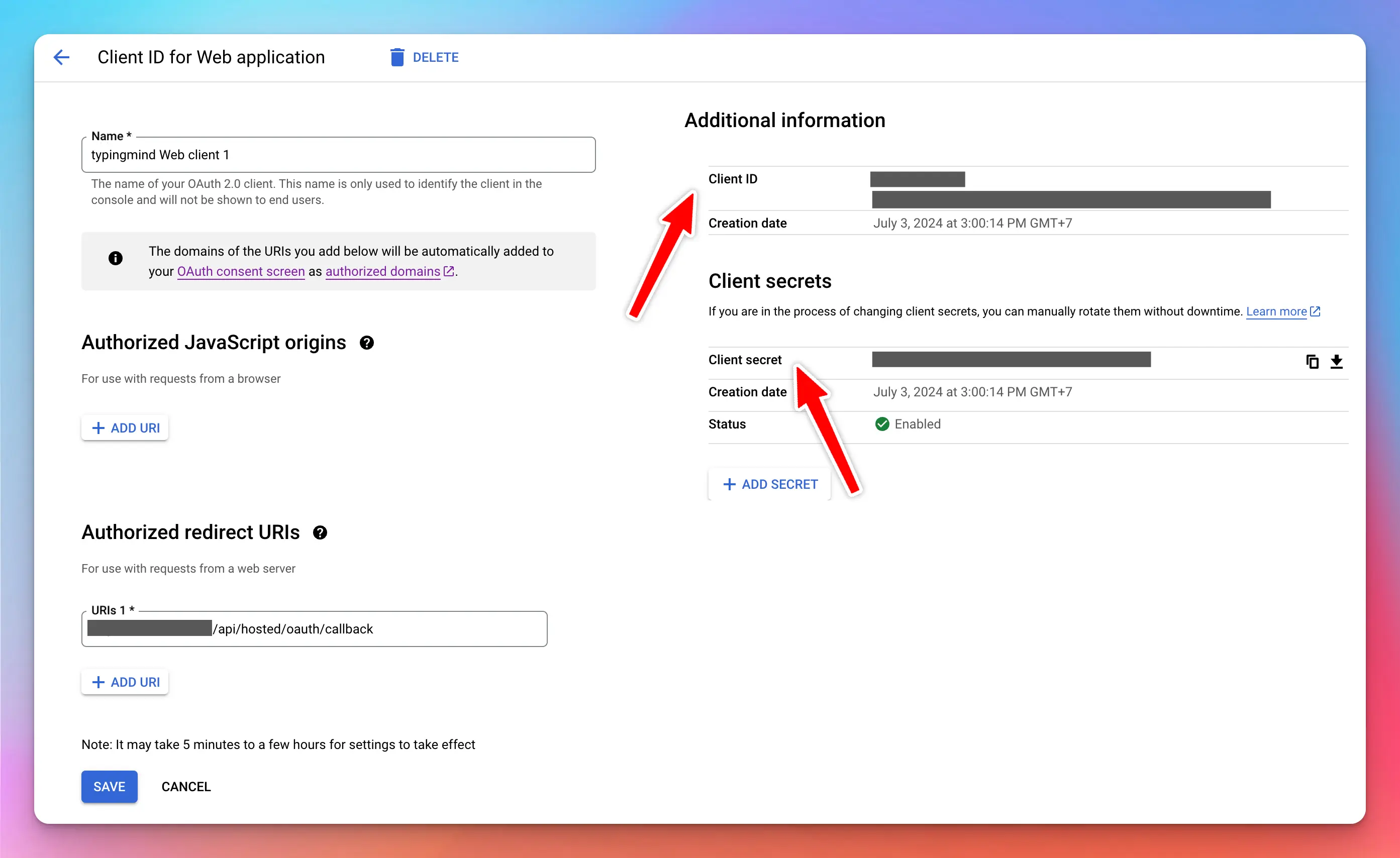
Go to https://console.cloud.google.com and sign up an account if you don’t already have one.Then click “OAuth consent screen” and start setting up your OAuth app info (name, logo, website, etc.). This info will be shown to the user when they try to login to your chat instance with Google.Then go to “Credentials” and create a new credentials using OAuth Client IDUnder the “Authorized redirect URIs”, enter the following value:https://[your.domain.com](http://your.domain.com)/api/hosted/oauth/callback (replace your.domain.com with your instance URL)You will also see this URL at a later step and copy it.Once you are done, take note of the Client ID and Client Secret. You will need to use these values in the next step.
Login to your Admin Panel → User Management → Authentication → OAuth 2.0
Click Add New OAuth 2.0 Connection
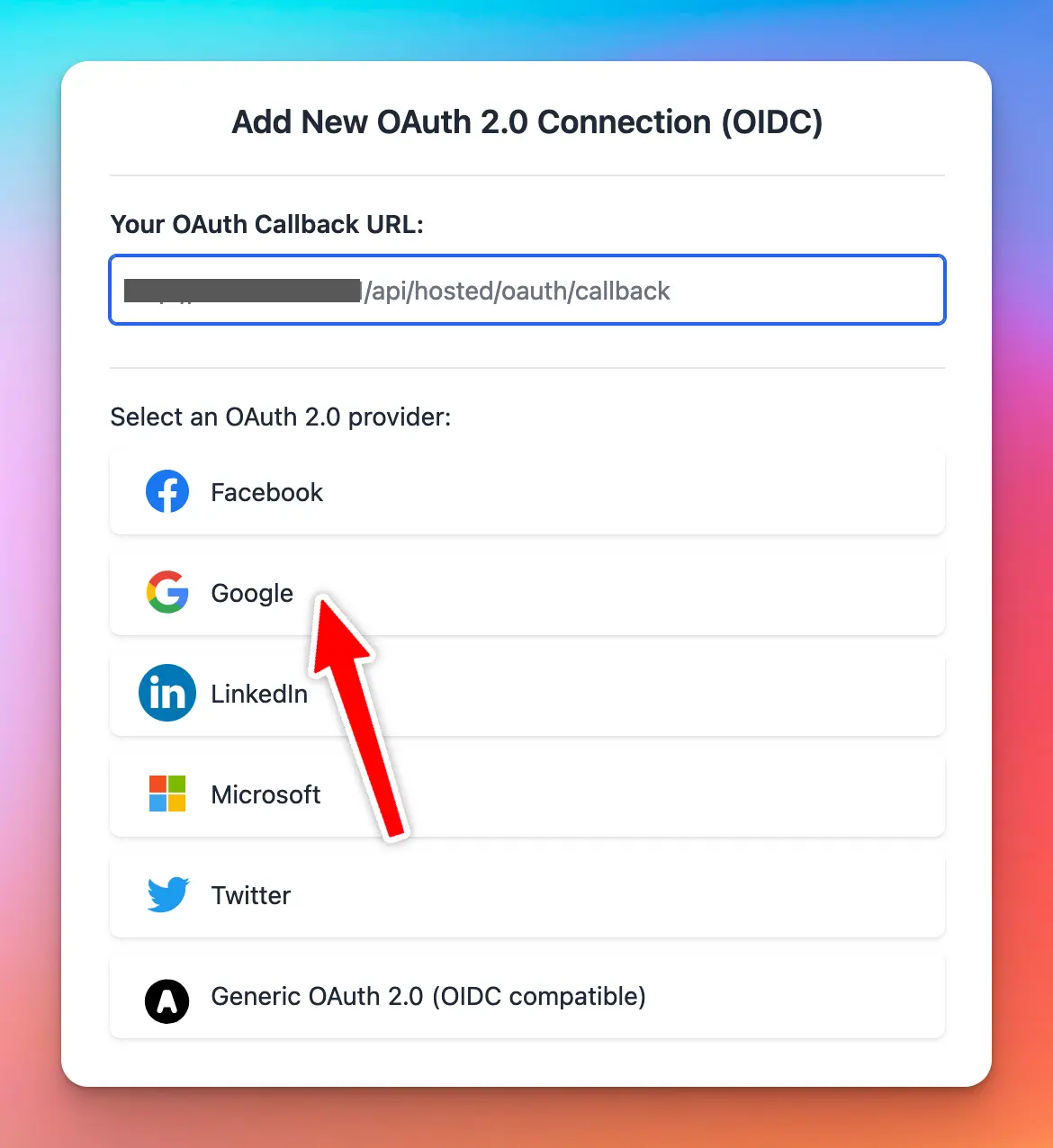
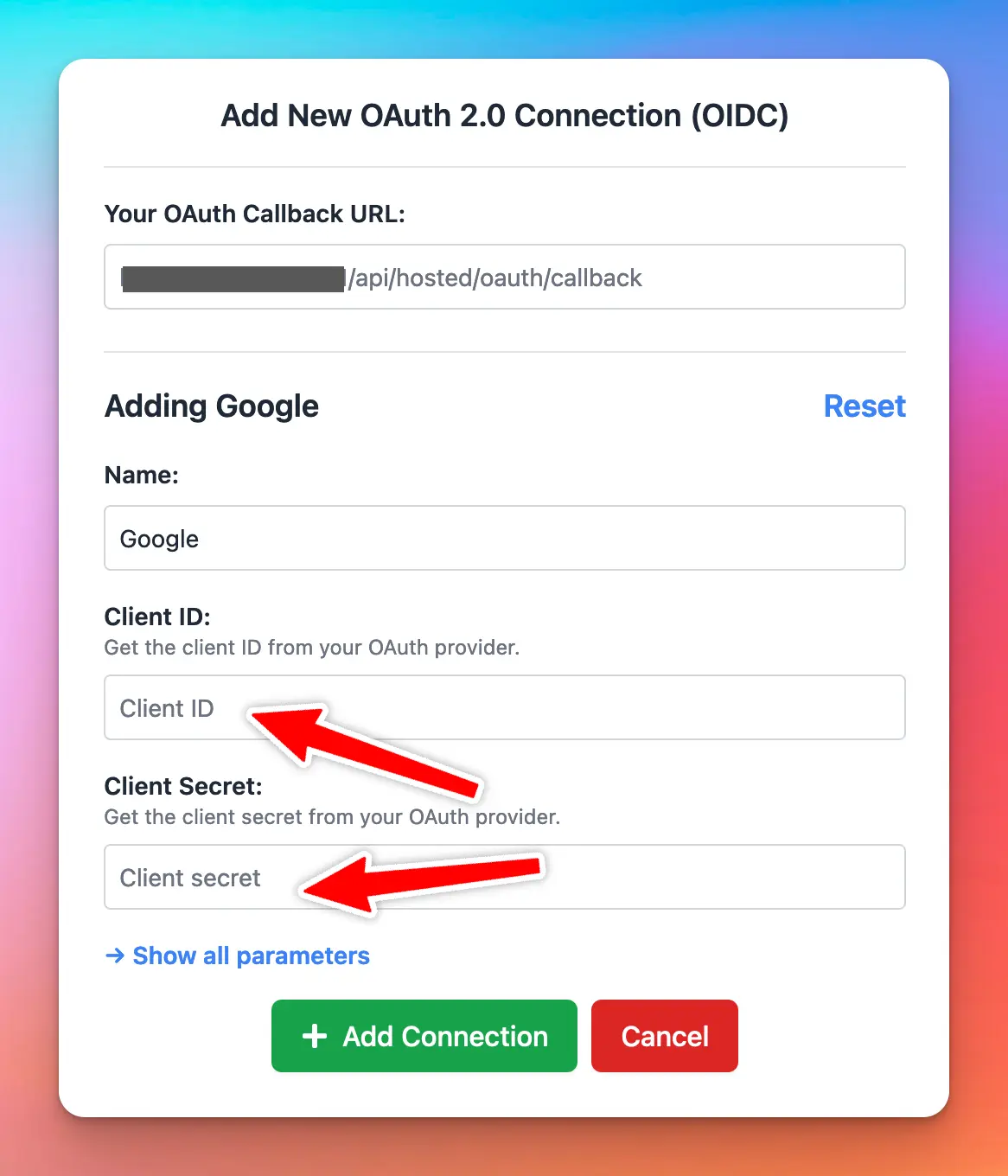
At this step, you will see your OAuth Callback URL. You need to set this URL in your Google Cloud OAuth credentials setting, under the “Authorized redirect URIs” section.Then select “Google” from the UI.Next, enter your Client ID and Client Secret. Then click Add Connection.Once the connection is added, you will see the new entry in the admin panel and under the login section of your chat instance.
Use other identity providers (Generic OAuth 2.0 with OIDC)
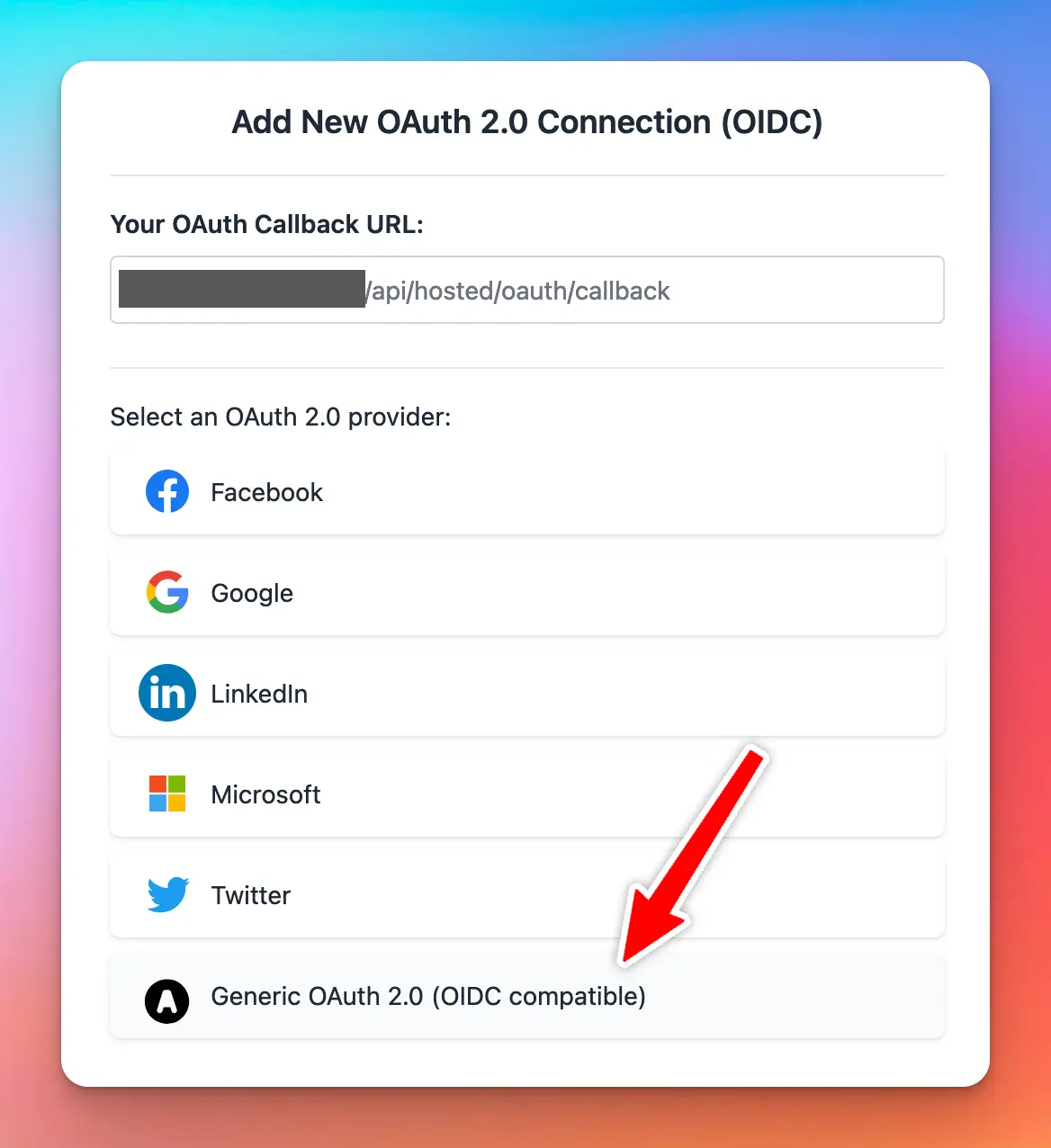
If you want to integrate with a custom identity provider, select “Generic OAuth 2.0” option.In this mode, you will need to provide all the relevant information needed to for the authorization flow to work. The required parameters are:
Authorization URL
Token URL
User Info URL
Content Type
Scopes
TypingMind uses standard OAuth 2.0 / OIDC authorization flow to identify the user. For this reason, if your OAuth provider does not follow the OAuth 2.0 standard and OIDC protocol, the user authorization flow might not work.Here are some tips and workarounds if the user authorization fails:
Ensure that the access_token and id_token property is returned from the request to Token URL.
The id_token must be a JWT token with the following property in its payload:
sub : system wide unique user identification number
User account will be created the first time they login with OAuth. This user account will take up a seat in your instance. If you don’t have enough seats, the login will fail.
When OAuth 2.0 is enabled, new users can login to your instance without having to be invited first. This is equivalent to setting your instance to Authorized Mode.
The user profile (name, picture) will be updated every time the user login again.
At this time, the user account does not get logged out or deleted if you revoke the access token from the identity provider. You will need to remove the user manually from TypingMind’s Admin Panel. If you encounter this case and need a better solution, please contact us.
If the OAuth account have the same email as an existing account in your instance, the user will be automatically connected to that OAuth connection.
At this time, a user can only connect with exactly one OAuth connection. For example, if they already connect using Google login and later connect again using Facebook login, they will need to unlink their account from Google login first.
You can use the access_token (or id_token) via plugins using a special parameter in the plugin’s code, see the TypingMind Plugins for more details.
Was this page helpful?
{"docsConfig":{"theme":"mint","$schema":"https://mintlify.com/docs.json","name":"TypingMind Docs","description":"Your go-to resource for getting the most out of TypingMind","colors":{"primary":"#1539a3","light":"#1e4bd4","dark":"#102c7f"},"logo":{"light":"https://mintcdn.com/typingmind/RaTUOQa09vPhW7_D/images/logo-light(3).svg?fit=max\u0026auto=format\u0026n=RaTUOQa09vPhW7_D\u0026q=85\u0026s=368f39de7ecc6605f73c43c2017546a3","dark":"https://mintcdn.com/typingmind/RaTUOQa09vPhW7_D/images/logo-dark(3).svg?fit=max\u0026auto=format\u0026n=RaTUOQa09vPhW7_D\u0026q=85\u0026s=01a6eb27b4db3af8a1d5557525c579d3","href":"https://www.typingmind.com/?utm_source=docs"},"favicon":"https://mintcdn.com/typingmind/pm53BB_D69NXvWmb/images/logotypingmind3.webp?fit=max\u0026auto=format\u0026n=pm53BB_D69NXvWmb\u0026q=85\u0026s=a689e470c2dc7a6b4fd8efa9a7549ae8","background":{"color":{"light":"#ffffff","dark":"#000000"}},"navbar":{"links":[{"href":"mailto:support@typingmind.com","label":"Support"},{"href":"https://feedback.typingmind.com/changelog","label":"Changelog"}]},"footer":{"socials":{"x":"https://x.com/TypingMindApp","linkedin":"https://www.linkedin.com/company/typingmind","youtube":"https://www.youtube.com/@TypingMind","website":"https://www.typingmind.com/?utm_source=docs"}},"seo":{"indexing":"all"},"icons":{"library":"lucide"},"interaction":{"drilldown":false},"styling":{"latex":true},"navigation":{"pages":[]}},"deployment":{"deploymentMetadataValue":{"subdomain":"typingmind","hasAudioNarration":false,"actualSubdomain":"typingmind","customDomains":["docs.typingmind.com"],"gitSource":{"type":"github","owner":"typingmindinternal","repo":"typingmind-docs","deployBranch":"main","contentDirectory":"","isPrivate":true,"mountPath":"","label":""},"chroma":{"liveDeploymentHistoryId":"6ad9e2482cd1c8b6f014cb92","collectionId":"223f21e7-6801-4591-9803-bd0e77355f65","schemaVersion":"v3","latestBuiltDeploymentHistoryId":"6ad9e2482cd1c8b6f014cb92"},"feedback":{"thumbs":true},"entitlements":{"AI_CHAT":{"status":"DISABLED"}},"buildId":"6ad9e2482cd1c8b6f014cb92","clientVersion":"0.0.3939","searchFilterCounts":[{"language":"default","tag":"Documentation","count":189},{"language":"default","tag":"TypingMind Teams","count":66},{"language":"default","tag":"AI Models","count":37},{"language":"default","tag":"Plugins","count":31},{"language":"default","tag":"Account \u0026 support","count":28},{"language":"default","tag":"Supported Models","count":21},{"language":"default","tag":"Model Context Protocol (MCP)","count":20},{"language":"default","tag":"Get started","count":19},{"language":"default","tag":"Chat Management","count":18},{"language":"default","tag":"Workspace Setup","count":18}]},"assistantConfig":{"enableAskAiButton":false,"enableStarterQuestions":false,"enableContextualStarterQuestions":false,"enableAskAiSearchBar":true},"hasChatPermissions":false,"hasWebMcpPermissions":false,"toggles":[{"name":"kill-isr","enabled":true,"variant":{"name":"disabled","enabled":false,"feature_enabled":true},"impressionData":false},{"name":"agent-mintlify-slack","enabled":true,"variant":{"name":"disabled","enabled":false,"feature_enabled":true},"impressionData":false},{"name":"editor-v7-file-tree","enabled":true,"variant":{"name":"disabled","enabled":false,"feature_enabled":true},"impressionData":false},{"name":"agent-integrations-settings","enabled":true,"variant":{"name":"disabled","enabled":false,"feature_enabled":true},"impressionData":false},{"name":"automations-pr-grouping","enabled":true,"variant":{"name":"disabled","enabled":false,"feature_enabled":true},"impressionData":false},{"name":"custom-prefix","enabled":true,"variant":{"name":"disabled","enabled":false,"feature_enabled":true},"impressionData":false},{"name":"analytics-v7","enabled":true,"variant":{"name":"disabled","enabled":false,"feature_enabled":true},"impressionData":false},{"name":"user-flows-analytics","enabled":true,"variant":{"name":"disabled","enabled":false,"feature_enabled":true},"impressionData":false},{"name":"no-publish-flow","enabled":true,"variant":{"name":"disabled","enabled":false,"feature_enabled":true},"impressionData":false},{"name":"workos-onboarding","enabled":true,"variant":{"name":"disabled","enabled":false,"feature_enabled":true},"impressionData":false},{"name":"llms-txt-v2","enabled":true,"variant":{"name":"disabled","enabled":false,"feature_enabled":true},"impressionData":false},{"name":"pause-universal-search-reconcile","enabled":true,"variant":{"name":"disabled","enabled":false,"feature_enabled":true},"impressionData":false},{"name":"snapshot-serving-live","enabled":true,"variant":{"name":"disabled","enabled":false,"feature_enabled":true},"impressionData":false},{"name":"stripTemperatureMiddleware","enabled":true,"variant":{"name":"disabled","enabled":false,"feature_enabled":true},"impressionData":false},{"name":"per-site-search-delta","enabled":true,"variant":{"name":"disabled","enabled":false,"feature_enabled":true},"impressionData":false},{"name":"support-platform-pylon-zendesk","enabled":true,"variant":{"name":"disabled","enabled":false,"feature_enabled":true},"impressionData":false},{"name":"snapshot-serving","enabled":true,"variant":{"name":"disabled","enabled":false,"feature_enabled":true},"impressionData":false},{"name":"instant-rollback","enabled":true,"variant":{"name":"disabled","enabled":false,"feature_enabled":true},"impressionData":false},{"name":"granular-notifications-server","enabled":true,"variant":{"name":"disabled","enabled":false,"feature_enabled":true},"impressionData":false},{"name":"granular-notifications","enabled":true,"variant":{"name":"disabled","enabled":false,"feature_enabled":true},"impressionData":false},{"name":"editor-private-page-search","enabled":true,"variant":{"name":"disabled","enabled":false,"feature_enabled":true},"impressionData":false},{"name":"automations-fable","enabled":true,"variant":{"name":"disabled","enabled":false,"feature_enabled":true},"impressionData":false},{"name":"fixed-ai-action-pricing","enabled":true,"variant":{"name":"disabled","enabled":false,"feature_enabled":true},"impressionData":false},{"name":"automation-resolve-merge-conflict","enabled":true,"variant":{"name":"disabled","enabled":false,"feature_enabled":true},"impressionData":false},{"name":"scoped-publishing","enabled":true,"variant":{"name":"disabled","enabled":false,"feature_enabled":true},"impressionData":false},{"name":"mintql","enabled":true,"variant":{"name":"disabled","enabled":false,"feature_enabled":true},"impressionData":false},{"name":"page-level-analytics","enabled":true,"variant":{"name":"disabled","enabled":false,"feature_enabled":true},"impressionData":false},{"name":"editor-version-history-v2","enabled":true,"variant":{"name":"disabled","enabled":false,"feature_enabled":true},"impressionData":false},{"name":"editor-nav-generations","enabled":true,"variant":{"name":"disabled","enabled":false,"feature_enabled":true},"impressionData":false},{"name":"billing-page-v2","enabled":true,"variant":{"name":"disabled","enabled":false,"feature_enabled":true},"impressionData":false},{"name":"vite-origin","enabled":true,"variant":{"name":"disabled","enabled":false,"feature_enabled":true},"impressionData":false},{"name":"workspace-projects","enabled":true,"variant":{"name":"disabled","enabled":false,"feature_enabled":true},"impressionData":false},{"name":"assistant-v5","enabled":true,"variant":{"name":"disabled","enabled":false,"feature_enabled":true},"impressionData":false},{"name":"byok-sep-25","enabled":true,"variant":{"name":"disabled","enabled":false,"feature_enabled":true},"impressionData":false},{"name":"fork-pr-previews","enabled":true,"variant":{"name":"disabled","enabled":false,"feature_enabled":true},"impressionData":false},{"name":"revalidation-jwt","enabled":true,"variant":{"name":"disabled","enabled":false,"feature_enabled":true},"impressionData":false},{"name":"editor-agent-model-picker","enabled":true,"variant":{"name":"disabled","enabled":false,"feature_enabled":true},"impressionData":false},{"name":"billing-updated-9-15","enabled":true,"variant":{"name":"disabled","enabled":false,"feature_enabled":true},"impressionData":false},{"name":"hobby-abuse-scan","enabled":true,"variant":{"name":"disabled","enabled":false,"feature_enabled":true},"impressionData":false},{"name":"dashboard-inbox","enabled":true,"variant":{"name":"disabled","enabled":false,"feature_enabled":true},"impressionData":false}],"isAtlas":false,"googleFontsInlined":false},"customCss":[],"page":{"pagePath":"typingmind-team/user-management/o-auth-2-0","slug":"/typingmind-team/user-management/o-auth-2-0","pageMetadata":{"title":"OAuth 2.0","description":null,"href":"/typingmind-team/user-management/o-auth-2-0"},"pageType":"default","mdx":{"mdxSource":{"compiledSource":"\"use strict\";const{Fragment:_Fragment,jsx:_jsx,jsxs:_jsxs}=arguments[0];const{useMDXComponents:_provideComponents}=arguments[0];function _createMdxContent(props){const _components={a:`a`,code:`code`,li:`li`,ol:`ol`,p:`p`,strong:`strong`,ul:`ul`,..._provideComponents(),...props.components},{Heading,OptimizedImage,Tip}=_components;if(!Heading)_missingMdxReference(`Heading`,true);if(!OptimizedImage)_missingMdxReference(`OptimizedImage`,true);if(!Tip)_missingMdxReference(`Tip`,true);return _jsxs(_Fragment,{children:[_jsx(_components.p,{children:`Users can log in to your chat instance with Google, Facebook, and other accounts. In order to do this, you need to set up OAuth 2.0 as a user authentication method in your TypingMind instance.`}),`\n`,_jsx(_components.p,{children:`This page will guide you on how to set up OAuth 2.0 for user authentication.`}),`\n`,_jsx(OptimizedImage,{src:`https://mintcdn.com/typingmind/WjL1vJONkCdYBRi1/typingmind-team/user-management/single-sign-on-(sso)/Untitled.webp?fit=max\u0026auto=format\u0026n=WjL1vJONkCdYBRi1\u0026q=85\u0026s=3f323f3fc106a1b62eaf6aac6da8527e`,alt:`Untitled`,\"data-og-width\":`1736`,width:`1736`,\"data-og-height\":`984`,height:`984`,\"data-path\":`typingmind-team/user-management/single-sign-on-(sso)/Untitled.webp`,\"data-optimize\":`true`,\"data-opv\":`3`,srcset:`https://mintcdn.com/typingmind/WjL1vJONkCdYBRi1/typingmind-team/user-management/single-sign-on-(sso)/Untitled.webp?w=280\u0026fit=max\u0026auto=format\u0026n=WjL1vJONkCdYBRi1\u0026q=85\u0026s=c44b7af6b1cca372cae729362aeece86 280w, https://mintcdn.com/typingmind/WjL1vJONkCdYBRi1/typingmind-team/user-management/single-sign-on-(sso)/Untitled.webp?w=560\u0026fit=max\u0026auto=format\u0026n=WjL1vJONkCdYBRi1\u0026q=85\u0026s=2e63a86996dfd0cf7ea05db4b06173a1 560w, https://mintcdn.com/typingmind/WjL1vJONkCdYBRi1/typingmind-team/user-management/single-sign-on-(sso)/Untitled.webp?w=840\u0026fit=max\u0026auto=format\u0026n=WjL1vJONkCdYBRi1\u0026q=85\u0026s=d89bd23a67b5701ff492ec2e302e9049 840w, https://mintcdn.com/typingmind/WjL1vJONkCdYBRi1/typingmind-team/user-management/single-sign-on-(sso)/Untitled.webp?w=1100\u0026fit=max\u0026auto=format\u0026n=WjL1vJONkCdYBRi1\u0026q=85\u0026s=165fb8a21431b7898c1481200929642c 1100w, https://mintcdn.com/typingmind/WjL1vJONkCdYBRi1/typingmind-team/user-management/single-sign-on-(sso)/Untitled.webp?w=1650\u0026fit=max\u0026auto=format\u0026n=WjL1vJONkCdYBRi1\u0026q=85\u0026s=34f7d9d410763939f17806dc2451310c 1650w, https://mintcdn.com/typingmind/WjL1vJONkCdYBRi1/typingmind-team/user-management/single-sign-on-(sso)/Untitled.webp?w=2500\u0026fit=max\u0026auto=format\u0026n=WjL1vJONkCdYBRi1\u0026q=85\u0026s=f94b6894ddaba610aeff3ef154108fb3 2500w`}),`\n`,_jsx(Heading,{level:`2`,id:`overview`,children:`Overview`}),`\n`,_jsxs(_components.p,{children:[`TypingMind supports `,_jsx(_components.strong,{children:`OAuth 2.0 / OpenID Connect (OIDC)`}),`, which means all providers that provide OIDC compatible authorization flow can be integrated into TypingMind for user authentication.`]}),`\n`,_jsx(_components.p,{children:`We have built-in support for the following providers:`}),`\n`,_jsxs(_components.ul,{children:[`\n`,_jsx(_components.li,{children:`Google`}),`\n`,_jsx(_components.li,{children:`Microsoft`}),`\n`,_jsx(_components.li,{children:`Facebook`}),`\n`,_jsx(_components.li,{children:`LinkedIn`}),`\n`,_jsx(_components.li,{children:`Twitter`}),`\n`]}),`\n`,_jsx(_components.p,{children:`For other providers, you can still integrate but you have to add all the parameters manually. We’ll show this in a later section of this document.`}),`\n`,_jsx(Heading,{level:`2`,id:`step-1-create-an-oauth-app-in-your-identity-provider`,children:`Step 1: Create an OAuth app in your identity provider`}),`\n`,_jsx(_components.p,{children:`TypingMind needs an OAuth Client ID and OAuth Client Secret to integrate with the OAuth provider. In order to have this information, you will need to create an OAuth app with the provider.`}),`\n`,_jsx(_components.p,{children:`In this example, we will use Google as our provider.`}),`\n`,_jsx(Tip,{children:_jsx(_components.p,{children:`The steps to create an OAuth app are mostly the same across all providers (Facebook, Microsoft, LinkedIn, etc.). If you don’t know how to create an OAuth app with your provider, a quick Google search should give you the necessary information.`})}),`\n`,_jsxs(_components.p,{children:[`Go to `,_jsx(_components.a,{href:`https://console.cloud.google.com`,children:`https://console.cloud.google.com`}),` and sign up an account if you don’t already have one.`]}),`\n`,_jsx(_components.p,{children:`Then click “OAuth consent screen” and start setting up your OAuth app info (name, logo, website, etc.). This info will be shown to the user when they try to login to your chat instance with Google.`}),`\n`,_jsx(OptimizedImage,{src:`https://mintlify.s3.us-west-1.amazonaws.com/typingmind/typingmind-team/user-management/single-sign-on-(sso)/Untitled%201.webp`,alt:`Untitled`}),`\n`,_jsxs(_components.p,{children:[`Then go to “Credentials” and create a new credentials using `,_jsx(_components.strong,{children:`OAuth Client ID`})]}),`\n`,_jsx(OptimizedImage,{src:`https://mintlify.s3.us-west-1.amazonaws.com/typingmind/typingmind-team/user-management/single-sign-on-(sso)/Untitled%202.webp`,alt:`Untitled`}),`\n`,_jsx(_components.p,{children:`Under the “Authorized redirect URIs”, enter the following value:`}),`\n`,_jsxs(_components.p,{children:[_jsx(_components.code,{children:`https://[your.domain.com](http://your.domain.com)/api/hosted/oauth/callback`}),` (replace `,_jsx(_components.code,{children:`your.domain.com`}),` with your instance URL)`]}),`\n`,_jsx(_components.p,{children:`You will also see this URL at a later step and copy it.`}),`\n`,_jsx(OptimizedImage,{src:`https://mintlify.s3.us-west-1.amazonaws.com/typingmind/typingmind-team/user-management/single-sign-on-(sso)/Untitled%203.webp`,alt:`Untitled`}),`\n`,_jsx(_components.p,{children:`Once you are done, take note of the Client ID and Client Secret. You will need to use these values in the next step.`}),`\n`,_jsx(OptimizedImage,{src:`https://mintlify.s3.us-west-1.amazonaws.com/typingmind/typingmind-team/user-management/oauth-2.0/Untitled%204.webp`,alt:`Untitled`}),`\n`,_jsx(Heading,{level:`2`,id:`step-2-add-a-new-oauth-connection`,children:`Step 2: Add a new OAuth connection`}),`\n`,_jsxs(_components.ul,{children:[`\n`,_jsxs(_components.li,{children:[`Login to your `,_jsx(_components.strong,{children:`Admin Panel → User Management → Authentication → OAuth 2.0`})]}),`\n`,_jsx(_components.li,{children:`Click Add New OAuth 2.0 Connection`}),`\n`]}),`\n`,_jsx(OptimizedImage,{src:`https://mintlify.s3.us-west-1.amazonaws.com/typingmind/typingmind-team/user-management/oauth-2.0/Untitled%205.webp`,alt:`Untitled`}),`\n`,_jsxs(_components.p,{children:[`At this step, you will see your `,_jsx(_components.strong,{children:`OAuth Callback URL.`}),` You need to set this URL in your Google Cloud OAuth credentials setting, under the “`,_jsx(_components.strong,{children:`Authorized redirect URIs”`}),` section.`]}),`\n`,_jsx(_components.p,{children:`Then select “Google” from the UI.`}),`\n`,_jsx(OptimizedImage,{src:`https://mintlify.s3.us-west-1.amazonaws.com/typingmind/typingmind-team/user-management/oauth-2.0/Untitled%206.webp`,alt:`Untitled`}),`\n`,_jsx(_components.p,{children:`Next, enter your Client ID and Client Secret. Then click Add Connection.`}),`\n`,_jsx(OptimizedImage,{src:`https://mintlify.s3.us-west-1.amazonaws.com/typingmind/typingmind-team/user-management/oauth-2.0/Untitled%207.webp`,alt:`Untitled`}),`\n`,_jsx(_components.p,{children:`Once the connection is added, you will see the new entry in the admin panel and under the login section of your chat instance.`}),`\n`,_jsx(OptimizedImage,{src:`https://mintlify.s3.us-west-1.amazonaws.com/typingmind/typingmind-team/user-management/oauth-2.0/Untitled%208.webp`,alt:`Untitled`}),`\n`,_jsx(OptimizedImage,{src:`https://mintlify.s3.us-west-1.amazonaws.com/typingmind/typingmind-team/user-management/oauth-2.0/Untitled%209.webp`,alt:`Untitled`}),`\n`,_jsx(Heading,{level:`2`,id:`use-other-identity-providers-generic-oauth-2-0-with-oidc`,children:`Use other identity providers (Generic OAuth 2.0 with OIDC)`}),`\n`,_jsxs(_components.p,{children:[`If you want to integrate with a custom identity provider, select “`,_jsx(_components.strong,{children:`Generic OAuth 2.0`}),`” option.`]}),`\n`,_jsx(_components.p,{children:`In this mode, you will need to provide all the relevant information needed to for the authorization flow to work. The required parameters are:`}),`\n`,_jsxs(_components.ul,{children:[`\n`,_jsx(_components.li,{children:`Authorization URL`}),`\n`,_jsx(_components.li,{children:`Token URL`}),`\n`,_jsx(_components.li,{children:`User Info URL`}),`\n`,_jsx(_components.li,{children:`Content Type`}),`\n`,_jsx(_components.li,{children:`Scopes`}),`\n`]}),`\n`,_jsx(OptimizedImage,{src:`https://mintlify.s3.us-west-1.amazonaws.com/typingmind/typingmind-team/user-management/oauth-2.0/Untitled%2010.webp`,alt:`Untitled`}),`\n`,_jsx(_components.p,{children:`TypingMind uses standard OAuth 2.0 / OIDC authorization flow to identify the user. For this reason, if your OAuth provider does not follow the OAuth 2.0 standard and OIDC protocol, the user authorization flow might not work.`}),`\n`,_jsx(_components.p,{children:`Here are some tips and workarounds if the user authorization fails:`}),`\n`,_jsxs(_components.ul,{children:[`\n`,_jsxs(_components.li,{children:[`Ensure that the `,_jsx(_components.code,{children:`access_token`}),` and `,_jsx(_components.code,{children:`id_token`}),` property is returned from the request to `,_jsx(_components.strong,{children:`Token URL`}),`.`]}),`\n`,_jsxs(_components.li,{children:[`The `,_jsx(_components.code,{children:`id_token`}),` must be a JWT token with the following property in its payload:`,`\n`,_jsxs(_components.ul,{children:[`\n`,_jsxs(_components.li,{children:[_jsx(_components.code,{children:`sub`}),` : system wide unique user identification number`]}),`\n`,_jsx(_components.li,{children:_jsx(_components.code,{children:`email`})}),`\n`,_jsx(_components.li,{children:_jsx(_components.code,{children:`given_name`})}),`\n`,_jsx(_components.li,{children:_jsx(_components.code,{children:`family_name`})}),`\n`,_jsxs(_components.li,{children:[_jsx(_components.code,{children:`picture`}),` : URL to the user’s profile picture.`]}),`\n`]}),`\n`]}),`\n`]}),`\n`,_jsx(Heading,{level:`2`,id:`notes-and-limitations`,children:`Notes and limitations`}),`\n`,_jsxs(_components.ol,{children:[`\n`,_jsx(_components.li,{children:`User account will be created the first time they login with OAuth. This user account will take up a seat in your instance. If you don’t have enough seats, the login will fail.`}),`\n`,_jsxs(_components.li,{children:[`When OAuth 2.0 is enabled, new users can login to your instance without having to be invited first. This is equivalent to setting your instance to `,_jsx(_components.a,{href:`/typingmind-team/user-management/access-control:-private-and-authorized-mode`,children:`Authorized Mode`}),`.`]}),`\n`,_jsx(_components.li,{children:`The user profile (name, picture) will be updated every time the user login again.`}),`\n`,_jsx(_components.li,{children:`At this time, the user account does not get logged out or deleted if you revoke the access token from the identity provider. You will need to remove the user manually from TypingMind’s Admin Panel. If you encounter this case and need a better solution, please contact us.`}),`\n`,_jsx(_components.li,{children:`If the OAuth account have the same email as an existing account in your instance, the user will be automatically connected to that OAuth connection.`}),`\n`,_jsx(_components.li,{children:`At this time, a user can only connect with exactly one OAuth connection. For example, if they already connect using Google login and later connect again using Facebook login, they will need to unlink their account from Google login first.`}),`\n`,_jsxs(_components.li,{children:[`You can use the `,_jsx(_components.code,{children:`access_token`}),` (or `,_jsx(_components.code,{children:`id_token`}),`) via plugins using a special parameter in the plugin’s code, see the `,_jsx(_components.a,{href:`/plugins/use-typingmind-plugin`,children:_jsx(_components.strong,{children:`TypingMind Plugins`})}),` for more details.`]}),`\n`]})]})}function MDXContent(props={}){const{wrapper:MDXLayout}={..._provideComponents(),...props.components};return MDXLayout?_jsx(MDXLayout,{...props,children:_jsx(_createMdxContent,{...props})}):_createMdxContent(props)}return{default:MDXContent};function _missingMdxReference(id,component){throw new Error(`Expected `+(component?`component`:`object`)+\" `\"+id+\"` to be defined: you likely forgot to import, pass, or provide it.\")}","frontmatter":{},"scope":{"config":{},"pageMetadata":{"title":"OAuth 2.0","description":null,"href":"/typingmind-team/user-management/o-auth-2-0"}}},"mdxSourceWithNoJs":null},"mdxExtracts":{"tableOfContents":[{"title":"Overview","slug":"overview","depth":2,"children":[]},{"title":"Step 1: Create an OAuth app in your identity provider","slug":"step-1-create-an-oauth-app-in-your-identity-provider","depth":2,"children":[]},{"title":"Step 2: Add a new OAuth connection","slug":"step-2-add-a-new-oauth-connection","depth":2,"children":[]},{"title":"Use other identity providers (Generic OAuth 2.0 with OIDC)","slug":"use-other-identity-providers-generic-oauth-2-0-with-oidc","depth":2,"children":[]},{"title":"Notes and limitations","slug":"notes-and-limitations","depth":2,"children":[]}],"codeExamples":{}},"jsLinks":["/_mintlify/custom/typingmind/27b7ba6d2da1a086/custom-script.js"],"subdomain":"typingmind","siteName":"TypingMind Docs","title":"OAuth 2.0 - TypingMind Docs","navMaps":{"firstHrefInVersion":{},"firstHrefInLanguage":{}},"lastModified":"2026-10-22T10:16:23.013Z","originalFileLocation":"typingmind-team/user-management/o-auth-2-0.mdx"},"headHtml":"\u003cscript data-mint-head>(function(){var d=document.documentElement,p=null;if(!p){try{p=localStorage.getItem(\"isDarkMode\")}catch(e){}if(p==='true')p='dark';else if(p==='false')p='light';if(p!=='light'\u0026\u0026p!=='dark'\u0026\u0026p!=='system')p=\"system\"}var r=p==='system'?(matchMedia(\"(prefers-color-scheme: dark)\").matches?'dark':'light'):p;d.classList.remove(r==='dark'?'light':'dark');d.classList.add(r);d.setAttribute(\"data-theme-preference\",p)})();\u003c/script>\u003cmeta data-mint-head name=\"application-name\" content=\"TypingMind Docs\">\u003cmeta data-mint-head name=\"generator\" content=\"Mintlify\">\u003clink data-mint-head rel=\"icon\" type=\"image/png\" sizes=\"192x192\" href=\"/mintlify-assets/_mintlify/favicons/typingmind/JFYYJ0dnVuWlZb7w/_generated/favicon/android-chrome-192x192.png\" media=\"(prefers-color-scheme: light)\">\u003clink data-mint-head rel=\"apple-touch-icon\" type=\"image/png\" sizes=\"180x180\" href=\"/mintlify-assets/_mintlify/favicons/typingmind/JFYYJ0dnVuWlZb7w/_generated/favicon/apple-touch-icon.png\">\u003clink data-mint-head rel=\"icon\" type=\"image/png\" sizes=\"16x16\" href=\"/mintlify-assets/_mintlify/favicons/typingmind/JFYYJ0dnVuWlZb7w/_generated/favicon/favicon-16x16.png\" media=\"(prefers-color-scheme: light)\">\u003clink data-mint-head rel=\"icon\" type=\"image/png\" sizes=\"32x32\" href=\"/mintlify-assets/_mintlify/favicons/typingmind/JFYYJ0dnVuWlZb7w/_generated/favicon/favicon-32x32.png\" media=\"(prefers-color-scheme: light)\">\u003clink data-mint-head rel=\"shortcut icon\" type=\"image/x-icon\" href=\"/mintlify-assets/_mintlify/favicons/typingmind/JFYYJ0dnVuWlZb7w/_generated/favicon/favicon.ico\" media=\"(prefers-color-scheme: light)\">\u003clink data-mint-head rel=\"icon\" type=\"image/png\" sizes=\"192x192\" href=\"/mintlify-assets/_mintlify/favicons/typingmind/JFYYJ0dnVuWlZb7w/_generated/favicon-dark/android-chrome-192x192.png\" media=\"(prefers-color-scheme: dark)\">\u003clink data-mint-head rel=\"icon\" type=\"image/png\" sizes=\"16x16\" href=\"/mintlify-assets/_mintlify/favicons/typingmind/JFYYJ0dnVuWlZb7w/_generated/favicon-dark/favicon-16x16.png\" media=\"(prefers-color-scheme: dark)\">\u003clink data-mint-head rel=\"icon\" type=\"image/png\" sizes=\"32x32\" href=\"/mintlify-assets/_mintlify/favicons/typingmind/JFYYJ0dnVuWlZb7w/_generated/favicon-dark/favicon-32x32.png\" media=\"(prefers-color-scheme: dark)\">\u003clink data-mint-head rel=\"shortcut icon\" type=\"image/x-icon\" href=\"/mintlify-assets/_mintlify/favicons/typingmind/JFYYJ0dnVuWlZb7w/_generated/favicon-dark/favicon.ico\" media=\"(prefers-color-scheme: dark)\">\u003cmeta data-mint-head property=\"og:title\" content=\"OAuth 2.0 - TypingMind Docs\">\u003cmeta data-mint-head property=\"og:site_name\" content=\"TypingMind Docs\">\u003cmeta data-mint-head property=\"og:url\" content=\"https://docs.typingmind.com/typingmind-team/user-management/o-auth-2-0\">\u003cmeta data-mint-head property=\"og:type\" content=\"website\">\u003cmeta data-mint-head property=\"og:image\" content=\"https://typingmind.mintlify.app/_mintlify/api/og/v2?division=Users+%26+Authentication\u0026amp;title=OAuth+2.0\u0026amp;theme=7c04f062e25525ad4cacb65c\u0026amp;signature=6b0b5c84a7e18464b817baa74fe3ea03c41b2ca76f2554a8850ad036cb08951b\">\u003cmeta data-mint-head property=\"og:image:width\" content=\"1200\">\u003cmeta data-mint-head property=\"og:image:height\" content=\"630\">\u003cmeta data-mint-head name=\"twitter:card\" content=\"summary_large_image\">\u003cmeta data-mint-head name=\"twitter:title\" content=\"OAuth 2.0 - TypingMind Docs\">\u003cmeta data-mint-head name=\"twitter:image\" content=\"https://typingmind.mintlify.app/_mintlify/api/og/v2?division=Users+%26+Authentication\u0026amp;title=OAuth+2.0\u0026amp;theme=7c04f062e25525ad4cacb65c\u0026amp;signature=6b0b5c84a7e18464b817baa74fe3ea03c41b2ca76f2554a8850ad036cb08951b\">\u003cmeta data-mint-head name=\"twitter:image:width\" content=\"1200\">\u003cmeta data-mint-head name=\"twitter:image:height\" content=\"630\">\u003cmeta data-mint-head name=\"msapplication-config\" content=\"/mintlify-assets/_mintlify/favicons/typingmind/JFYYJ0dnVuWlZb7w/_generated/favicon/browserconfig.xml\">\u003cmeta data-mint-head name=\"apple-mobile-web-app-title\" content=\"TypingMind Docs\">\u003cmeta data-mint-head name=\"msapplication-TileColor\" content=\"#1539a3\">\u003clink data-mint-head rel=\"canonical\" href=\"https://docs.typingmind.com/typingmind-team/user-management/o-auth-2-0\">\u003clink data-mint-head rel=\"alternate\" type=\"application/xml\" href=\"/sitemap.xml\">\u003clink data-mint-head rel=\"alternate\" type=\"text/markdown\" href=\"/typingmind-team/user-management/o-auth-2-0.md\">\u003cscript data-mint-head type=\"application/ld+json\">{\"@context\":\"https://schema.org\",\"@graph\":[{\"@type\":\"Organization\",\"@id\":\"https://docs.typingmind.com/#organization\",\"name\":\"TypingMind Docs\",\"url\":\"https://docs.typingmind.com\",\"logo\":{\"@type\":\"ImageObject\",\"url\":\"https://mintcdn.com/typingmind/RaTUOQa09vPhW7_D/images/logo-light(3).svg?fit=max\u0026auto=format\u0026n=RaTUOQa09vPhW7_D\u0026q=85\u0026s=368f39de7ecc6605f73c43c2017546a3\"}},{\"@type\":\"WebSite\",\"@id\":\"https://docs.typingmind.com#website\",\"name\":\"TypingMind Docs\",\"url\":\"https://docs.typingmind.com\",\"publisher\":{\"@id\":\"https://docs.typingmind.com/#organization\"}},{\"@type\":\"WebPage\",\"@id\":\"https://docs.typingmind.com/typingmind-team/user-management/o-auth-2-0#webpage\",\"url\":\"https://docs.typingmind.com/typingmind-team/user-management/o-auth-2-0\",\"name\":\"OAuth 2.0\",\"dateModified\":\"2026-10-22T10:16:23.013Z\",\"isPartOf\":{\"@id\":\"https://docs.typingmind.com#website\"},\"breadcrumb\":{\"@id\":\"https://docs.typingmind.com/typingmind-team/user-management/o-auth-2-0#breadcrumb\"}},{\"@type\":\"BreadcrumbList\",\"@id\":\"https://docs.typingmind.com/typingmind-team/user-management/o-auth-2-0#breadcrumb\",\"itemListElement\":[{\"@type\":\"ListItem\",\"position\":1,\"name\":\"User Management\",\"item\":\"https://docs.typingmind.com/user-management\"},{\"@type\":\"ListItem\",\"position\":2,\"name\":\"Users \u0026 Authentication\",\"item\":\"https://docs.typingmind.com/typingmind-team/user-management/invite-team-members\"},{\"@type\":\"ListItem\",\"position\":3,\"name\":\"OAuth 2.0\",\"item\":\"https://docs.typingmind.com/typingmind-team/user-management/o-auth-2-0\"}]},{\"@type\":[\"Article\",\"TechArticle\"],\"@id\":\"https://docs.typingmind.com/typingmind-team/user-management/o-auth-2-0#article\",\"headline\":\"OAuth 2.0\",\"name\":\"OAuth 2.0\",\"url\":\"https://docs.typingmind.com/typingmind-team/user-management/o-auth-2-0\",\"mainEntityOfPage\":{\"@id\":\"https://docs.typingmind.com/typingmind-team/user-management/o-auth-2-0#webpage\"},\"dateModified\":\"2026-10-22T10:16:23.013Z\",\"publisher\":{\"@id\":\"https://docs.typingmind.com/#organization\"},\"isPartOf\":{\"@id\":\"https://docs.typingmind.com#website\"}}]}\u003c/script>\u003cscript data-mint-head type=\"application/ld+json\">{\"@context\":\"https://schema.org\",\"@type\":\"WebSite\",\"name\":\"TypingMind Docs\",\"creator\":{\"@type\":\"Organization\",\"name\":\"Mintlify\",\"url\":\"https://mintlify.com\"}}\u003c/script>","siteName":"TypingMind Docs","nav":{"global":null,"tabs":[{"tab":"Documentation","pages":[{"title":"Documentation","href":""}]},{"tab":"TypingMind Teams","pages":[{"title":"Welcome to TypingMind Teams","icon":"sparkle","href":"/typingmind-teams"},{"group":"Get started","pages":[{"group":"Quickstart","icon":"rocket","pages":[{"title":"Cloud-host","sidebarTitle":"Cloud-host","href":"/typingmind-team/getting-started/cloud-host"},{"title":"Cloud-host vs Self-host","sidebarTitle":"Cloud-host vs Self-host","href":"/typingmind-team/getting-started/cloud-host-vs-self-host"},{"title":"Compare Teams Plans","sidebarTitle":"Compare Teams Plans","href":"/typingmind-team/getting-started/compare-typingmind-team-plans"},{"title":"Terminology","href":"/typingmind-team/getting-started/terminology"},{"title":"API Keys Setup","sidebarTitle":"API Keys Setup","href":"/typingmind-team/getting-started/set-up-api-keys"},{"title":"Use Markdown","href":"/typingmind-team/getting-started/use-markdown"},{"title":"Control the response quality","href":"/typingmind-team/getting-started/control-the-response-quality"}]},{"group":"Teams vs Other Solutions","icon":"columns-3","pages":[{"title":"TypingMind Teams vs ChatGPT for Teams","href":"/typingmind-team/getting-started/typingmind-team-vs.-chatgpt-for-team"},{"title":"TypingMind Teams vs Claude Team","href":"/typingmind-team/getting-started/typingmind-team-vs-claude-team"},{"title":"TypingMind Teams vs LibreChat","href":"/typingmind-team/getting-started/typingmind-team-vs-librechat"},{"title":"TypingMind Teams vs LobeChat","href":"/typingmind-team/getting-started/typingmind-team-vs-lobechat"},{"title":"TypingMind Teams vs Open WebUI","href":"/typingmind-vs-open-webui"}]},{"group":"Self-host","icon":"server","pages":[{"hidden":true,"title":null,"href":"/typingmind-team/self-host-guides"},{"title":"Self-host","sidebarTitle":"Self-host","href":"/typingmind-team/getting-started/self-host-typingmind-team"},{"title":"Installation Instruction (Docker)","sidebarTitle":"Installation Instruction (Docker)","href":"/typingmind-team/self-host-guides/get-started-with-self-host-installation-instruct"},{"title":"External connectors for Knowledge Base","sidebarTitle":"External connectors for Knowledge Base","href":"/typingmind-team/self-host-guides/setup-external-connectors-for-knowledge-base"}]},{"group":"Use Cases","icon":"mouse-pointer","pages":[{"hidden":true,"title":null,"href":"/typingmind-team/use-cases"},{"title":"Build a Customer Support bot","hidden":true,"href":"/typingmind-team/use-cases/build-a-customer-support-bot-exactly-like-typingmi"},{"title":"Build an AI Coaching Agent","href":"/typingmind-team/use-cases/build-an-ai-coaching-agent-for-your-members"}]}]},{"group":"Workspace Setup","pages":[{"title":"Branding and Customizations","hidden":true,"href":"/typingmind-team/branding-and-customizations/branding-and-customizations"},{"group":"Custom Branding","icon":"images","pages":[{"title":"Custom Branding","href":"/typingmind-team/branding-and-customizations/custom-branding"},{"title":"Custom Domain","href":"/typingmind-team/branding-and-customizations/custom-domain"},{"title":null,"href":"/typingmind-team/branding-and-customizations/customize-the-chat-interface"},{"title":"Custom Email Sender via SMTP","href":"/typingmind-team/branding-and-customizations/custom-email-sender-via-smtp"}]},{"group":"Build Workspace Resources","icon":"share-2","pages":[{"title":"System Prompts on Admin Panel","href":"/typingmind-team/branding-and-customizations/system-prompts-on-admin-panel"},{"title":"Build a Shared Prompt Library","href":"/typingmind-team/branding-and-customizations/build-a-shared-prompt-library"},{"title":"Build a Shared AI Agent collection","href":"/typingmind-team/branding-and-customizations/build-a-shared-ai-agent-collection"}]},{"group":"Connect with Your Data","icon":"database-backup","pages":[{"title":"Data Integrations","sidebarTitle":"Data Integrations","href":"/typingmind-team/branding-and-customizations/four-levels-of-data-integrations"},{"title":"Get started with Knowledge Base","href":"/typingmind-team/branding-and-customizations/get-started-with-knowledge-base"},{"title":"How Knowledge Base Works","sidebarTitle":"How Knowledge Base Works","href":"/typingmind-team/branding-and-customizations/how-knowledge-base-works-in-typingmind-team"},{"title":"Connect with Notion pages","sidebarTitle":"Connect with Notion pages","href":"/typingmind-team/branding-and-customizations/connect-with-your-notion-pages"},{"title":"Agents with Knowledge Base","href":"/typingmind-team/branding-and-customizations/connect-knowledge-base-to-your-ai-agents"},{"title":"Training Files vs Knowledge Base","href":"/typingmind-team/branding-and-customizations/training-files-vs-knowledge-base"}]},{"group":"Integrations","icon":"bluetooth-connected","pages":[{"hidden":true,"title":null,"href":"/typingmind-team/integrations"},{"title":"API Integration Overview","href":"/typingmind-team/integrations/api-integration-overview"},{"title":"Embed a Chat Widget (Deprecated)","href":"/typingmind-team/integrations/embed-a-chat-widget"}]},{"title":"enable-llms-to-cite-sources-when-using-rag","hidden":true,"href":"/typingmind-team/branding-and-customizations/enable-llms-to-cite-sources-when-using-rag"}]},{"group":"Analytics \u0026 Report","pages":[{"title":"Analytics","hidden":true,"href":"/typingmind-team/analytics/analytics"},{"title":"Workspace Analytics","icon":"chart-no-axes-combined","sidebarTitle":"Workspace Analytics","href":"/typingmind-team/analytics/chatbot-analytics"},{"group":"Chat Logs","icon":"logs","pages":[{"title":"Export chat logs","href":"/typingmind-team/integrations/export-chat-logs"},{"title":"View User Chat Logs","href":"/typingmind-team/analytics/view-and-export-user-chat-logs"}]}]},{"group":"User Management","pages":[{"title":"User Management","hidden":true,"href":"/user-management"},{"group":"Users \u0026 Authentication","icon":"users","pages":[{"title":"Invite team members","href":"/typingmind-team/user-management/invite-team-members"},{"title":"Manage User Groups","sidebarTitle":"Manage User Groups","href":"/typingmind-team/user-management/create-and-manage-user-groups"},{"title":"Roles \u0026 Permissions","description":"Add team members to your chat instance, assign specific roles and permissions, and enable them to access the Admin Panel.","sidebarTitle":"Roles \u0026 Permissions","href":"/typingmind-team/user-management/roles-and-permissions"},{"title":"OAuth 2.0","href":"/typingmind-team/user-management/o-auth-2-0"},{"title":"Single Sign-On (SSO)","description":null,"href":"/typingmind-team/user-management/single-sign-on-(sso)"},{"title":"SSO via JumpCloud","sidebarTitle":"SSO via JumpCloud","href":"/typingmind-team/user-management/set-up-sso-via-jumpcloud"},{"title":"External Authentication via JWT","href":"/typingmind-team/user-management/external-authentication-via-jwt"},{"title":"Directory Sync (SCIM v2)","href":"/typingmind-team/user-management/directory-sync-(scim-v2)"}]},{"group":"Access Control","icon":"lock-keyhole","pages":[{"title":"Access Control: Private and Authorized Mode","href":"/typingmind-team/user-management/access-control:-private-and-authorized-mode"},{"title":"Usage Limits","sidebarTitle":"Usage Limits","href":"/typingmind-team/user-management/usage-limits"},{"title":"Restrict Model Access","href":"/typingmind-team/branding-and-customizations/restrict-model-access"},{"title":"Restrict Prompt Access","href":"/typingmind-team/branding-and-customizations/restrict-prompt-access"},{"title":"Restrict AI Agents Access","href":"/typingmind-team/branding-and-customizations/restrict-ai-agents-access"},{"title":"Restrict Plugin Access ","href":"/typingmind-team/branding-and-customizations/restrict-plugin-access"}]}]},{"group":"Account Management","pages":[{"group":"Account Management","icon":"user-pen","pages":[{"title":"Account Management","hidden":true,"href":"/typingmind-team/account-management/account-management"},{"title":"Manage Subscription","sidebarTitle":"Manage Subscription","href":"/typingmind-team/account-management/manage-your-subscription"},{"title":"Purchase add-ons (Seats/Training Characters)","href":"/typingmind-team/account-management/purchase-training-characters"},{"title":"Change Workspace Owner","sidebarTitle":"Change Workspace Owner","href":"/typingmind-team/account-management/change-the-owner-email"},{"title":"EU Data Center","href":"/typingmind-team/account-management/eu-data-center"}]},{"group":"Reseller Program (Discontinued)","icon":"heart-handshake","pages":[{"title":"Reseller Program","href":"/typingmind-team/reseller-program"},{"title":"Monetize With TypingMind","href":"/typingmind-team/reseller-program/how-to-monetize-with-typingmind"},{"title":"Reseller License \u0026 Demo Chat Instance","href":"/typingmind-team/reseller-program/reseller-license-and-demo-chat-instance"}]}]},{"group":"Tips","pages":[{"title":"How to Build a Company AI Knowledge Base","href":"/how-to-build-a-company-ai-knowledge-base"}]}]}]},"title":"OAuth 2.0 - TypingMind Docs","buildId":"dpl_5UDDZ9hnigTkoV7QtvQ39eUp84nu","deploymentId":"dpl_5UDDZ9hnigTkoV7QtvQ39eUp84nu","dynamics":["a74be98ba7"],"chunks":["zoom-image-lightbox-ChyC7Hte.js","PlusIcon-DXkY3IBj.js","lightbox-handle-r17bVUz3.js"]}
.svg?fit=max&auto=format&n=RaTUOQa09vPhW7_D&q=85&s=368f39de7ecc6605f73c43c2017546a3)
.svg?fit=max&auto=format&n=RaTUOQa09vPhW7_D&q=85&s=01a6eb27b4db3af8a1d5557525c579d3)
/Untitled.webp?fit=max&auto=format&n=WjL1vJONkCdYBRi1&q=85&s=3f323f3fc106a1b62eaf6aac6da8527e)
/Untitled%201.webp) Then go to “Credentials” and create a new credentials using OAuth Client ID
Then go to “Credentials” and create a new credentials using OAuth Client ID
/Untitled%202.webp) Under the “Authorized redirect URIs”, enter the following value:
Under the “Authorized redirect URIs”, enter the following value:
/Untitled%203.webp) Once you are done, take note of the Client ID and Client Secret. You will need to use these values in the next step.
Once you are done, take note of the Client ID and Client Secret. You will need to use these values in the next step.
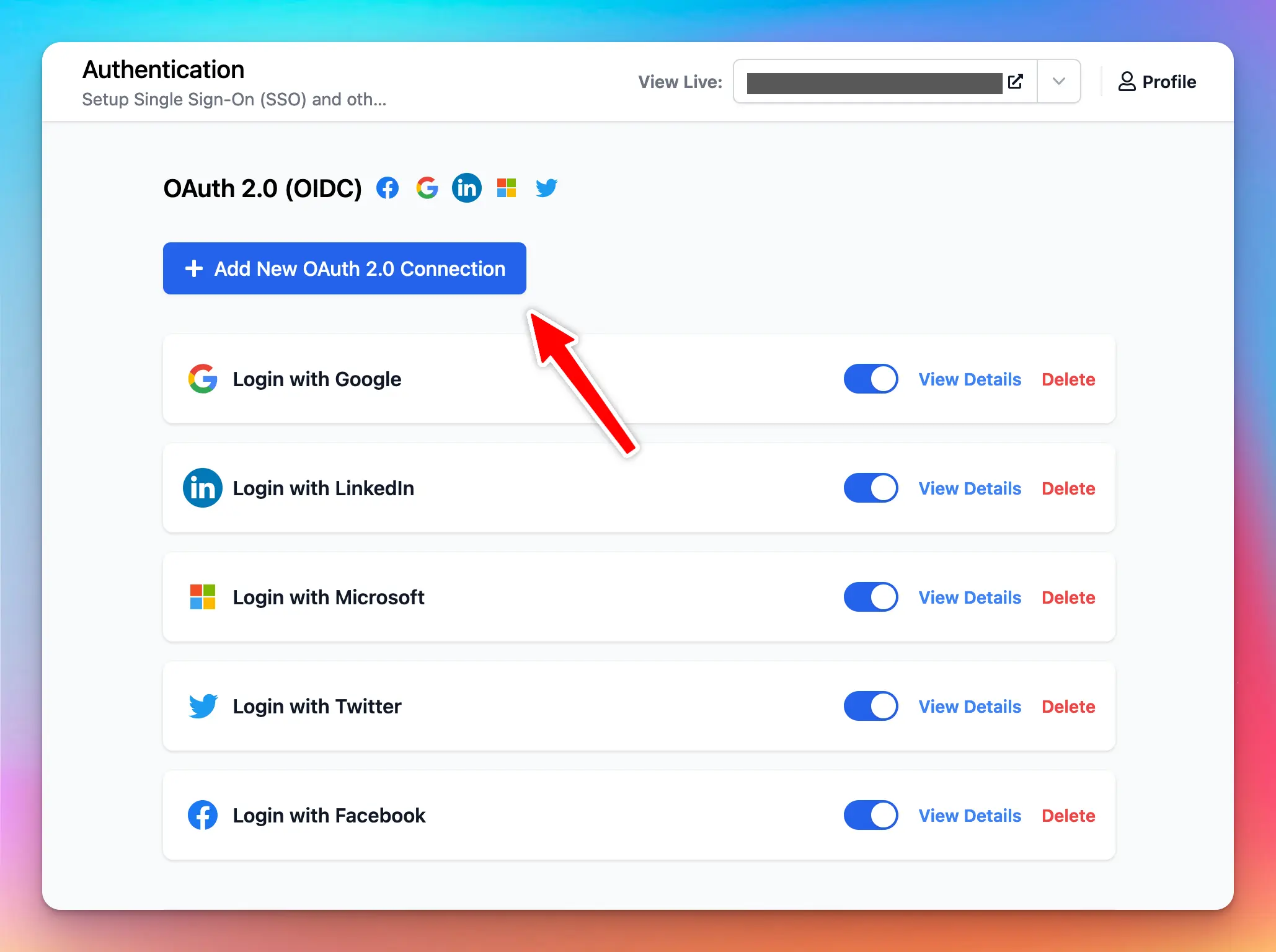 At this step, you will see your OAuth Callback URL. You need to set this URL in your Google Cloud OAuth credentials setting, under the “Authorized redirect URIs” section.
Then select “Google” from the UI.
At this step, you will see your OAuth Callback URL. You need to set this URL in your Google Cloud OAuth credentials setting, under the “Authorized redirect URIs” section.
Then select “Google” from the UI.
 Next, enter your Client ID and Client Secret. Then click Add Connection.
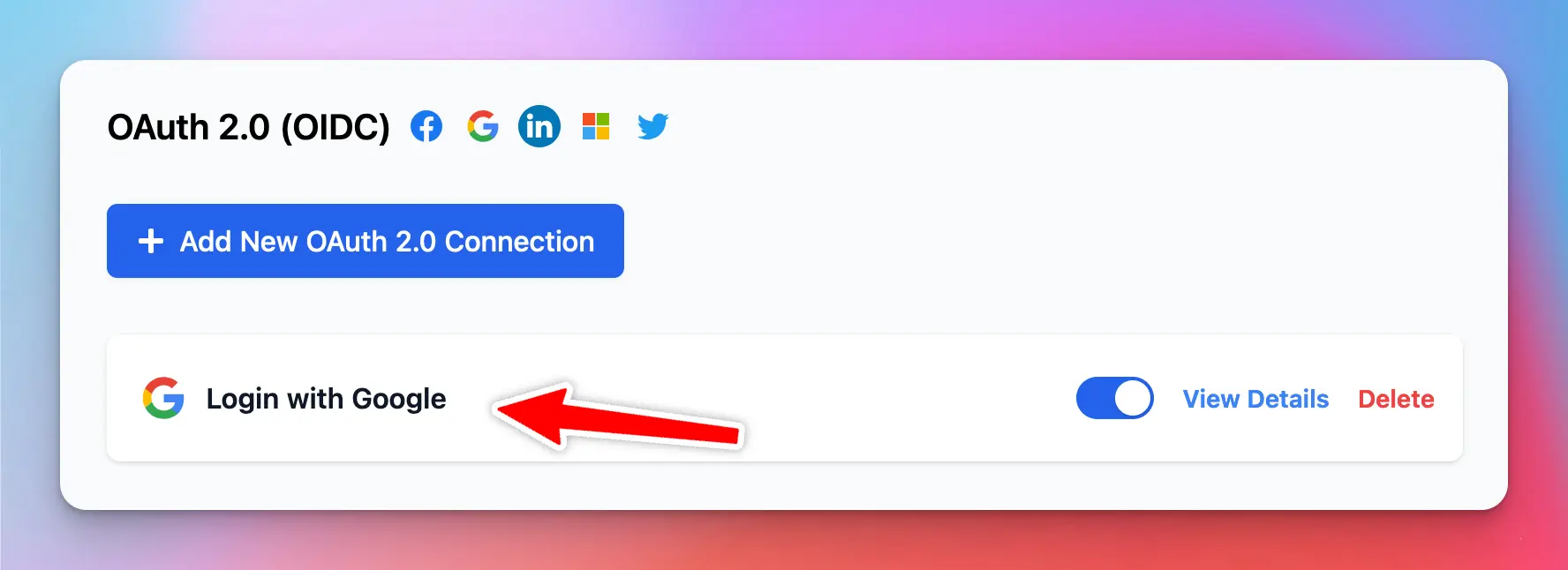
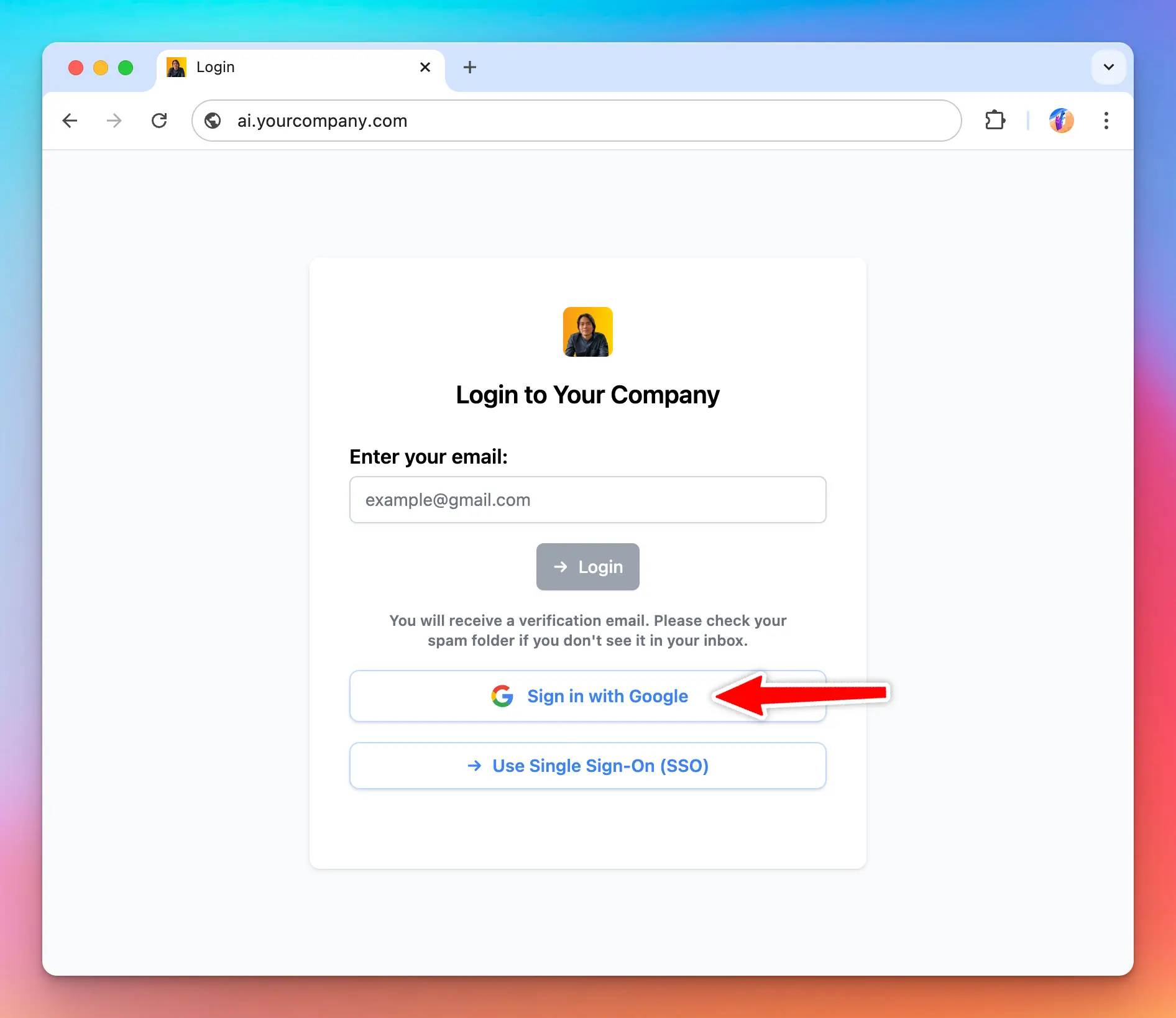
 Once the connection is added, you will see the new entry in the admin panel and under the login section of your chat instance.
 TypingMind uses standard OAuth 2.0 / OIDC authorization flow to identify the user. For this reason, if your OAuth provider does not follow the OAuth 2.0 standard and OIDC protocol, the user authorization flow might not work.
Here are some tips and workarounds if the user authorization fails:
TypingMind uses standard OAuth 2.0 / OIDC authorization flow to identify the user. For this reason, if your OAuth provider does not follow the OAuth 2.0 standard and OIDC protocol, the user authorization flow might not work.
Here are some tips and workarounds if the user authorization fails: