.svg?fit=max&auto=format&n=RaTUOQa09vPhW7_D&q=85&s=368f39de7ecc6605f73c43c2017546a3)
.svg?fit=max&auto=format&n=RaTUOQa09vPhW7_D&q=85&s=01a6eb27b4db3af8a1d5557525c579d3)
What Is Shadow AI?
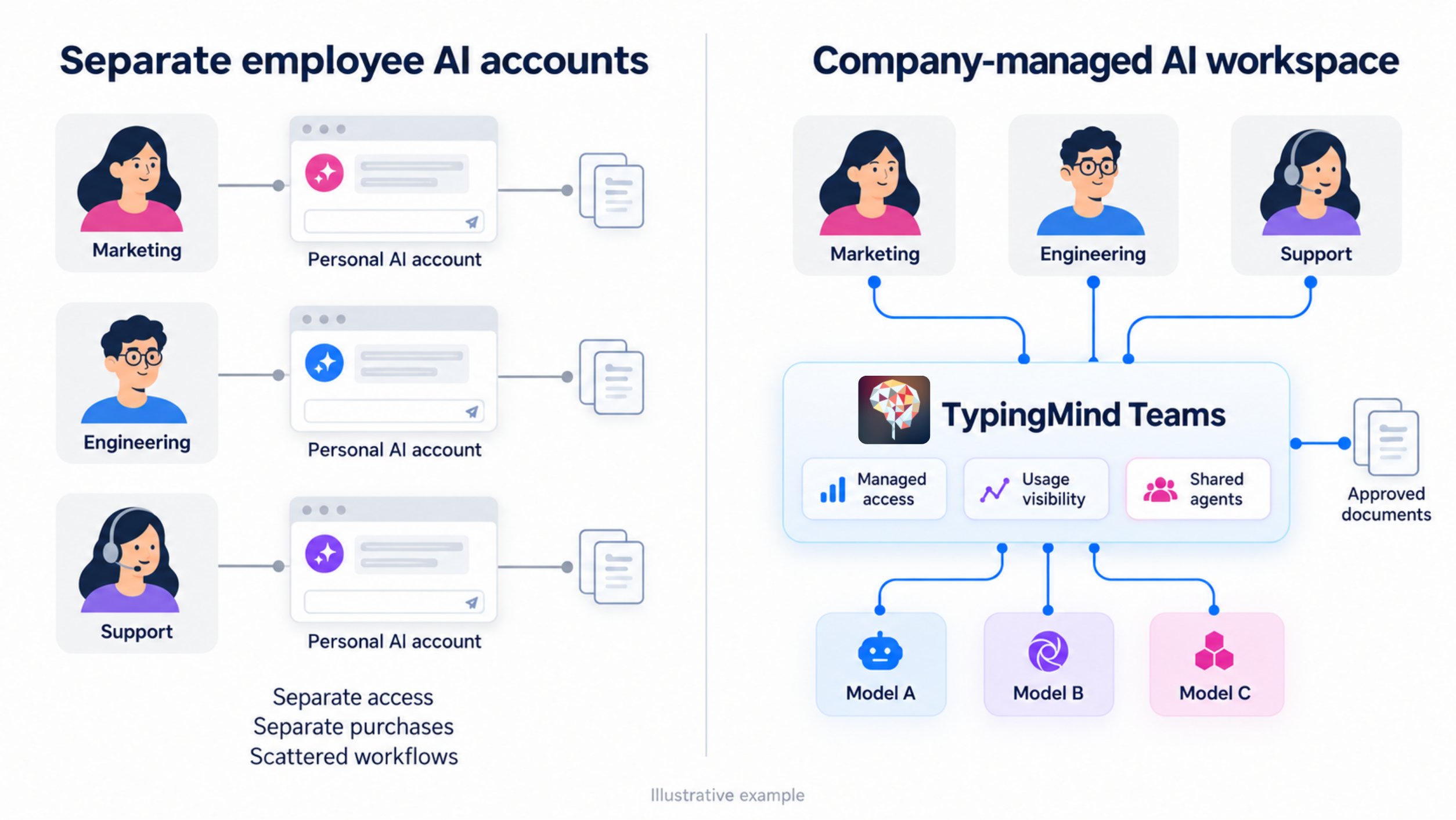
Shadow AI is the use of AI tools for work without the organization’s formal approval or oversight. IBM uses the term to describe unsanctioned AI use by employees or end users. Read IBM’s definition of shadow AI Examples might include:- An employee summarizing internal documents through an unapproved personal AI account.
- A team purchasing an AI service without completing the company’s review process.
- Someone connecting an AI application to a company document repository without authorization.
- A department introducing an AI agent without assigning responsibility for its access and ongoing maintenance.
When Does Informal AI Use Become a Management Problem?
Start by looking for operational friction rather than assuming that every unfamiliar tool represents a crisis.Every request becomes a separate decision
If each department asks for a different AI product, the person responsible for approval has to repeatedly establish what it does, why it is needed, and how it will be used. Without a consistent evaluation process, similar requests can receive different answers.Employees cannot explain what information they are allowed to use
“Be careful with company data” leaves too much room for interpretation. Can employees summarize an internal presentation? What about customer feedback? Does removing names change the answer? Who should they ask when they are unsure? If employees cannot find practical guidance, even well-intentioned users may make inconsistent decisions.Access and spending are difficult to account for
Separate purchases and accounts can make basic administration more complicated:- Which accounts support active work?
- Who owns each subscription?
- What should happen when someone changes roles?
- Which tools duplicate an existing capability?
- Who reviews continued access?
Useful workflows stay with individual employees
An employee may develop an effective prompt, assistant, or document workflow, but colleagues may have no easy way to reuse it. That creates a second problem: the organization pays for experimentation without consistently turning it into a shared capability.Understand Why Employees Choose Their Own Tools
Before asking people to change, find out what they would lose by moving to the approved alternative. These are possible explanations to investigate, not assumptions about every employee.The approved option does not support their task
A tool may work well for basic writing but fall short for another workflow. Employees might need a different model, document handling, integrations, or a more suitable interface. Ask them to demonstrate the task. A feature request becomes easier to evaluate when it is tied to actual work.Getting access takes too long
A lengthy approval process can conflict with a task that needs to be completed today. Review how employees request access, who makes the decision, and how long a response usually takes. A process that is easy to follow is more likely to be used.They already know another tool
Moving tools has a cost. Employees may need to recreate prompts, learn a new interface, and check whether their usual tasks still work. A successful rollout should account for that effort.The guidance is unclear
Some employees may not know whether a particular use is permitted. They need a short, accessible explanation of approved tools, allowed uses, restricted information, and where to ask for clarification. Before choosing a new platform, write down the workflows your current approach does not serve well. That list should shape the evaluation.What Should an Approved Alternative Provide?
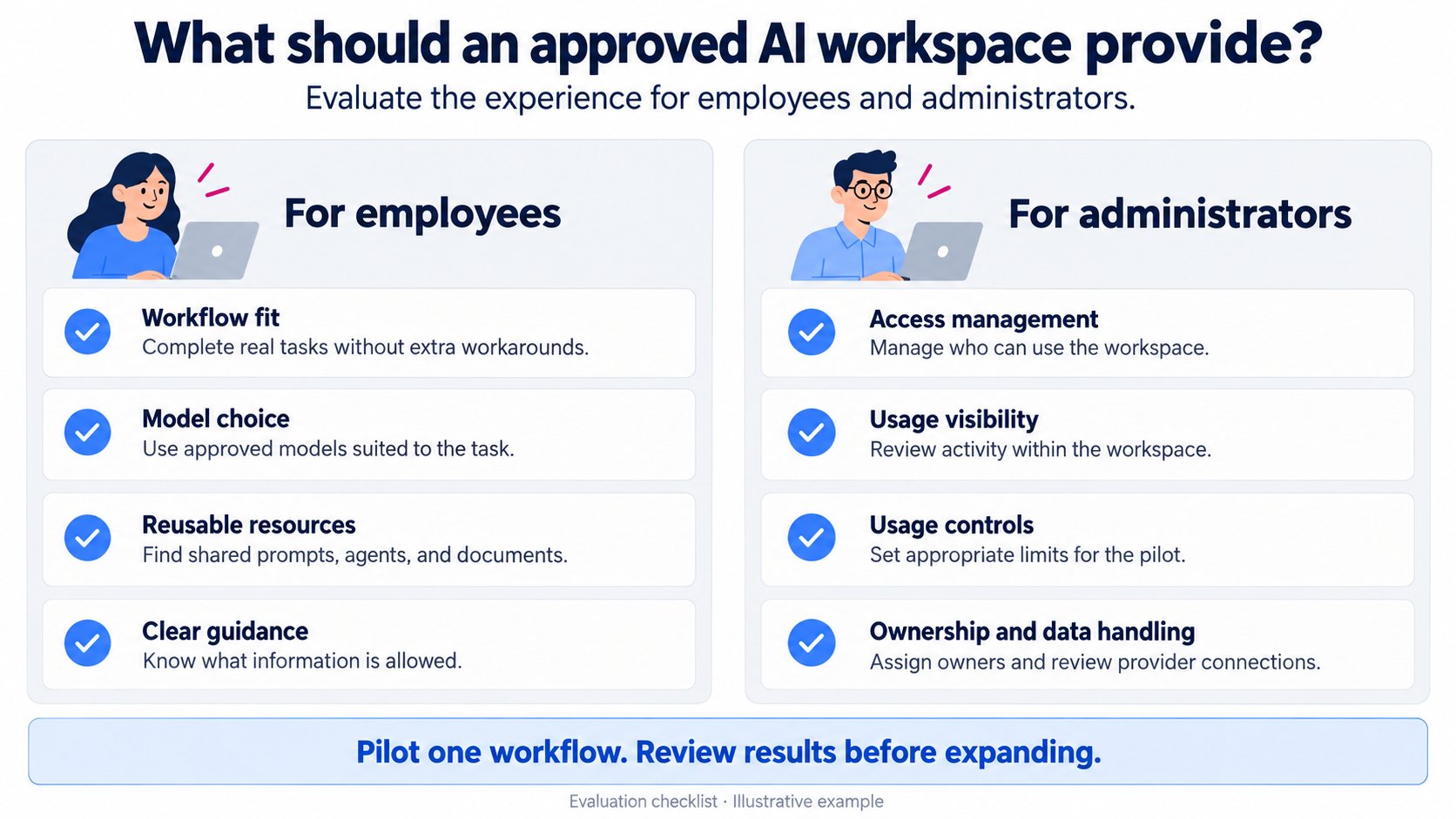
An approved AI workspace needs to work for employees and the people responsible for administering it. Use the following criteria to evaluate options.
Evaluate the actual configuration you intend to use. A list of available features does not establish that the workspace meets your requirements.
Where TypingMind Teams Fits
TypingMind Teams provides a shared AI chat workspace with access to multiple model providers, administration controls, shared resources, and usage analytics. It is one option to evaluate when employees need model choice within a company-managed environment. Explore TypingMind Teams A practical evaluation should connect those capabilities to a specific need:
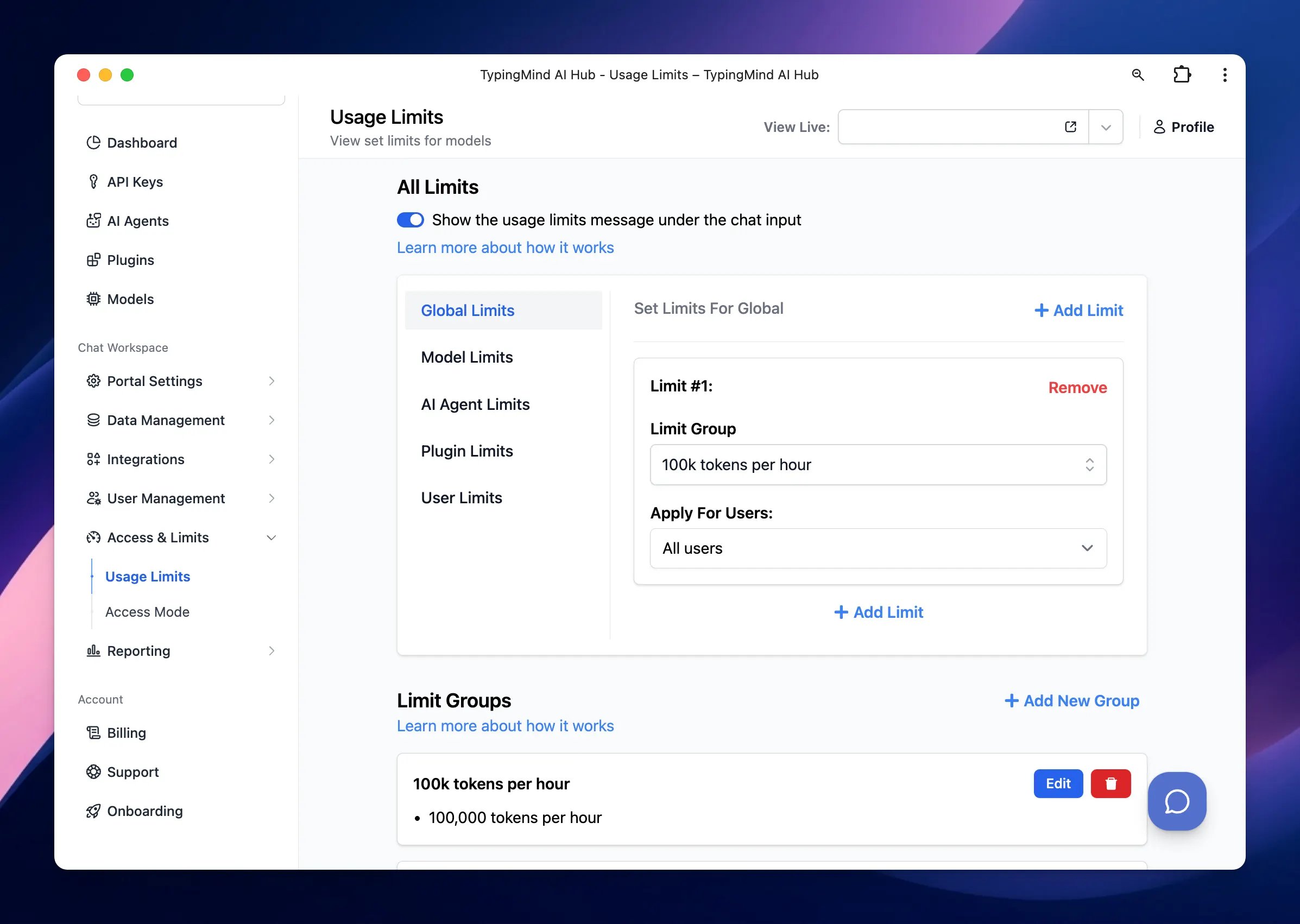
TypingMind Teams also supports reusable usage limit groups and analytics broken down by dimensions such as model, agent, and user. Its documented limits include messages and characters; treat these as usage controls rather than assuming they guarantee an exact spending cap. Review usage and limits
The important test is whether the configured workspace offers a useful, manageable alternative for the work employees already do.
What a Shared Workspace Does Not Solve by Itself
A shared AI workspace gives you an environment to administer. It does not automatically give you visibility into every AI application employees use elsewhere. Organization-wide shadow AI discovery is a separate capability. For example, Microsoft describes its discovery feature as a network-based way to identify unsanctioned AI applications. See Microsoft’s explanation of shadow AI discovery Similarly, introducing a workspace does not by itself:- Establish which categories of information employees may use.
- Verify every generated answer.
- Replace the review of connected providers and services.
- Ensure employees will adopt the tool.
- Resolve ownership of existing accounts and subscriptions.
Start With a Small Pilot
A pilot lets you evaluate a proposed change without requiring every employee to move immediately.1. Select one recurring workflow
Choose work that happens often enough to evaluate and has a clear owner. Possible examples include:- An onboarding assistant using approved internal documents.
- A support drafting assistant working from an approved help center.
- A writing workflow using reviewed templates and suitable source material.
2. Record the current workflow
Before changing anything, document:- How the task is completed today.
- Which tools are involved.
- What information is used.
- Where people encounter delays or rework.
- How the final result is checked.
3. Agree on the pilot’s boundaries
Write a short guide covering:
Use concrete examples in the information guidance. Employees should not have to interpret a broad policy from scratch each time they ask a question.
4. Help participants recreate their useful workflows
Ask participants to bring a task they already perform. Help them configure the prompts, agents, or documents needed to complete it in the new workspace. If they cannot reproduce an important part of their current workflow, record the gap. That feedback is a reason to improve the rollout or reconsider the fit.5. Review the results before expanding
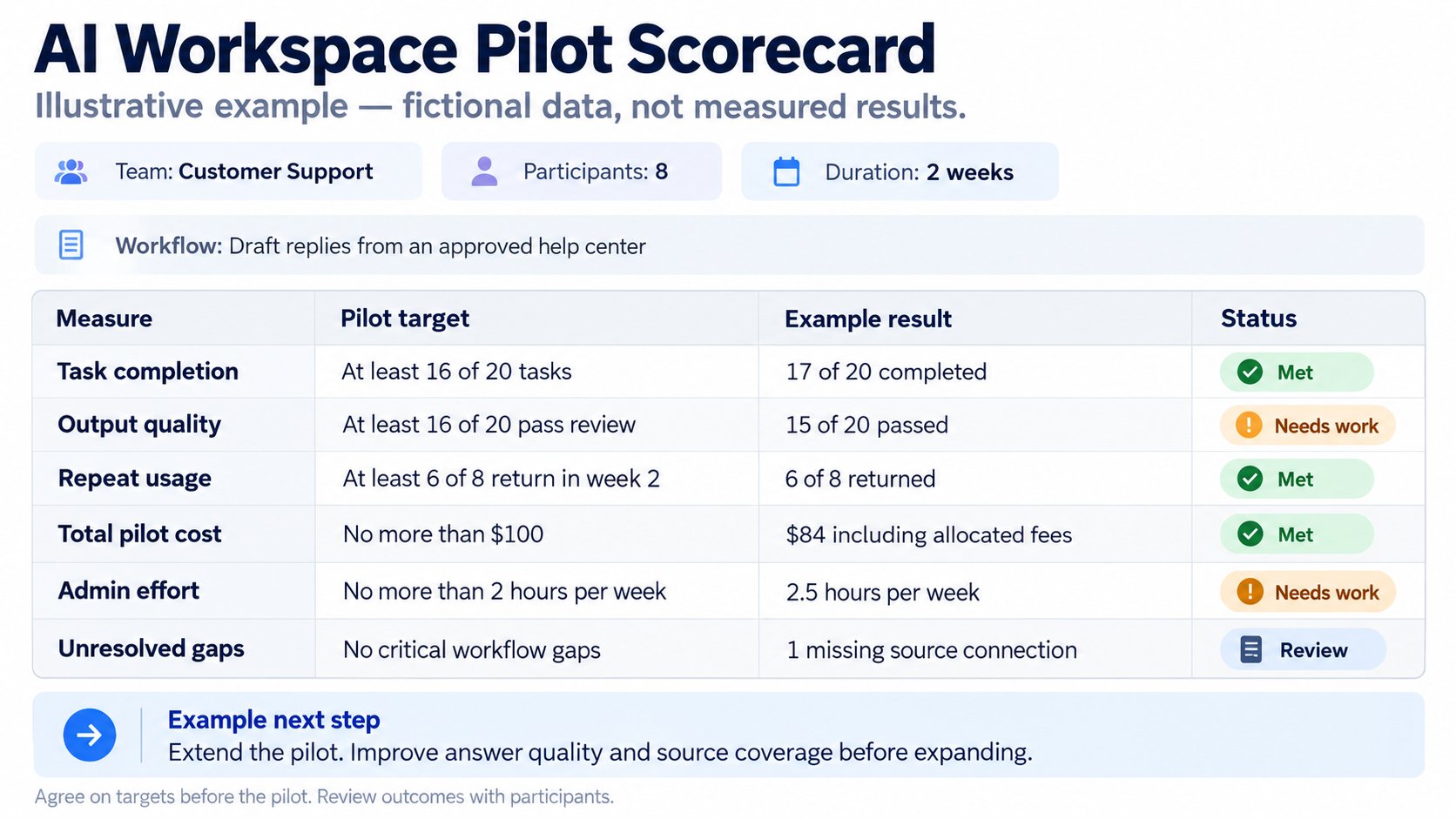
Choose a review date and evaluate the pilot using the criteria agreed at the beginning.
Low adoption needs investigation. It may indicate a workflow gap, insufficient onboarding, or an unsuitable product choice.
A successful pilot should provide enough evidence to decide what to expand, change, or stop.
Make the Approved Path Easy to Use
After the pilot, publish a short internal guide answering five questions:- Where do I access the approved workspace?
- What can I use it for?
- What information can I enter?
- How do I request another model, tool, or integration?
- Where do I report a problem or uncertain answer?
A Checklist Before You Choose a Workspace
Use these questions in your evaluation meeting:- Have we identified the workflows employees want help with?
- Have we asked why the current approved options are insufficient?
- Can the proposed workspace support those tasks?
- Have we reviewed its provider connections and data handling?
- Do employees have understandable usage guidance?
- Can we manage access and review usage within the workspace?
- Have we assigned an operational owner?
- Do we know what a successful pilot would look like?
- Have we separated workspace administration from organization-wide discovery?