> ## Documentation Index
> Fetch the complete documentation index at: https://docs.typingmind.com/llms.txt
> Use this file to discover all available pages before exploring further.
# Overview
With TypingMind, every conversation with AI can launch workflows, update CRMs, resolve support tickets, publish content, or trigger reports — all automatically, across the tools you already use.
## Why Businesses Automate with TypingMind
* **Save hours** by cutting repetitive steps out of daily operations.
* **Connect familiar platforms** like Salesforce, HubSpot, Zendesk, Slack, and Google Workspace.
* **Scale workflows** from personal productivity to team‑wide automation.
* **Stay flexible** with an API and integrations that adapt to your stack.
## Core Capabilities for Automation on TypingMind
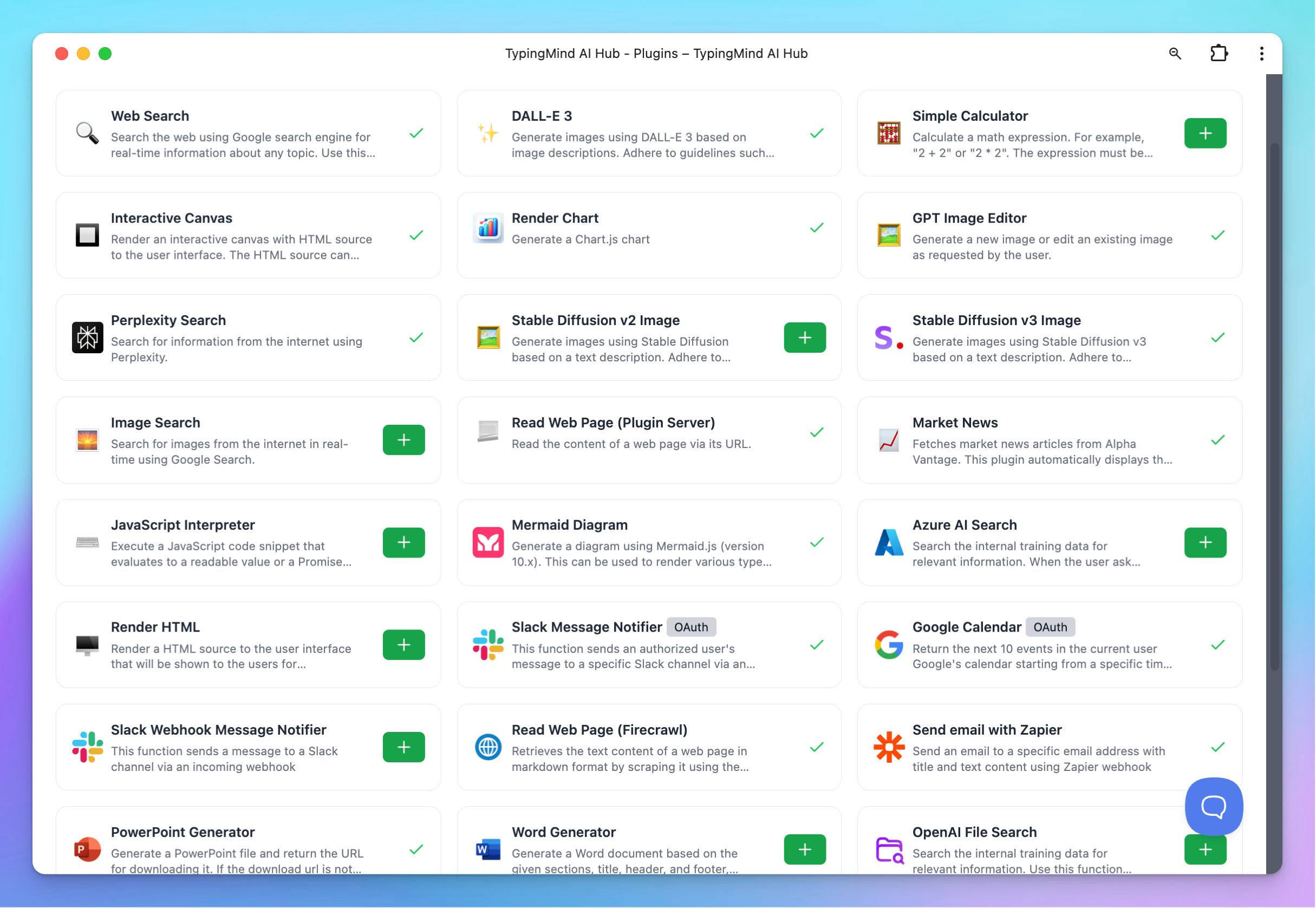
On TypingMind, you can build use our available plugins or build custom plugins to connect directly with the third-party platforms your team already uses. This makes it simple to extend your workflows without leaving the app.
**Use it for:**
* Sending **Slack messages**
* Querying **databases**
* Updating **support tickets**
* Generating **images**
* Rendering **charts & visualizations**
**Impact:** Seamless integrations that bring your external tools into TypingMind → fewer context switches, faster workflows, and more powerful automations.
How to implement plugins:
You can create plugins using one of the following methods:
* [**JavaScript code**](https://docs.typingmind.com/plugins/build-a-typingmind-plugin) — write custom logic directly.
* [**HTTP action**](https://docs.typingmind.com/plugins/build-a-typingmind-plugin) — connect to external APIs and services.
* [**Model Context Protocols (MCP)**](https://docs.typingmind.com/model-context-protocol-\(mcp\)-in-typingmind) — integrate structured data and actions into your AI workflows.
## Example Automation Flows You Can Run on TypingMind Chat
### 1. Customer Support
* A customer submits a ticket via **Intercom** (connected with TypingMind).
* The support agent interacts with AI through the **TypingMind UI** to manage and organize Intercom tickets.
* The AI automatically labels the ticket within the **TypingMind chat**.
* Notify team in **Slack**
* The customer receives an **instant follow-up response** or an **escalation notice**.
**Impact**: faster response times, reduced agent workload, happier customers.
### 2. Marketing Content Pipeline
* Research trends and competitors using Web Search
* Generate blog draft, optimize for SEO, and create visuals.
* Push the draft straight to **WordPress or HubSpot**.
* Auto‑share finished content to **LinkedIn/Twitter** with tailored captions.
**Impact**: content team moves from idea → publish in a single flow.
### 3. Internal Reporting
* Pull daily metrics from **Google Analytics, BigQuery, or Sheets**.
* AI summarizes insights in natural language.
* Charts are generated automatically.
* Digest is delivered to **Slack or Gmail**.
**Impact**: no more manual dashboards—everyone stays informed automatically.
 ## Example Automation Flows You Can Run on TypingMind Chat
### 1. Customer Support
* A customer submits a ticket via **Intercom** (connected with TypingMind).
* The support agent interacts with AI through the **TypingMind UI** to manage and organize Intercom tickets.
* The AI automatically labels the ticket within the **TypingMind chat**.
* Notify team in **Slack**
* The customer receives an **instant follow-up response** or an **escalation notice**.
**Impact**: faster response times, reduced agent workload, happier customers.
### 2. Marketing Content Pipeline
* Research trends and competitors using Web Search
* Generate blog draft, optimize for SEO, and create visuals.
* Push the draft straight to **WordPress or HubSpot**.
* Auto‑share finished content to **LinkedIn/Twitter** with tailored captions.
**Impact**: content team moves from idea → publish in a single flow.
### 3. Internal Reporting
* Pull daily metrics from **Google Analytics, BigQuery, or Sheets**.
* AI summarizes insights in natural language.
* Charts are generated automatically.
* Digest is delivered to **Slack or Gmail**.
**Impact**: no more manual dashboards—everyone stays informed automatically.
## Example Automation Flows You Can Run on TypingMind Chat
### 1. Customer Support
* A customer submits a ticket via **Intercom** (connected with TypingMind).
* The support agent interacts with AI through the **TypingMind UI** to manage and organize Intercom tickets.
* The AI automatically labels the ticket within the **TypingMind chat**.
* Notify team in **Slack**
* The customer receives an **instant follow-up response** or an **escalation notice**.
**Impact**: faster response times, reduced agent workload, happier customers.
### 2. Marketing Content Pipeline
* Research trends and competitors using Web Search
* Generate blog draft, optimize for SEO, and create visuals.
* Push the draft straight to **WordPress or HubSpot**.
* Auto‑share finished content to **LinkedIn/Twitter** with tailored captions.
**Impact**: content team moves from idea → publish in a single flow.
### 3. Internal Reporting
* Pull daily metrics from **Google Analytics, BigQuery, or Sheets**.
* AI summarizes insights in natural language.
* Charts are generated automatically.
* Digest is delivered to **Slack or Gmail**.
**Impact**: no more manual dashboards—everyone stays informed automatically.