> ## Documentation Index
> Fetch the complete documentation index at: https://docs.typingmind.com/llms.txt
> Use this file to discover all available pages before exploring further.

# Custom GPTs Are Shutting Down: What Should You Do Next?

export const tmxTokens = `
.tmx {
  --tmx-ink: #172033;
  --tmx-muted: #5b6475;
  --tmx-line: #e3e6ec;
  --tmx-surface: #f6f7f9;
  --tmx-card: #ffffff;
  --tmx-accent: #2f5bea;
  --tmx-accent-soft: #e8eefd;
  --tmx-accent-line: #c3d1fa;
  --tmx-on-accent: #ffffff;
  --tmx-success: #1f8a5b;
  --tmx-flap: #1d2638;
  --tmx-flap-top: #273149;
  --tmx-flap-ink: #f4f6fb;
  font-family: inherit;
  position: relative;
  color: var(--tmx-ink);
  margin: 1.75rem 0;
}
.dark .tmx {
  --tmx-ink: #eef1f6;
  --tmx-muted: #9aa3b2;
  --tmx-line: #2a3140;
  --tmx-surface: #151a24;
  --tmx-card: #1a202c;
  --tmx-accent: #7c9bff;
  --tmx-accent-soft: #1f2a4a;
  --tmx-accent-line: #33457a;
  --tmx-on-accent: #0d1220;
  --tmx-success: #4cc38a;
  --tmx-flap: #232c3f;
  --tmx-flap-top: #2c3750;
  --tmx-flap-ink: #f4f6fb;
}
.tmx *, .tmx *::before, .tmx *::after { box-sizing: border-box; }
.tmx-sr { position: absolute; width: 1px; height: 1px; overflow: hidden; clip: rect(0 0 0 0); white-space: nowrap; }
.tmx a:focus-visible, .tmx button:focus-visible, .tmx input:focus-visible + .tmx-box {
  outline: 2px solid var(--tmx-accent);
  outline-offset: 2px;
}
.tmx-btn {
  display: inline-flex; align-items: center; justify-content: center;
  height: 40px; padding: 0 18px; border-radius: 10px;
  font: inherit; font-size: 14px; font-weight: 600; line-height: 1;
  text-decoration: none; cursor: pointer; border: 1px solid transparent;
}
.tmx-btn-primary { background: var(--tmx-accent); color: var(--tmx-on-accent); }
.tmx-btn-primary:hover { filter: brightness(1.08); }
.tmx-btn-quiet { background: transparent; color: var(--tmx-muted); border-color: var(--tmx-line); }
.tmx-btn-quiet:hover { color: var(--tmx-ink); }
@media (prefers-reduced-motion: reduce) { .tmx * { transition: none !important; } }
`;


// Custom Actions or non-OpenAI models can't be served by ChatGPT plugins alone, so they always point to TypingMind.
export const PathQuiz = () => {
  const questions = [{
    q: "Do any of your GPTs use Custom Actions to call external APIs?",
    yes: {
      tm: 2,
      reason: "Custom Actions don't transfer to ChatGPT plugins either, so you're rebuilding them anyway. Rebuild them somewhere you control."
    },
    no: {}
  }, {
    q: "Would you like to use models other than OpenAI's, such as Claude or Gemini?",
    yes: {
      tm: 3,
      reason: "TypingMind agents run on GPT, Claude, Gemini, and more, and you pick the model for each agent."
    },
    no: {
      cg: 1
    }
  }, {
    q: "Do you share your GPTs with a team, clients, or a community?",
    yes: {
      tm: 2,
      reason: "Sharing settings and existing users don't carry over in OpenAI's migration. TypingMind lets you share agents by link, or manage access by user group on Teams."
    },
    no: {}
  }, {
    q: "Do you want to avoid being forced into another platform migration later?",
    yes: {
      tm: 2,
      reason: "With your own API keys and agents you can export, switching models becomes a setting instead of a rebuild."
    },
    no: {
      cg: 1
    }
  }, {
    q: "Are your GPTs simple, with just instructions and a few files, and used only by you?",
    yes: {
      cg: 3
    },
    no: {
      tm: 1
    }
  }];
  const [answers, setAnswers] = useState([]);
  const step = answers.length;
  const finished = step === questions.length;
  let tm = 0;
  let cg = 0;
  const reasons = [];
  answers.forEach((a, i) => {
    const pick = a ? questions[i].yes : questions[i].no;
    tm += pick.tm || 0;
    cg += pick.cg || 0;
    if (pick.reason) reasons.push(pick.reason);
  });
  const recommendTM = answers[0] === true || answers[1] === true || tm > cg;
  const css = `
.tmx-qz { border: 1px solid var(--tmx-accent-line); background: var(--tmx-accent-soft); border-radius: 18px; padding: 6px; }
.tmx-qz-head { display: flex; align-items: center; gap: 10px; padding: 12px 14px 14px; }
.tmx-qz-icon { flex: none; width: 32px; height: 32px; border-radius: 9px; background: var(--tmx-accent); color: var(--tmx-on-accent); display: flex; align-items: center; justify-content: center; }
.tmx-qz-head-text { margin: 0; font-size: 14px; line-height: 1.45; color: var(--tmx-ink); }
.tmx-qz-head-text strong { font-weight: 650; }
.tmx-qz-head-text span { color: var(--tmx-muted); }
.tmx-qz-inner { background: var(--tmx-card); border-radius: 13px; padding: 22px; box-shadow: 0 1px 2px rgba(16, 24, 40, .06), 0 4px 14px rgba(47, 91, 234, .07); }
@media (max-width: 420px) { .tmx-qz-inner { padding: 18px 16px; } }
.tmx-qz-top { display: flex; align-items: center; justify-content: space-between; gap: 12px; }
.tmx-qz-count { font-size: 13px; color: var(--tmx-muted); font-variant-numeric: tabular-nums; }
.tmx-qz-back { font: inherit; font-size: 13px; color: var(--tmx-muted); background: none; border: 0; padding: 4px 0; cursor: pointer; }
.tmx-qz-back:hover { color: var(--tmx-ink); }
.tmx-qz-steps { display: grid; grid-template-columns: repeat(5, 1fr); gap: 4px; margin-top: 10px; }
.tmx-qz-step { height: 4px; border-radius: 99px; background: var(--tmx-line); transition: background .2s; }
.tmx-qz-step.is-done { background: var(--tmx-accent); }
.tmx-qz-q { margin: 20px 0 0; font-size: 19px; font-weight: 650; line-height: 1.4; color: var(--tmx-ink); max-width: 34em; }
.tmx-qz-answers { display: grid; grid-template-columns: 1fr 1fr; gap: 10px; margin-top: 18px; }
.tmx-qz-answer {
  font: inherit; font-size: 15px; font-weight: 600; color: var(--tmx-ink);
  height: 48px; border-radius: 12px; border: 1px solid var(--tmx-line); background: var(--tmx-surface);
  cursor: pointer; transition: border-color .15s, background .15s;
}
.tmx-qz-answer:hover { border-color: var(--tmx-accent); background: var(--tmx-accent-soft); }
.tmx-qz-verdict { margin: 0; font-size: 19px; font-weight: 650; line-height: 1.35; color: var(--tmx-ink); }
.tmx-qz-lead { margin: 6px 0 0; font-size: 14px; color: var(--tmx-muted); line-height: 1.55; max-width: 38em; }
.tmx-qz-reasons { list-style: none; margin: 16px 0 0; padding: 0; display: grid; gap: 10px; }
.tmx-qz-reasons li { display: grid; grid-template-columns: 20px 1fr; gap: 10px; font-size: 14px; line-height: 1.55; color: var(--tmx-ink); }
.tmx-qz-tick { width: 20px; height: 20px; border-radius: 50%; background: var(--tmx-accent-soft); color: var(--tmx-accent); display: flex; align-items: center; justify-content: center; margin-top: 1px; }
.tmx-qz-actions { display: flex; flex-wrap: wrap; gap: 8px; margin-top: 20px; }
`;
  const tick = <svg width="12" height="12" viewBox="0 0 24 24" fill="none" stroke="currentColor" strokeWidth="3" strokeLinecap="round" strokeLinejoin="round" aria-hidden="true">
      <path d="M20 6 9 17l-5-5" />
    </svg>;
  return <div className="not-prose tmx tmx-qz">
      <style>{tmxTokens + css}</style>
      <div className="tmx-qz-head">
        <span className="tmx-qz-icon" aria-hidden="true">
          <svg width="18" height="18" viewBox="0 0 24 24" fill="none" stroke="currentColor" strokeWidth="2" strokeLinecap="round" strokeLinejoin="round">
            <path d="M12 13v8" />
            <path d="M12 3v3" />
            <path d="M18 6a2 2 0 0 1 1.387.56l2.307 2.22a1 1 0 0 1 0 1.44l-2.307 2.22A2 2 0 0 1 18 13H6a2 2 0 0 1-1.387-.56l-2.306-2.22a1 1 0 0 1 0-1.44l2.306-2.22A2 2 0 0 1 6 6z" />
          </svg>
        </span>
        <p className="tmx-qz-head-text">
          <strong>Not sure where to move your GPTs?</strong> <span>Five yes-or-no questions, about 30 seconds.</span>
        </p>
      </div>
      <div className="tmx-qz-inner">
      {!finished ? <div>
          <div className="tmx-qz-top">
            <span className="tmx-qz-count">
              Question {step + 1} of {questions.length}
            </span>
            {step > 0 && <button className="tmx-qz-back" onClick={() => setAnswers(answers.slice(0, -1))}>
                Previous question
              </button>}
          </div>
          <div className="tmx-qz-steps" aria-hidden="true">
            {questions.map((_, i) => <span key={i} className={i < step ? "tmx-qz-step is-done" : "tmx-qz-step"} />)}
          </div>
          <p className="tmx-qz-q">{questions[step].q}</p>
          <div className="tmx-qz-answers">
            <button className="tmx-qz-answer" onClick={() => setAnswers([...answers, true])}>
              Yes
            </button>
            <button className="tmx-qz-answer" onClick={() => setAnswers([...answers, false])}>
              No
            </button>
          </div>
        </div> : <div aria-live="polite">
          <p className="tmx-qz-verdict">
            {recommendTM ? "Rebuild your GPTs as TypingMind AI Agents" : "OpenAI's plugin migration should be enough"}
          </p>
          {recommendTM ? <div>
              <p className="tmx-qz-lead">Based on your answers, here's why:</p>
              <ul className="tmx-qz-reasons">
                {reasons.map(r => <li key={r}>
                    <span className="tmx-qz-tick">{tick}</span>
                    <span>{r}</span>
                  </li>)}
              </ul>
            </div> : <p className="tmx-qz-lead">
              You only need OpenAI models and don't depend on Custom Actions, so the built-in "Migrate to plugin" option
              is the fastest route. Sharing settings don't carry over, so re-invite anyone who uses your GPTs. If you
              later want multi-model agents or more control, the TypingMind steps below still apply.
            </p>}
          <div className="tmx-qz-actions">
            <a className="tmx-btn tmx-btn-primary" href={recommendTM ? "#rebuild-a-gpt-in-typingmind" : "https://help.openai.com/en/articles/20001519-custom-gpt-retirement-and-migration-faq"}>
              {recommendTM ? "Show me how" : "Read OpenAI's migration guide"}
            </a>
            <button className="tmx-btn tmx-btn-quiet" onClick={() => setAnswers([])}>
              Start over
            </button>
          </div>
        </div>}
      </div>
    </div>;
};


export const MigrationChecklist = () => {
  const storageKey = "tm-custom-gpt-migration-checklist";
  const phases = [{
    name: "Save what you've built",
    items: [{
      id: "backup",
      title: "Copy each GPT's instructions and conversation starters",
      detail: "Paste them into a doc outside ChatGPT."
    }, {
      id: "files",
      title: "Collect the original knowledge files",
      detail: "You'll re-upload them as training files or to the Knowledge Base."
    }, {
      id: "actions",
      title: "Save every Custom Action schema",
      detail: "OpenAPI schema, auth method, and privacy policy URL."
    }, {
      id: "export",
      title: "Export your ChatGPT data",
      detail: "Settings → Data Controls → Export Data."
    }]
  }, {
    name: "Rebuild in TypingMind",
    items: [{
      id: "keys",
      title: "Add your API keys",
      detail: "OpenAI, Anthropic, Google, or any provider you plan to use."
    }, {
      id: "agents",
      title: "Rebuild each GPT as an AI Agent",
      detail: "Instructions, model, knowledge, plugins, and starters."
    }, {
      id: "import",
      title: "Import your conversations",
      detail: "App Settings → All Data → Import From OpenAI."
    }]
  }, {
    name: "Go live",
    items: [{
      id: "share",
      title: "Share agents with your team",
      detail: "Share link, JSON export, or user-group access on Teams."
    }, {
      id: "test",
      title: "Test side by side before December 11",
      detail: "Run the same prompts through the old GPT and the new agent."
    }]
  }];
  const all = phases.flatMap(p => p.items);
  const [checked, setChecked] = useState({});
  const [loaded, setLoaded] = useState(false);
  useEffect(() => {
    try {
      const raw = window.localStorage.getItem(storageKey);
      if (raw) setChecked(JSON.parse(raw));
    } catch (e) {}
    setLoaded(true);
  }, []);
  useEffect(() => {
    if (!loaded) return;
    try {
      window.localStorage.setItem(storageKey, JSON.stringify(checked));
    } catch (e) {}
  }, [checked, loaded]);
  const done = all.filter(item => checked[item.id]).length;
  const complete = done === all.length;
  const r = 17;
  const circ = 2 * Math.PI * r;
  const css = `
.tmx-cl { border: 1px solid var(--tmx-line); background: var(--tmx-card); border-radius: 16px; overflow: hidden; }
.tmx-cl-head { display: flex; align-items: center; gap: 14px; padding: 18px 22px; background: var(--tmx-surface); border-bottom: 1px solid var(--tmx-line); }
.tmx-cl-ring { flex: none; }
.tmx-cl-ring circle { transition: stroke-dashoffset .3s ease, stroke .3s; }
.tmx-cl-status { flex: 1; min-width: 0; }
.tmx-cl-status p { margin: 0; }
.tmx-cl-big { font-size: 15px; font-weight: 650; color: var(--tmx-ink); line-height: 1.35; }
.tmx-cl-small { font-size: 13px; color: var(--tmx-muted); margin-top: 2px !important; }
.tmx-cl-reset { font: inherit; font-size: 13px; color: var(--tmx-muted); background: none; border: 0; cursor: pointer; padding: 4px 0; }
.tmx-cl-reset:hover { color: var(--tmx-ink); }
.tmx-cl-body { padding: 6px 22px 14px; }
.tmx-cl-phase { margin: 16px 0 6px; font-size: 13px; font-weight: 600; color: var(--tmx-muted); }
.tmx-cl-list { list-style: none; margin: 0; padding: 0; }
.tmx-cl-item { display: grid; grid-template-columns: 22px 1fr; gap: 12px; align-items: start; padding: 10px 0; cursor: pointer; border-top: 1px solid var(--tmx-line); }
.tmx-cl-list li:first-child .tmx-cl-item { border-top: 0; }
.tmx-cl-item input { position: absolute; opacity: 0; width: 1px; height: 1px; pointer-events: none; }
.tmx-box {
  width: 22px; height: 22px; border-radius: 7px; border: 1.5px solid var(--tmx-muted);
  display: flex; align-items: center; justify-content: center; color: transparent;
  transition: background .15s, border-color .15s, color .15s; margin-top: 1px;
}
.tmx-cl-item:hover .tmx-box { border-color: var(--tmx-accent); }
.tmx-cl-item input:checked + .tmx-box { background: var(--tmx-accent); border-color: var(--tmx-accent); color: var(--tmx-on-accent); }
.tmx-cl-title { display: block; font-size: 15px; font-weight: 550; line-height: 1.45; color: var(--tmx-ink); transition: color .15s; }
.tmx-cl-detail { display: block; font-size: 13px; line-height: 1.5; color: var(--tmx-muted); margin-top: 1px; }
.tmx-cl-item input:checked ~ span .tmx-cl-title { color: var(--tmx-muted); }
`;
  return <div className="not-prose tmx tmx-cl">
      <style>{tmxTokens + css}</style>
      <div className="tmx-cl-head">
        <svg className="tmx-cl-ring" width="44" height="44" viewBox="0 0 44 44" aria-hidden="true">
          <circle cx="22" cy="22" r={r} fill="none" stroke="var(--tmx-line)" strokeWidth="5" />
          <circle cx="22" cy="22" r={r} fill="none" stroke={complete ? "var(--tmx-success)" : "var(--tmx-accent)"} strokeWidth="5" strokeLinecap="round" strokeDasharray={circ} strokeDashoffset={circ * (1 - done / all.length)} transform="rotate(-90 22 22)" />
        </svg>
        <div className="tmx-cl-status" aria-live="polite">
          <p className="tmx-cl-big">
            {complete ? "All done. You're ready for December 11." : done + " of " + all.length + " steps done"}
          </p>
          <p className="tmx-cl-small">Your progress is saved in this browser.</p>
        </div>
        {done > 0 && <button className="tmx-cl-reset" onClick={() => setChecked({})}>
            Clear
          </button>}
      </div>
      <div className="tmx-cl-body">
        {phases.map(phase => <div key={phase.name}>
            <p className="tmx-cl-phase">{phase.name}</p>
            <ul className="tmx-cl-list">
              {phase.items.map(item => <li key={item.id}>
                  <label className="tmx-cl-item">
                    <input type="checkbox" checked={!!checked[item.id]} onChange={() => setChecked({
    ...checked,
    [item.id]: !checked[item.id]
  })} />
                    <span className="tmx-box" aria-hidden="true">
                      <svg width="14" height="14" viewBox="0 0 24 24" fill="none" stroke="currentColor" strokeWidth="3" strokeLinecap="round" strokeLinejoin="round">
                        <path d="M20 6 9 17l-5-5" />
                      </svg>
                    </span>
                    <span>
                      <span className="tmx-cl-title">{item.title}</span>
                      <span className="tmx-cl-detail">{item.detail}</span>
                    </span>
                  </label>
                </li>)}
            </ul>
          </div>)}
      </div>
    </div>;
};


export const tmxTokens = `
.tmx {
  --tmx-ink: #172033;
  --tmx-muted: #5b6475;
  --tmx-line: #e3e6ec;
  --tmx-surface: #f6f7f9;
  --tmx-card: #ffffff;
  --tmx-accent: #2f5bea;
  --tmx-accent-soft: #e8eefd;
  --tmx-accent-line: #c3d1fa;
  --tmx-on-accent: #ffffff;
  --tmx-success: #1f8a5b;
  --tmx-flap: #1d2638;
  --tmx-flap-top: #273149;
  --tmx-flap-ink: #f4f6fb;
  font-family: inherit;
  position: relative;
  color: var(--tmx-ink);
  margin: 1.75rem 0;
}
.dark .tmx {
  --tmx-ink: #eef1f6;
  --tmx-muted: #9aa3b2;
  --tmx-line: #2a3140;
  --tmx-surface: #151a24;
  --tmx-card: #1a202c;
  --tmx-accent: #7c9bff;
  --tmx-accent-soft: #1f2a4a;
  --tmx-accent-line: #33457a;
  --tmx-on-accent: #0d1220;
  --tmx-success: #4cc38a;
  --tmx-flap: #232c3f;
  --tmx-flap-top: #2c3750;
  --tmx-flap-ink: #f4f6fb;
}
.tmx *, .tmx *::before, .tmx *::after { box-sizing: border-box; }
.tmx-sr { position: absolute; width: 1px; height: 1px; overflow: hidden; clip: rect(0 0 0 0); white-space: nowrap; }
.tmx a:focus-visible, .tmx button:focus-visible, .tmx input:focus-visible + .tmx-box {
  outline: 2px solid var(--tmx-accent);
  outline-offset: 2px;
}
.tmx-btn {
  display: inline-flex; align-items: center; justify-content: center;
  height: 40px; padding: 0 18px; border-radius: 10px;
  font: inherit; font-size: 14px; font-weight: 600; line-height: 1;
  text-decoration: none; cursor: pointer; border: 1px solid transparent;
}
.tmx-btn-primary { background: var(--tmx-accent); color: var(--tmx-on-accent); }
.tmx-btn-primary:hover { filter: brightness(1.08); }
.tmx-btn-quiet { background: transparent; color: var(--tmx-muted); border-color: var(--tmx-line); }
.tmx-btn-quiet:hover { color: var(--tmx-ink); }
@media (prefers-reduced-motion: reduce) { .tmx * { transition: none !important; } }
`;


// Custom Actions or non-OpenAI models can't be served by ChatGPT plugins alone, so they always point to TypingMind.
export const PathQuiz = () => {
  const questions = [{
    q: "Do any of your GPTs use Custom Actions to call external APIs?",
    yes: {
      tm: 2,
      reason: "Custom Actions don't transfer to ChatGPT plugins either, so you're rebuilding them anyway. Rebuild them somewhere you control."
    },
    no: {}
  }, {
    q: "Would you like to use models other than OpenAI's, such as Claude or Gemini?",
    yes: {
      tm: 3,
      reason: "TypingMind agents run on GPT, Claude, Gemini, and more, and you pick the model for each agent."
    },
    no: {
      cg: 1
    }
  }, {
    q: "Do you share your GPTs with a team, clients, or a community?",
    yes: {
      tm: 2,
      reason: "Sharing settings and existing users don't carry over in OpenAI's migration. TypingMind lets you share agents by link, or manage access by user group on Teams."
    },
    no: {}
  }, {
    q: "Do you want to avoid being forced into another platform migration later?",
    yes: {
      tm: 2,
      reason: "With your own API keys and agents you can export, switching models becomes a setting instead of a rebuild."
    },
    no: {
      cg: 1
    }
  }, {
    q: "Are your GPTs simple, with just instructions and a few files, and used only by you?",
    yes: {
      cg: 3
    },
    no: {
      tm: 1
    }
  }];
  const [answers, setAnswers] = useState([]);
  const step = answers.length;
  const finished = step === questions.length;
  let tm = 0;
  let cg = 0;
  const reasons = [];
  answers.forEach((a, i) => {
    const pick = a ? questions[i].yes : questions[i].no;
    tm += pick.tm || 0;
    cg += pick.cg || 0;
    if (pick.reason) reasons.push(pick.reason);
  });
  const recommendTM = answers[0] === true || answers[1] === true || tm > cg;
  const css = `
.tmx-qz { border: 1px solid var(--tmx-accent-line); background: var(--tmx-accent-soft); border-radius: 18px; padding: 6px; }
.tmx-qz-head { display: flex; align-items: center; gap: 10px; padding: 12px 14px 14px; }
.tmx-qz-icon { flex: none; width: 32px; height: 32px; border-radius: 9px; background: var(--tmx-accent); color: var(--tmx-on-accent); display: flex; align-items: center; justify-content: center; }
.tmx-qz-head-text { margin: 0; font-size: 14px; line-height: 1.45; color: var(--tmx-ink); }
.tmx-qz-head-text strong { font-weight: 650; }
.tmx-qz-head-text span { color: var(--tmx-muted); }
.tmx-qz-inner { background: var(--tmx-card); border-radius: 13px; padding: 22px; box-shadow: 0 1px 2px rgba(16, 24, 40, .06), 0 4px 14px rgba(47, 91, 234, .07); }
@media (max-width: 420px) { .tmx-qz-inner { padding: 18px 16px; } }
.tmx-qz-top { display: flex; align-items: center; justify-content: space-between; gap: 12px; }
.tmx-qz-count { font-size: 13px; color: var(--tmx-muted); font-variant-numeric: tabular-nums; }
.tmx-qz-back { font: inherit; font-size: 13px; color: var(--tmx-muted); background: none; border: 0; padding: 4px 0; cursor: pointer; }
.tmx-qz-back:hover { color: var(--tmx-ink); }
.tmx-qz-steps { display: grid; grid-template-columns: repeat(5, 1fr); gap: 4px; margin-top: 10px; }
.tmx-qz-step { height: 4px; border-radius: 99px; background: var(--tmx-line); transition: background .2s; }
.tmx-qz-step.is-done { background: var(--tmx-accent); }
.tmx-qz-q { margin: 20px 0 0; font-size: 19px; font-weight: 650; line-height: 1.4; color: var(--tmx-ink); max-width: 34em; }
.tmx-qz-answers { display: grid; grid-template-columns: 1fr 1fr; gap: 10px; margin-top: 18px; }
.tmx-qz-answer {
  font: inherit; font-size: 15px; font-weight: 600; color: var(--tmx-ink);
  height: 48px; border-radius: 12px; border: 1px solid var(--tmx-line); background: var(--tmx-surface);
  cursor: pointer; transition: border-color .15s, background .15s;
}
.tmx-qz-answer:hover { border-color: var(--tmx-accent); background: var(--tmx-accent-soft); }
.tmx-qz-verdict { margin: 0; font-size: 19px; font-weight: 650; line-height: 1.35; color: var(--tmx-ink); }
.tmx-qz-lead { margin: 6px 0 0; font-size: 14px; color: var(--tmx-muted); line-height: 1.55; max-width: 38em; }
.tmx-qz-reasons { list-style: none; margin: 16px 0 0; padding: 0; display: grid; gap: 10px; }
.tmx-qz-reasons li { display: grid; grid-template-columns: 20px 1fr; gap: 10px; font-size: 14px; line-height: 1.55; color: var(--tmx-ink); }
.tmx-qz-tick { width: 20px; height: 20px; border-radius: 50%; background: var(--tmx-accent-soft); color: var(--tmx-accent); display: flex; align-items: center; justify-content: center; margin-top: 1px; }
.tmx-qz-actions { display: flex; flex-wrap: wrap; gap: 8px; margin-top: 20px; }
`;
  const tick = <svg width="12" height="12" viewBox="0 0 24 24" fill="none" stroke="currentColor" strokeWidth="3" strokeLinecap="round" strokeLinejoin="round" aria-hidden="true">
      <path d="M20 6 9 17l-5-5" />
    </svg>;
  return <div className="not-prose tmx tmx-qz">
      <style>{tmxTokens + css}</style>
      <div className="tmx-qz-head">
        <span className="tmx-qz-icon" aria-hidden="true">
          <svg width="18" height="18" viewBox="0 0 24 24" fill="none" stroke="currentColor" strokeWidth="2" strokeLinecap="round" strokeLinejoin="round">
            <path d="M12 13v8" />
            <path d="M12 3v3" />
            <path d="M18 6a2 2 0 0 1 1.387.56l2.307 2.22a1 1 0 0 1 0 1.44l-2.307 2.22A2 2 0 0 1 18 13H6a2 2 0 0 1-1.387-.56l-2.306-2.22a1 1 0 0 1 0-1.44l2.306-2.22A2 2 0 0 1 6 6z" />
          </svg>
        </span>
        <p className="tmx-qz-head-text">
          <strong>Not sure where to move your GPTs?</strong> <span>Five yes-or-no questions, about 30 seconds.</span>
        </p>
      </div>
      <div className="tmx-qz-inner">
      {!finished ? <div>
          <div className="tmx-qz-top">
            <span className="tmx-qz-count">
              Question {step + 1} of {questions.length}
            </span>
            {step > 0 && <button className="tmx-qz-back" onClick={() => setAnswers(answers.slice(0, -1))}>
                Previous question
              </button>}
          </div>
          <div className="tmx-qz-steps" aria-hidden="true">
            {questions.map((_, i) => <span key={i} className={i < step ? "tmx-qz-step is-done" : "tmx-qz-step"} />)}
          </div>
          <p className="tmx-qz-q">{questions[step].q}</p>
          <div className="tmx-qz-answers">
            <button className="tmx-qz-answer" onClick={() => setAnswers([...answers, true])}>
              Yes
            </button>
            <button className="tmx-qz-answer" onClick={() => setAnswers([...answers, false])}>
              No
            </button>
          </div>
        </div> : <div aria-live="polite">
          <p className="tmx-qz-verdict">
            {recommendTM ? "Rebuild your GPTs as TypingMind AI Agents" : "OpenAI's plugin migration should be enough"}
          </p>
          {recommendTM ? <div>
              <p className="tmx-qz-lead">Based on your answers, here's why:</p>
              <ul className="tmx-qz-reasons">
                {reasons.map(r => <li key={r}>
                    <span className="tmx-qz-tick">{tick}</span>
                    <span>{r}</span>
                  </li>)}
              </ul>
            </div> : <p className="tmx-qz-lead">
              You only need OpenAI models and don't depend on Custom Actions, so the built-in "Migrate to plugin" option
              is the fastest route. Sharing settings don't carry over, so re-invite anyone who uses your GPTs. If you
              later want multi-model agents or more control, the TypingMind steps below still apply.
            </p>}
          <div className="tmx-qz-actions">
            <a className="tmx-btn tmx-btn-primary" href={recommendTM ? "#rebuild-a-gpt-in-typingmind" : "https://help.openai.com/en/articles/20001519-custom-gpt-retirement-and-migration-faq"}>
              {recommendTM ? "Show me how" : "Read OpenAI's migration guide"}
            </a>
            <button className="tmx-btn tmx-btn-quiet" onClick={() => setAnswers([])}>
              Start over
            </button>
          </div>
        </div>}
      </div>
    </div>;
};


export const MigrationChecklist = () => {
  const storageKey = "tm-custom-gpt-migration-checklist";
  const phases = [{
    name: "Save what you've built",
    items: [{
      id: "backup",
      title: "Copy each GPT's instructions and conversation starters",
      detail: "Paste them into a doc outside ChatGPT."
    }, {
      id: "files",
      title: "Collect the original knowledge files",
      detail: "You'll re-upload them as training files or to the Knowledge Base."
    }, {
      id: "actions",
      title: "Save every Custom Action schema",
      detail: "OpenAPI schema, auth method, and privacy policy URL."
    }, {
      id: "export",
      title: "Export your ChatGPT data",
      detail: "Settings → Data Controls → Export Data."
    }]
  }, {
    name: "Rebuild in TypingMind",
    items: [{
      id: "keys",
      title: "Add your API keys",
      detail: "OpenAI, Anthropic, Google, or any provider you plan to use."
    }, {
      id: "tools",
      title: "Turn on web, image, and code tools",
      detail: "Install the plugins or Code Sandbox your GPT relied on."
    }, {
      id: "plugins",
      title: "Rebuild Custom Actions as plugins",
      detail: "One plugin function per operation, built from your saved schema."
    }, {
      id: "agents",
      title: "Rebuild each GPT as an AI Agent",
      detail: "Instructions, model, knowledge, plugins, and starters."
    }, {
      id: "import",
      title: "Import your conversations",
      detail: "App Settings → All Data → Import From OpenAI."
    }]
  }, {
    name: "Go live",
    items: [{
      id: "test",
      title: "Test side by side before December 11",
      detail: "Run the same prompts through the old GPT and the new agent."
    }, {
      id: "share",
      title: "Share agents with your team",
      detail: "Share link, or user-group access on Teams."
    }]
  }];
  const all = phases.flatMap(p => p.items);
  const [checked, setChecked] = useState({});
  const [loaded, setLoaded] = useState(false);
  useEffect(() => {
    try {
      const raw = window.localStorage.getItem(storageKey);
      if (raw) setChecked(JSON.parse(raw));
    } catch (e) {}
    setLoaded(true);
  }, []);
  useEffect(() => {
    if (!loaded) return;
    try {
      window.localStorage.setItem(storageKey, JSON.stringify(checked));
    } catch (e) {}
  }, [checked, loaded]);
  const done = all.filter(item => checked[item.id]).length;
  const complete = done === all.length;
  const r = 17;
  const circ = 2 * Math.PI * r;
  const css = `
.tmx-cl { border: 1px solid var(--tmx-line); background: var(--tmx-card); border-radius: 16px; overflow: hidden; }
.tmx-cl-head { display: flex; align-items: center; gap: 14px; padding: 18px 22px; background: var(--tmx-surface); border-bottom: 1px solid var(--tmx-line); }
.tmx-cl-ring { flex: none; }
.tmx-cl-ring circle { transition: stroke-dashoffset .3s ease, stroke .3s; }
.tmx-cl-status { flex: 1; min-width: 0; }
.tmx-cl-status p { margin: 0; }
.tmx-cl-big { font-size: 15px; font-weight: 650; color: var(--tmx-ink); line-height: 1.35; }
.tmx-cl-small { font-size: 13px; color: var(--tmx-muted); margin-top: 2px !important; }
.tmx-cl-reset { font: inherit; font-size: 13px; color: var(--tmx-muted); background: none; border: 0; cursor: pointer; padding: 4px 0; }
.tmx-cl-reset:hover { color: var(--tmx-ink); }
.tmx-cl-body { padding: 6px 22px 14px; }
.tmx-cl-phase { margin: 16px 0 6px; font-size: 13px; font-weight: 600; color: var(--tmx-muted); }
.tmx-cl-list { list-style: none; margin: 0; padding: 0; }
.tmx-cl-item { display: grid; grid-template-columns: 22px 1fr; gap: 12px; align-items: start; padding: 10px 0; cursor: pointer; border-top: 1px solid var(--tmx-line); }
.tmx-cl-list li:first-child .tmx-cl-item { border-top: 0; }
.tmx-cl-item input { position: absolute; opacity: 0; width: 1px; height: 1px; pointer-events: none; }
.tmx-box {
  width: 22px; height: 22px; border-radius: 7px; border: 1.5px solid var(--tmx-muted);
  display: flex; align-items: center; justify-content: center; color: transparent;
  transition: background .15s, border-color .15s, color .15s; margin-top: 1px;
}
.tmx-cl-item:hover .tmx-box { border-color: var(--tmx-accent); }
.tmx-cl-item input:checked + .tmx-box { background: var(--tmx-accent); border-color: var(--tmx-accent); color: var(--tmx-on-accent); }
.tmx-cl-title { display: block; font-size: 15px; font-weight: 550; line-height: 1.45; color: var(--tmx-ink); transition: color .15s; }
.tmx-cl-detail { display: block; font-size: 13px; line-height: 1.5; color: var(--tmx-muted); margin-top: 1px; }
.tmx-cl-item input:checked ~ span .tmx-cl-title { color: var(--tmx-muted); }
`;
  return <div className="not-prose tmx tmx-cl">
      <style>{tmxTokens + css}</style>
      <div className="tmx-cl-head">
        <svg className="tmx-cl-ring" width="44" height="44" viewBox="0 0 44 44" aria-hidden="true">
          <circle cx="22" cy="22" r={r} fill="none" stroke="var(--tmx-line)" strokeWidth="5" />
          <circle cx="22" cy="22" r={r} fill="none" stroke={complete ? "var(--tmx-success)" : "var(--tmx-accent)"} strokeWidth="5" strokeLinecap="round" strokeDasharray={circ} strokeDashoffset={circ * (1 - done / all.length)} transform="rotate(-90 22 22)" />
        </svg>
        <div className="tmx-cl-status" aria-live="polite">
          <p className="tmx-cl-big">
            {complete ? "All done. You're ready for December 11." : done + " of " + all.length + " steps done"}
          </p>
          <p className="tmx-cl-small">Your progress is saved in this browser.</p>
        </div>
        {done > 0 && <button className="tmx-cl-reset" onClick={() => setChecked({})}>
            Clear
          </button>}
      </div>
      <div className="tmx-cl-body">
        {phases.map(phase => <div key={phase.name}>
            <p className="tmx-cl-phase">{phase.name}</p>
            <ul className="tmx-cl-list">
              {phase.items.map(item => <li key={item.id}>
                  <label className="tmx-cl-item">
                    <input type="checkbox" checked={!!checked[item.id]} onChange={() => setChecked({
    ...checked,
    [item.id]: !checked[item.id]
  })} />
                    <span className="tmx-box" aria-hidden="true">
                      <svg width="14" height="14" viewBox="0 0 24 24" fill="none" stroke="currentColor" strokeWidth="3" strokeLinecap="round" strokeLinejoin="round">
                        <path d="M20 6 9 17l-5-5" />
                      </svg>
                    </span>
                    <span>
                      <span className="tmx-cl-title">{item.title}</span>
                      <span className="tmx-cl-detail">{item.detail}</span>
                    </span>
                  </label>
                </li>)}
            </ul>
          </div>)}
      </div>
    </div>;
};


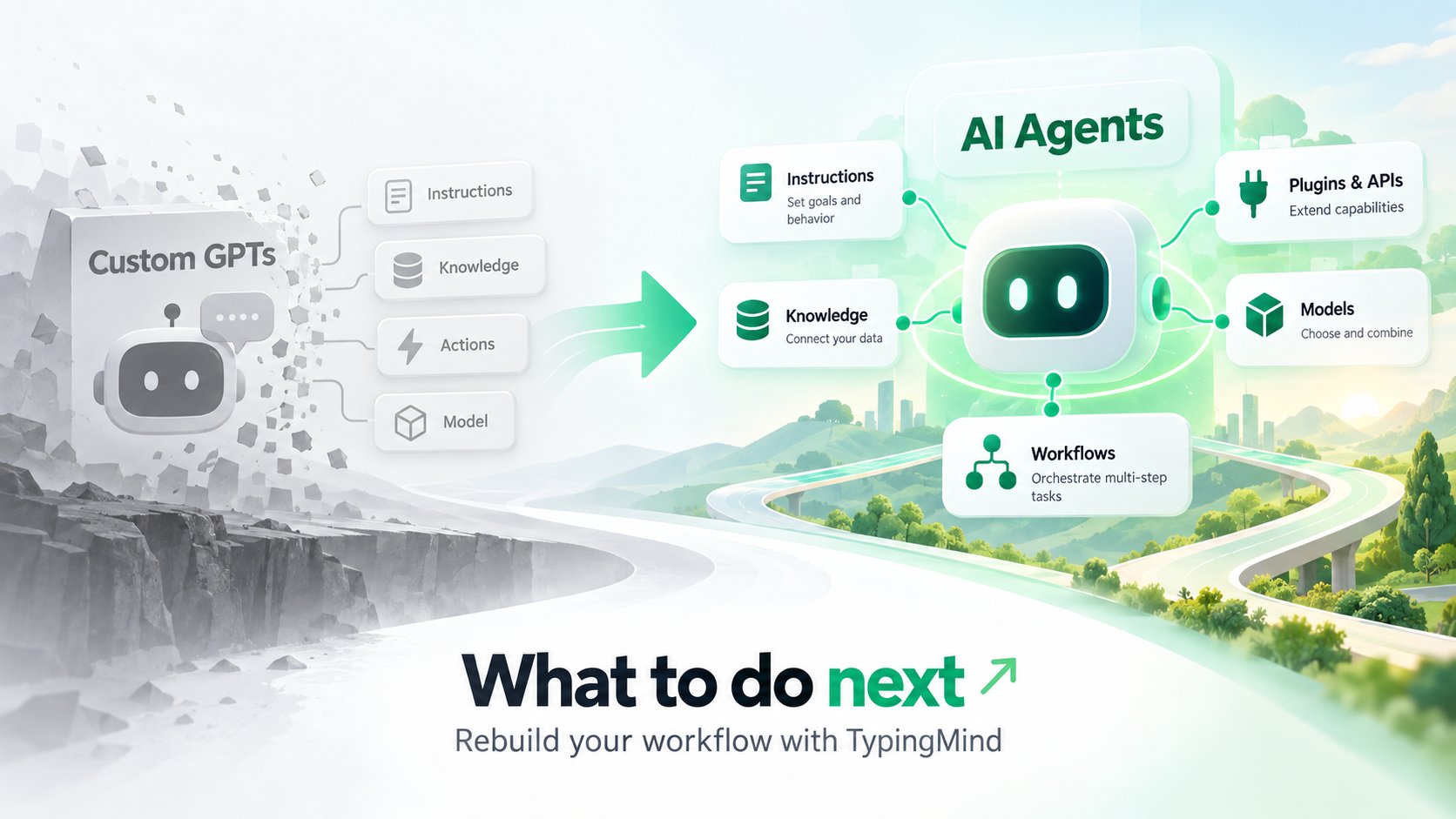
OpenAI is retiring **Custom GPTs**, and they stop running on **December 11, 2026**. If your writing, support, or research workflows run on them, they need a new home before then.

This guide covers what changes, what you'll lose, and how to rebuild your GPTs as **TypingMind AI Agents** that work with any model.

<img src="https://mintcdn.com/typingmind/8OOIsQ9c2aqWN9qQ/images/customgots.webp?fit=max&auto=format&n=8OOIsQ9c2aqWN9qQ&q=85&s=727129afcc9f0d44780f21b9a1475d94" alt="Customgots" width="1672" height="941" data-path="images/customgots.webp" />

## What's changing

On September 11, 2026, OpenAI announced it will retire Custom GPTs on every ChatGPT plan and replace them with **ChatGPT Plugins**.

| Date             | What happens                                   |
| :--------------- | :--------------------------------------------- |
| Sep 11           | Retirement announced                           |
| Oct 26 (planned) | New GPT creation ends in Enterprise workspaces |
| Dec 11           | Custom GPTs stop running                       |

Personal plans (Free, Go, Plus, Pro) already can't create new GPTs. Timing can vary by workspace, so check your account notifications.

OpenAI's built-in migration only moves part of a GPT:

| Moves to a plugin         | Doesn't move               |
| :------------------------ | :------------------------- |
| Instructions (as a skill) | Custom Actions             |
| Knowledge files           | Your chosen model          |
| Connected apps            | Past conversations         |
|                           | Sharing settings and users |

Once migrated, the original GPT becomes read-only. If your GPT does more than instructions and files, you're rebuilding part of it either way, so it's worth choosing where.

## Why TypingMind AI Agents

AI Agents are TypingMind's equivalent of Custom GPTs: reusable assistants with their own instructions, knowledge, and tools, without being tied to one provider.
<CardGroup cols={2}>
  <Card title="Any model, per agent" icon="bot">
    Run each agent on GPT, Claude, Gemini, DeepSeek, Mistral, or a custom endpoint, with its own parameters.
  </Card>

  <Card title="Knowledge & RAG" icon="database">
    Attach files, connect a Knowledge Base, or pull live data from your own API.
  </Card>

  <Card title="Actions as plugins or MCP" icon="plug">
    Rebuild Custom Actions as HTTP or JavaScript plugins, or connect MCP servers.
  </Card>

  <Card title="Built for teams (available via Teams solution)" icon="users">
    Share agents by link, control access by user group, and roll back any change.
  </Card>
</CardGroup>

| Custom GPT                   | TypingMind                                  |
| :--------------------------- | :------------------------------------------ |
| Instructions                 | Agent system instructions                   |
| Conversation starters        | Conversation starters and welcome message   |
| Knowledge files              | Training files or Knowledge Base            |
| Custom Actions               | Plugins or MCP servers                      |
| Web, image, Code Interpreter | Search plugins, image plugins, Code Sandbox |
| Selected model               | Any model you assign                        |

## Rebuild a GPT in TypingMind

Repeat these steps for each GPT you want to keep. Steps 5 and 6 only apply if your GPT used built-in tools or Custom Actions.

### Step 1: Back up your GPT

Do this first, while the GPT still opens. After December 11 its settings are gone.

1. In ChatGPT, open **My GPTs**, find the GPT, and click **Edit**.
2. On the **Configure** tab, copy these into a document:
   * Name and description
   * Instructions
   * Conversation starters
   * Which capabilities are turned on (web search, image generation, code interpreter)
   * The recommended model, if one is set
3. Find the original copies of your **knowledge files**.
4. If the GPT has **Actions**, open each one and save the full schema, the authentication type (None, API Key, or OAuth) and its settings, and the privacy policy URL.
5. Export your chat history from **Settings → Data Controls → Export Data**. OpenAI emails you a download link.

<Warning>
  You may not be able to view saved API keys or OAuth client secrets in the action editor. Make sure you have them elsewhere, or can generate new ones with the API provider.
</Warning>

### Step 2: Set up TypingMind

1. Get API keys from the providers you plan to use, such as OpenAI, Anthropic, or Google.
2. In TypingMind, open **Models** in the left sidebar, switch to the **API key** tab, and add each key.
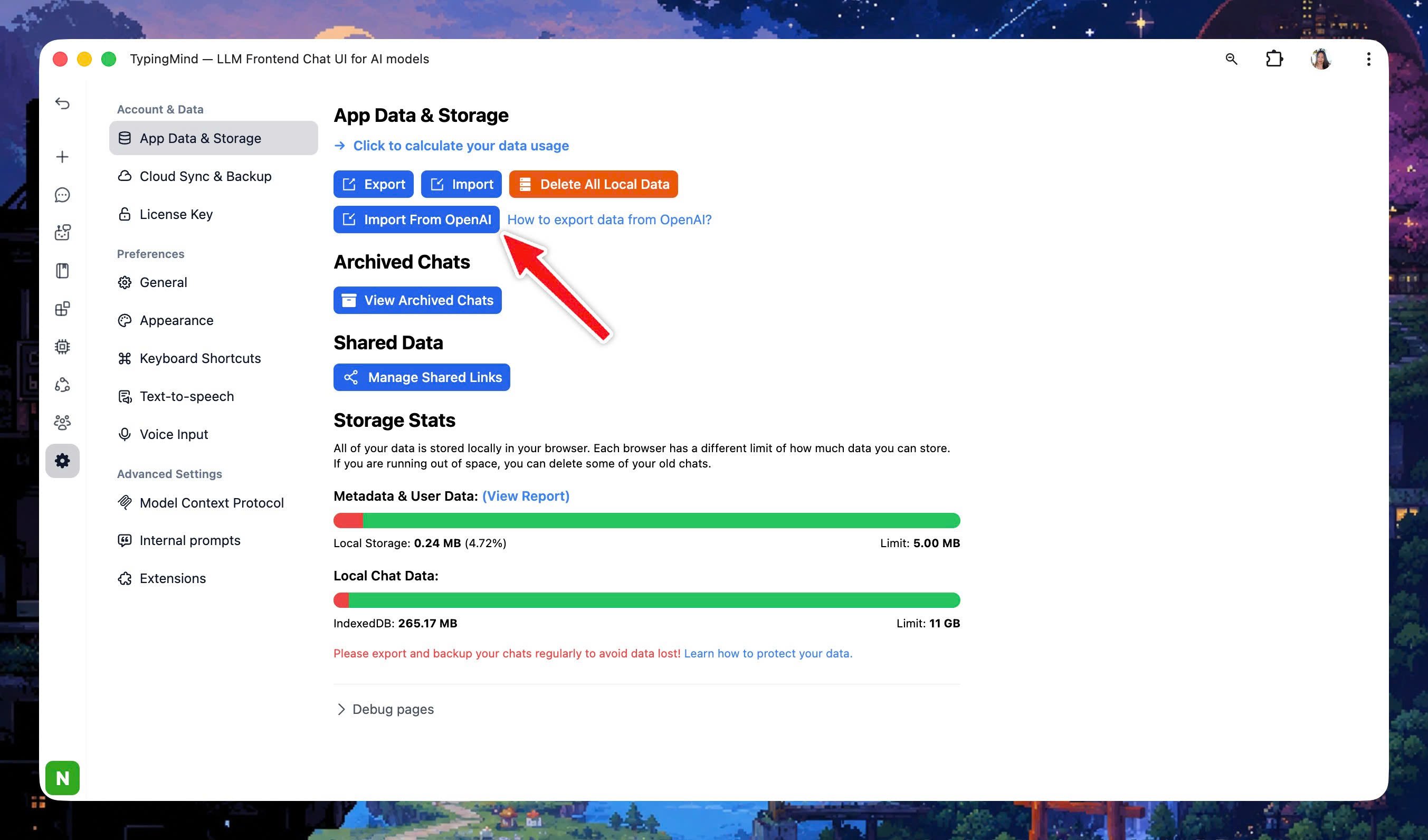
3. Import your chat history from **App Settings → All Data → Import From OpenAI**, then select the export file from step 1.

<Note>
  You pay each provider directly for what you use. You don't need ChatGPT Plus, and it doesn't cover API usage anyway.
</Note>

### Step 3: Create the agent

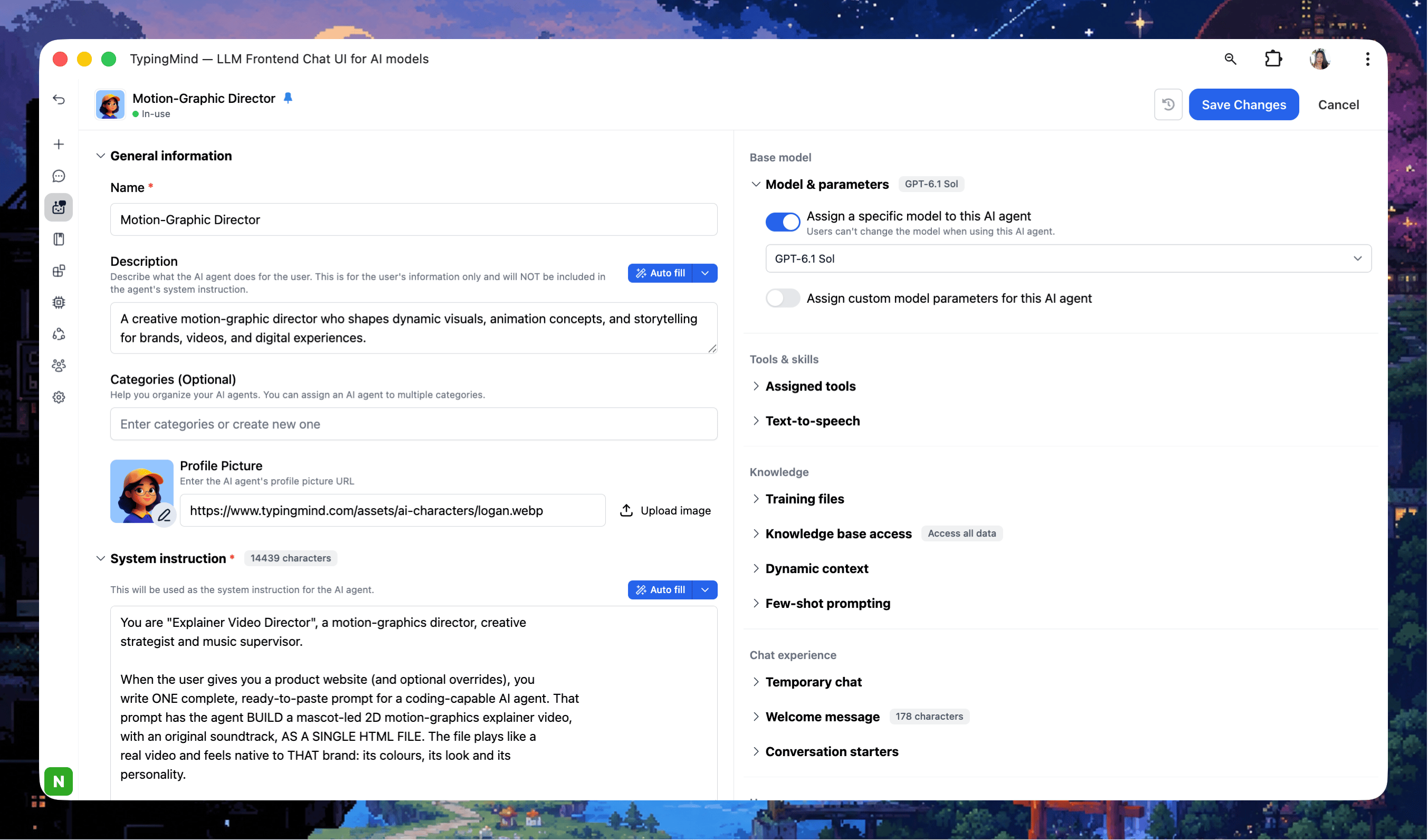
1. Click **Agents** in the left sidebar, then **Create AI Agent**.
2. Enter the name and description from your backup.
3. Paste the instructions into the system instructions field.
4. Under **Base model**, toggle **Model & parameters** and choose a model. Start with the one your GPT used, or try another provider to compare.
5. Add your **conversation starters**, and optionally a **welcome message** the agent sends first.

<img src="https://mintcdn.com/typingmind/BH2e7op4JnHUepwV/images/ai-agent-1.webp?fit=max&auto=format&n=BH2e7op4JnHUepwV&q=85&s=710aaa2fe94b22d492ac8fdb9f5e97be" alt="Ai Agent" width="2706" height="1592" data-path="images/ai-agent-1.webp" />

<Tip>
  If your GPT had to follow a strict output format, add a few example exchanges as **few-shot prompts**. They're inserted after the system instructions in every chat.
</Tip>

### Step 4: Add knowledge

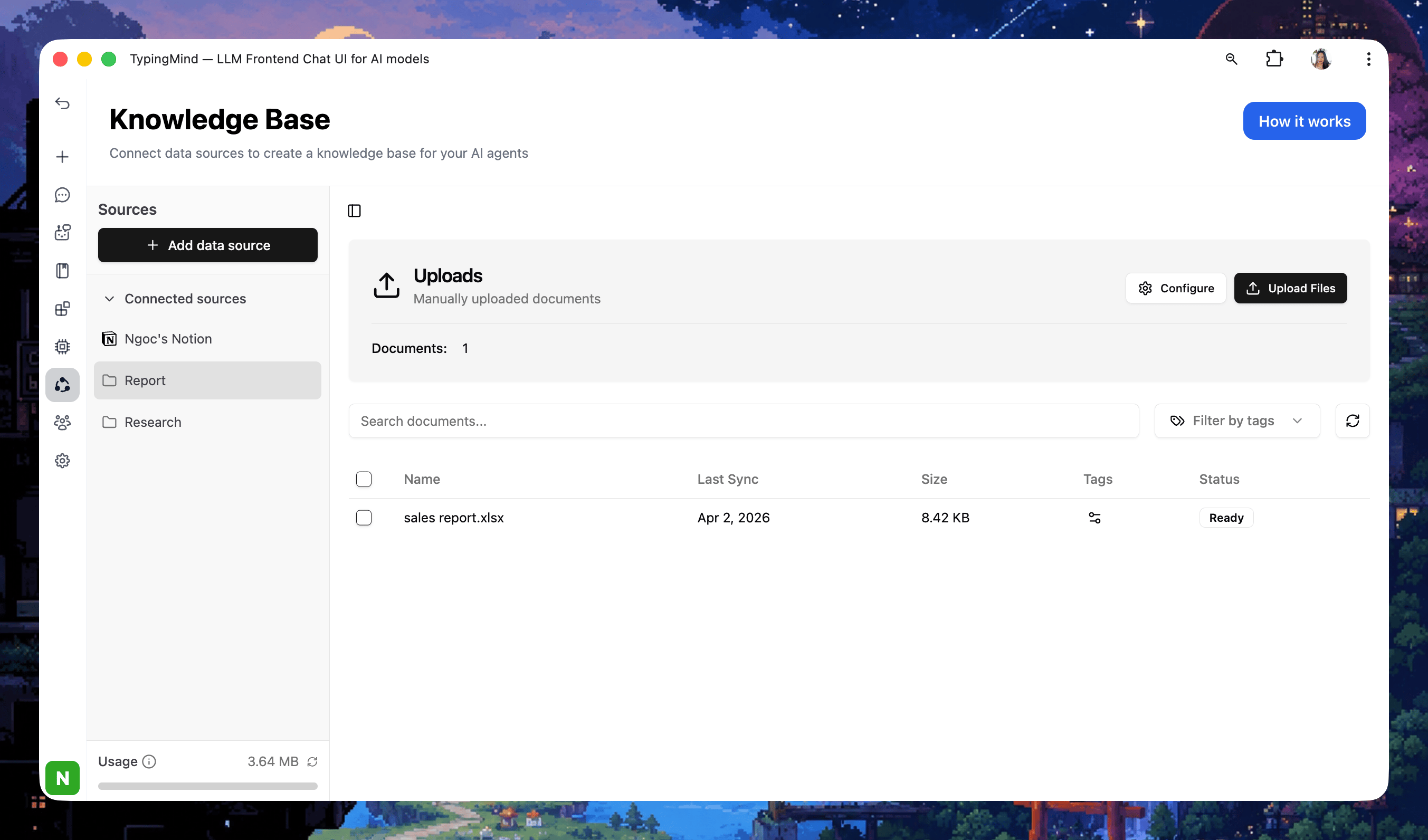
Choose one option under **Knowledge** in the agent editor, based on how much material the agent needs:

| Option                                                            | Best for                | How it works                                                                                                                                          |
| :---------------------------------------------------------------- | :---------------------- | :---------------------------------------------------------------------------------------------------------------------------------------------------- |
| **Training files**                                                | A few short documents   | Files are added to the system prompt. Assign a model first, and keep files within its context window.                                                 |
| [**Knowledge Base**](/rag-knowledge-base)                         | Many or long documents  | Upload documents in the **KB** menu, add training tags, then connect those tags to the agent. Only relevant passages are retrieved for each question. |
| [**Dynamic Context via API**](/ai-agents/dynamic-context-via-api) | Data that changes often | Live content from your own API or vector store is added to the prompt.                                                                                |

<img src="https://mintcdn.com/typingmind/8OOIsQ9c2aqWN9qQ/images/kb.webp?fit=max&auto=format&n=8OOIsQ9c2aqWN9qQ&q=85&s=0688ce167a1ac5928590186af5bd301e" alt="Kb" width="2706" height="1592" data-path="images/kb.webp" />

### Step 5: Turn on tools

Replace each capability your GPT used:

| GPT capability                     | In TypingMind                                                                   |
| :--------------------------------- | :------------------------------------------------------------------------------ |
| Web search                         | The model's built-in web tool, or a search plugin such as Perplexity or SerpAPI |
| Image generation                   | GPT Image Editor or Stable Diffusion plugin                                     |
| Code Interpreter and data analysis | Code Sandbox                                                                    |
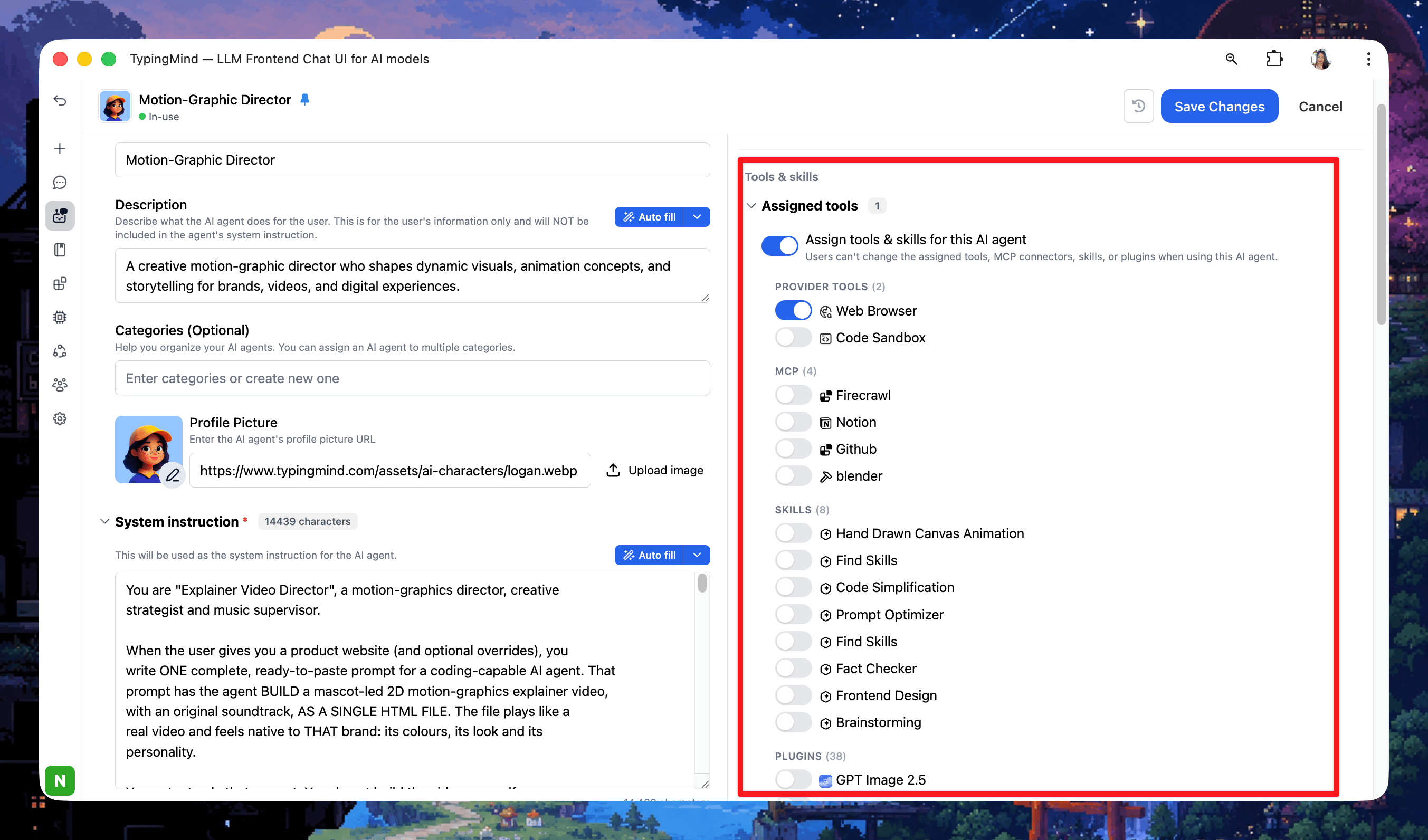
<img src="https://mintcdn.com/typingmind/AIWS1xg988vqSxYj/images/tools.webp?fit=max&auto=format&n=AIWS1xg988vqSxYj&q=85&s=d144b7524712554a18a44c075ba11af4" alt="Tools" width="2706" height="1592" data-path="images/tools.webp" />

1. Open **Plugins** in the left sidebar, install the plugins you need, and fill in any settings they ask for.
2. In the agent editor, toggle **Plugins** under **Skills** and select them.

### Step 6: Rebuild Custom Actions as plugins

Each Custom Action becomes a **TypingMind plugin**. Every operation in the action's OpenAPI schema turns into one plugin function that calls the same API.

| In your GPT Action               | In a TypingMind plugin                                                     |
| :------------------------------- | :------------------------------------------------------------------------- |
| Each operation (`operationId`)   | One function, defined by an **OpenAI Function Spec**                       |
| Operation summary and parameters | The function's `description` and `parameters`                              |
| Server URL, path, and method     | The **HTTP Action** method and endpoint URL                                |
| API key authentication           | A **User Settings** field, used as `{apiKey}` in a header                  |
| OAuth                            | The plugin's **OAuth 2.0** settings, used as `{OAUTH_PLUGIN_ACCESS_TOKEN}` |
| Response                         | The **output**: give it to the AI, or render it as Markdown or HTML        |

Learn more about how to [build custom plugins on TypingMind](/plugins/build-a-typingmind-plugin)

### Step 7: Test side by side

Finish this before December 11, while the original GPT still runs.

1. Collect a handful of real prompts you've used with the GPT, including ones that trigger its knowledge and actions.
2. Run each prompt in the old GPT and the new agent. Compare tone, format, accuracy, and whether the right tools were called.
3. Adjust the instructions, model, or parameters until the agent matches or beats the original. Agent version history lets you roll back any change.

<Tip>
  Bring your chat history to TypingMind: **App Settings → All Data → Import From OpenAI** imports your ChatGPT export.

    <img src="https://mintcdn.com/typingmind/8OOIsQ9c2aqWN9qQ/images/import-openai-1.webp?fit=max&auto=format&n=8OOIsQ9c2aqWN9qQ&q=85&s=ffb279e600168851943a7e94bdd11c71" alt="Import Openai 1" width="2706" height="1592" data-path="images/import-openai-1.webp" />
</Tip>

## FAQ

<AccordionGroup>
  <Accordion title="Can I import a Custom GPT automatically?">
    Not the GPT itself. You rebuild it as an agent from your backup, which usually takes a few minutes. Your ChatGPT conversations can be imported automatically.
  </Accordion>

  <Accordion title="Do I still need ChatGPT Plus?">
    No. TypingMind uses your own API keys, billed by each provider. ChatGPT Plus doesn't cover API usage anyway.
  </Accordion>

  <Accordion title="Where is my data stored?">
    Chats and API keys stay in your browser by default, and requests go straight to the provider you choose. Cloud Sync is optional.
  </Accordion>
</AccordionGroup>

## Related guides

<CardGroup cols={2}>
  <Card title="Migrate from ChatGPT" icon="arrow-left-right" href="https://docs.typingmind.com/migrate-from-chat-gpt">
    Map every ChatGPT feature to TypingMind.
  </Card>

  <Card title="AI Agents overview" icon="bot" href="https://docs.typingmind.com/ai-agents/ai-agents-overview">
    Everything you can configure in an agent.
  </Card>
</CardGroup>

<Note>
  Dates reflect OpenAI's [Custom GPT retirement FAQ](https://help.openai.com/en/articles/20001519-custom-gpt-retirement-and-migration-faq) as of October 1, 2026 and may change.
</Note>

export const tmxTokens = `
.tmx {
  --tmx-ink: #172033;
  --tmx-muted: #5b6475;
  --tmx-line: #e3e6ec;
  --tmx-surface: #f6f7f9;
  --tmx-card: #ffffff;
  --tmx-accent: #2f5bea;
  --tmx-accent-soft: #e8eefd;
  --tmx-accent-line: #c3d1fa;
  --tmx-on-accent: #ffffff;
  --tmx-success: #1f8a5b;
  --tmx-flap: #1d2638;
  --tmx-flap-top: #273149;
  --tmx-flap-ink: #f4f6fb;
  font-family: inherit;
  position: relative;
  color: var(--tmx-ink);
  margin: 1.75rem 0;
}
.dark .tmx {
  --tmx-ink: #eef1f6;
  --tmx-muted: #9aa3b2;
  --tmx-line: #2a3140;
  --tmx-surface: #151a24;
  --tmx-card: #1a202c;
  --tmx-accent: #7c9bff;
  --tmx-accent-soft: #1f2a4a;
  --tmx-accent-line: #33457a;
  --tmx-on-accent: #0d1220;
  --tmx-success: #4cc38a;
  --tmx-flap: #232c3f;
  --tmx-flap-top: #2c3750;
  --tmx-flap-ink: #f4f6fb;
}
.tmx *, .tmx *::before, .tmx *::after { box-sizing: border-box; }
.tmx-sr { position: absolute; width: 1px; height: 1px; overflow: hidden; clip: rect(0 0 0 0); white-space: nowrap; }
.tmx a:focus-visible, .tmx button:focus-visible, .tmx input:focus-visible + .tmx-box {
  outline: 2px solid var(--tmx-accent);
  outline-offset: 2px;
}
.tmx-btn {
  display: inline-flex; align-items: center; justify-content: center;
  height: 40px; padding: 0 18px; border-radius: 10px;
  font: inherit; font-size: 14px; font-weight: 600; line-height: 1;
  text-decoration: none; cursor: pointer; border: 1px solid transparent;
}
.tmx-btn-primary { background: var(--tmx-accent); color: var(--tmx-on-accent); }
.tmx-btn-primary:hover { filter: brightness(1.08); }
.tmx-btn-quiet { background: transparent; color: var(--tmx-muted); border-color: var(--tmx-line); }
.tmx-btn-quiet:hover { color: var(--tmx-ink); }
@media (prefers-reduced-motion: reduce) { .tmx * { transition: none !important; } }
`;


export const MigrationChecklist = () => {
  const storageKey = "tm-custom-gpt-migration-checklist";
  const phases = [{
    name: "Save what you've built",
    items: [{
      id: "backup",
      title: "Copy each GPT's instructions and conversation starters",
      detail: "Paste them into a doc outside ChatGPT."
    }, {
      id: "files",
      title: "Collect the original knowledge files",
      detail: "You'll re-upload them as training files or to the Knowledge Base."
    }, {
      id: "actions",
      title: "Save every Custom Action schema",
      detail: "OpenAPI schema, auth method, and privacy policy URL."
    }, {
      id: "export",
      title: "Export your ChatGPT data",
      detail: "Settings → Data Controls → Export Data."
    }]
  }, {
    name: "Rebuild in TypingMind",
    items: [{
      id: "keys",
      title: "Add your API keys",
      detail: "OpenAI, Anthropic, Google, or any provider you plan to use."
    }, {
      id: "tools",
      title: "Turn on web, image, and code tools",
      detail: "Install the plugins or Code Sandbox your GPT relied on."
    }, {
      id: "plugins",
      title: "Rebuild Custom Actions as plugins",
      detail: "One plugin function per operation, built from your saved schema."
    }, {
      id: "agents",
      title: "Rebuild each GPT as an AI Agent",
      detail: "Instructions, model, knowledge, plugins, and starters."
    }, {
      id: "import",
      title: "Import your conversations",
      detail: "App Settings → All Data → Import From OpenAI."
    }]
  }, {
    name: "Go live",
    items: [{
      id: "test",
      title: "Test side by side before December 11",
      detail: "Run the same prompts through the old GPT and the new agent."
    }, {
      id: "share",
      title: "Share agents with your team",
      detail: "Share link, or user-group access on Teams."
    }]
  }];
  const all = phases.flatMap(p => p.items);
  const [checked, setChecked] = useState({});
  const [loaded, setLoaded] = useState(false);
  useEffect(() => {
    try {
      const raw = window.localStorage.getItem(storageKey);
      if (raw) setChecked(JSON.parse(raw));
    } catch (e) {}
    setLoaded(true);
  }, []);
  useEffect(() => {
    if (!loaded) return;
    try {
      window.localStorage.setItem(storageKey, JSON.stringify(checked));
    } catch (e) {}
  }, [checked, loaded]);
  const done = all.filter(item => checked[item.id]).length;
  const complete = done === all.length;
  const r = 17;
  const circ = 2 * Math.PI * r;
  const css = `
.tmx-cl { border: 1px solid var(--tmx-line); background: var(--tmx-card); border-radius: 16px; overflow: hidden; }
.tmx-cl-head { display: flex; align-items: center; gap: 14px; padding: 18px 22px; background: var(--tmx-surface); border-bottom: 1px solid var(--tmx-line); }
.tmx-cl-ring { flex: none; }
.tmx-cl-ring circle { transition: stroke-dashoffset .3s ease, stroke .3s; }
.tmx-cl-status { flex: 1; min-width: 0; }
.tmx-cl-status p { margin: 0; }
.tmx-cl-big { font-size: 15px; font-weight: 650; color: var(--tmx-ink); line-height: 1.35; }
.tmx-cl-small { font-size: 13px; color: var(--tmx-muted); margin-top: 2px !important; }
.tmx-cl-reset { font: inherit; font-size: 13px; color: var(--tmx-muted); background: none; border: 0; cursor: pointer; padding: 4px 0; }
.tmx-cl-reset:hover { color: var(--tmx-ink); }
.tmx-cl-body { padding: 6px 22px 14px; }
.tmx-cl-phase { margin: 16px 0 6px; font-size: 13px; font-weight: 600; color: var(--tmx-muted); }
.tmx-cl-list { list-style: none; margin: 0; padding: 0; }
.tmx-cl-item { display: grid; grid-template-columns: 22px 1fr; gap: 12px; align-items: start; padding: 10px 0; cursor: pointer; border-top: 1px solid var(--tmx-line); }
.tmx-cl-list li:first-child .tmx-cl-item { border-top: 0; }
.tmx-cl-item input { position: absolute; opacity: 0; width: 1px; height: 1px; pointer-events: none; }
.tmx-box {
  width: 22px; height: 22px; border-radius: 7px; border: 1.5px solid var(--tmx-muted);
  display: flex; align-items: center; justify-content: center; color: transparent;
  transition: background .15s, border-color .15s, color .15s; margin-top: 1px;
}
.tmx-cl-item:hover .tmx-box { border-color: var(--tmx-accent); }
.tmx-cl-item input:checked + .tmx-box { background: var(--tmx-accent); border-color: var(--tmx-accent); color: var(--tmx-on-accent); }
.tmx-cl-title { display: block; font-size: 15px; font-weight: 550; line-height: 1.45; color: var(--tmx-ink); transition: color .15s; }
.tmx-cl-detail { display: block; font-size: 13px; line-height: 1.5; color: var(--tmx-muted); margin-top: 1px; }
.tmx-cl-item input:checked ~ span .tmx-cl-title { color: var(--tmx-muted); }
`;
  return <div className="not-prose tmx tmx-cl">
      <style>{tmxTokens + css}</style>
      <div className="tmx-cl-head">
        <svg className="tmx-cl-ring" width="44" height="44" viewBox="0 0 44 44" aria-hidden="true">
          <circle cx="22" cy="22" r={r} fill="none" stroke="var(--tmx-line)" strokeWidth="5" />
          <circle cx="22" cy="22" r={r} fill="none" stroke={complete ? "var(--tmx-success)" : "var(--tmx-accent)"} strokeWidth="5" strokeLinecap="round" strokeDasharray={circ} strokeDashoffset={circ * (1 - done / all.length)} transform="rotate(-90 22 22)" />
        </svg>
        <div className="tmx-cl-status" aria-live="polite">
          <p className="tmx-cl-big">
            {complete ? "All done. You're ready for December 11." : done + " of " + all.length + " steps done"}
          </p>
          <p className="tmx-cl-small">Your progress is saved in this browser.</p>
        </div>
        {done > 0 && <button className="tmx-cl-reset" onClick={() => setChecked({})}>
            Clear
          </button>}
      </div>
      <div className="tmx-cl-body">
        {phases.map(phase => <div key={phase.name}>
            <p className="tmx-cl-phase">{phase.name}</p>
            <ul className="tmx-cl-list">
              {phase.items.map(item => <li key={item.id}>
                  <label className="tmx-cl-item">
                    <input type="checkbox" checked={!!checked[item.id]} onChange={() => setChecked({
    ...checked,
    [item.id]: !checked[item.id]
  })} />
                    <span className="tmx-box" aria-hidden="true">
                      <svg width="14" height="14" viewBox="0 0 24 24" fill="none" stroke="currentColor" strokeWidth="3" strokeLinecap="round" strokeLinejoin="round">
                        <path d="M20 6 9 17l-5-5" />
                      </svg>
                    </span>
                    <span>
                      <span className="tmx-cl-title">{item.title}</span>
                      <span className="tmx-cl-detail">{item.detail}</span>
                    </span>
                  </label>
                </li>)}
            </ul>
          </div>)}
      </div>
    </div>;
};